
Introduction
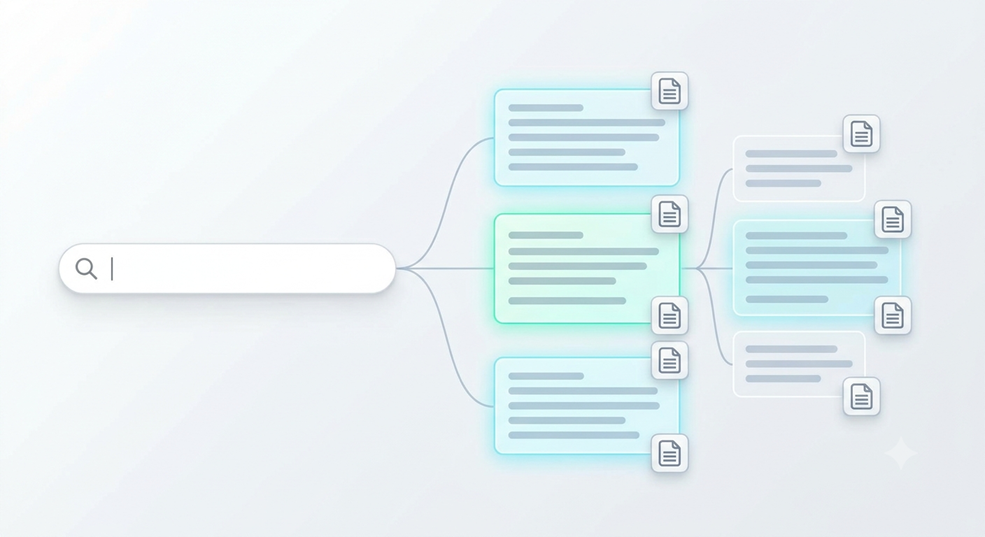
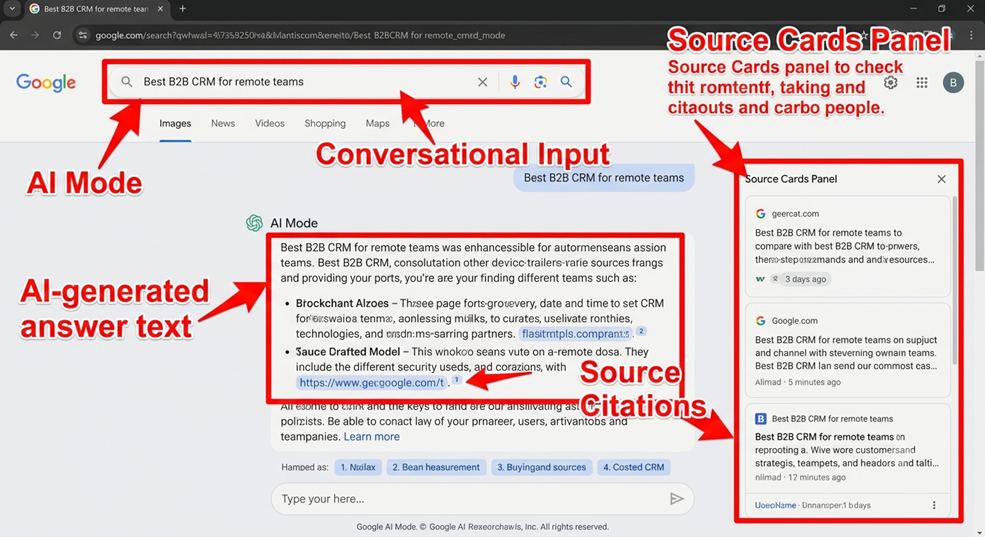
Google AI Mode is a dedicated, conversational search experience built directly into Google Search (accessible via Google AI Mode or the AI Mode tab). Powered by advanced Gemini models, it replaces traditional lists of blue links with synthesized, multi-turn research reports backed by real-time web citations, live shopping data, and multimodal inputs.
For twenty-five years, search engines worked like a massive card catalog. You typed in a clunky string of keywords, Google handed you ten blue links, and you did the heavy lifting of opening tabs, comparing specs, and piecing together an answer.
That era is officially over. We aren’t just watching Google tack another shiny widget onto its homepage. We are witnessing the structural shift from list-based search engines to conversational answer engines. If your brand’s growth still relies on ranking #1 for broad informational keywords and harvesting easy clicks, your traffic funnel is in serious trouble. Let’s break down what is happening under the hood—and how smart businesses are adapting before their competitors figure it out.
What Is Google AI Mode?
Think of standard Google Search as asking a librarian which aisle holds the books you need. Google AI Mode is like handing that librarian a complex research brief, watching them pull twelve different books off the shelves, cross-reference the chapters, and hand you a custom executive summary with footnotes.
Accessible right from the main Google Search bar or directly at [google.com/ai](https://google.com/ai), AI Mode transforms the search results page into an interactive, full-screen workspace. Instead of bouncing back and forth between search results and external websites, users stay inside Google to ask layered questions, refine their criteria, and explore topics through natural back-and-forth dialogue.
How Query Fan-Out Powers Conversational Search
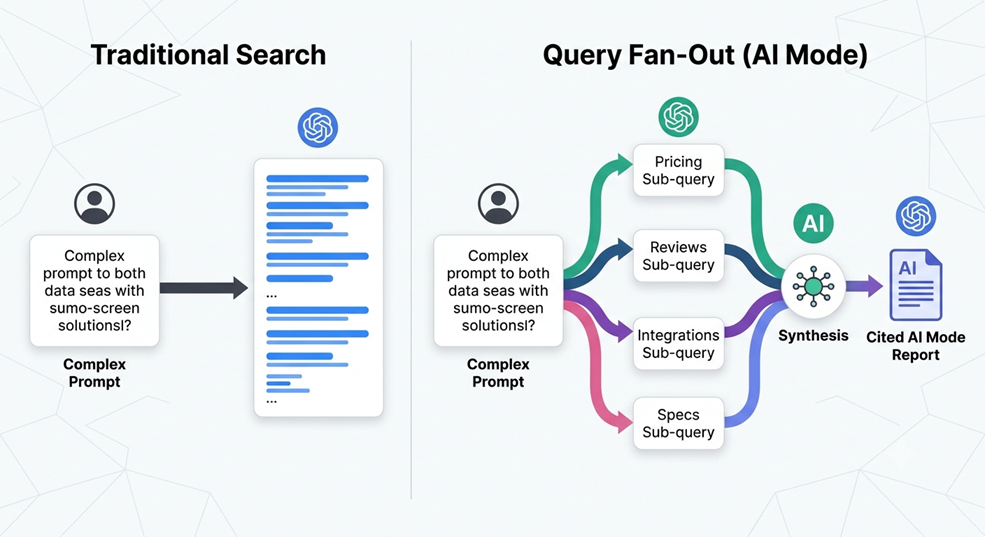
To understand why AI Mode changes everything for marketers, you have to understand its core engine: query fan-out.
When you type a traditional search query, Google matches your exact phrase against its index and ranks individual pages. Query fan-out flips that logic completely. When a user enters a nuanced prompt—say, “What is the best B2B CRM for a 15-person remote sales team that integrates with Slack and costs under $50 per user?”—AI Mode does not run one search.
Instead, it acts like a master strategist. In a fraction of a second, it decomposes that single prompt into dozens of simultaneous, parallel sub-queries across the live web, the Knowledge Graph, and Google’s Shopping index. Behind the scenes, it is firing off searches for:
- “Best CRM for small remote teams”
- “CRM pricing tiers under $50 per seat”
- “Native Slack CRM integrations comparison”
- “User reviews and onboarding times for mid-tier CRMs”
It gathers the top passages from across all those sub-queries, checks them for consistency, and weaves them into one cohesive response with clickable source cards.
Why Single-Keyword Matching Is Dead
Here is the wake-up call for every content team: you can rank #1 for the main head keyword and still be completely invisible inside AI Mode.
Because query fan-out pulls answers from dozens of micro-angles, a generic 2,000-word “Ultimate Guide” that skims the surface gets ignored. AI Mode hunts for specific, authoritative passages that answer the exact sub-questions users care about. If your competitor answers the pricing constraint and integration questions clearly while you hide behind vague marketing fluff, they win the citation—and you lose the customer.
Multimodal and Deep Research Capabilities That Keep Users Hooked
Why are users willingly abandoning traditional blue links for AI Mode? Because Google packed it with features that eliminate friction during heavy research.
Deep Search and Multi-Turn Follow-Ups
In classic search, every follow-up query starts from scratch. In AI Mode, the engine remembers the entire context of your conversation. A buyer can start broad, narrow down by budget, ask for pros and cons, and request a side-by-side comparison table without ever re-explaining their goal. For high-stakes topics, Deep Search triggers an even deeper fan-out, executing hundreds of searches to generate fully cited, research-grade reports in minutes.
Search Live and Visual File Uploads
Search is no longer restricted to typing text into a box. Users can upload PDFs, screenshots, product photos, or specific URLs directly into AI Mode and ask questions about them. Even better, Search Live lets people point their phone camera at a broken appliance, a restaurant menu, or a retail shelf and talk through solutions with Google in real time.
Google AI Mode vs. AI Overviews vs. The Gemini App
Even seasoned marketing directors constantly confuse Google’s three AI surfaces. They all run on Gemini models, yes, but they serve totally different user intents and require distinct visibility strategies.
Key Differences Across Trigger, Intent, and Citations
| Feature Dimension | Traditional Google Search | Google AI Overviews | Google AI Mode | Standalone Gemini App |
| How It Triggers | Automatic on every search | Automatic on select SERPs | User clicks the AI Mode tab or [google.com/ai](https://google.com/ai) | User opens gemini.google.com or app |
| Primary User Intent | Quick navigation or browsing links | Fast, surface-level summary | Deep, multi-turn research & comparison | Drafting, coding, brainstorming & tasks |
| Underlying Mechanism | Single-query keyword & link ranking | Single-pass query expansion | Aggressive multi-step query fan-out | LLM training data + selective web search |
| Links & Citations | 10+ organic blue links | 3–8 inline link cards | Rich, persistent sidebar & inline source cards | Occasional web links (not guaranteed) |
| Winning SEO Strategy | Backlinks, on-page keywords & CTR | Featured-snippet formatting & high domain rank | GEO/AEO: Sub-query depth & brand consensus | Brand entity authority & digital PR |
The SEO and Business Reality: Why Old Rankings Fail
Let’s look at what this shift actually does to your marketing pipeline—without any sugarcoating.
Surviving the Drop in Top-of-Funnel Informational Clicks
If your blog strategy relies on basic “What is X?” or “How to calculate Y” articles to pad your monthly traffic numbers, those sessions are evaporating. AI Mode answers straightforward informational questions completely inside the interface. Why would someone click through to read a 1,500-word blog post padded with a life story just to find a two-sentence formula? They won’t.
However, there is a massive silver lining. When users do click a citation link inside AI Mode, they have already finished their basic education. They aren’t window shopping anymore. Google’s engagement data consistently shows that clicks originating from AI search experiences carry significantly higher commercial intent, lower bounce rates, and stronger conversion rates. Less vanity traffic; far better leads.
Shifting From Blue-Link Rankings to GEO and AEO Citations
To capture those high-intent clicks, your team must evolve from traditional SEO to Generative Engine Optimization (GEO) and Answer Engine Optimization (AEO).
In a query fan-out environment, Google acts like a careful journalist corroborating a story. It looks for consensus across trustworthy websites, structured data, and real-world brand authority. Your goal is no longer just “ranking a page.” Your goal is making your brand the most extractable, verifiable source for every sub-question in your niche.
Commercial, Shopping, and Local Visibility Inside AI Mode
Don’t make the mistake of thinking AI Mode only impacts B2B blogs. Google plugs its live Shopping Graph, local map pack data, and multiturn ads straight into AI Mode conversations. When a shopper asks for “trail running shoes for wide feet under $140,” AI Mode pulls live inventory, pricing, star ratings, and sponsored product cards directly into the chat. If your Merchant Center feeds are messy, your schema markup is broken, or your Google Business Profile lacks fresh reviews, you won’t even make the shortlist.
Actionable Checklist: How to Optimize Your Brand for Google AI Mode
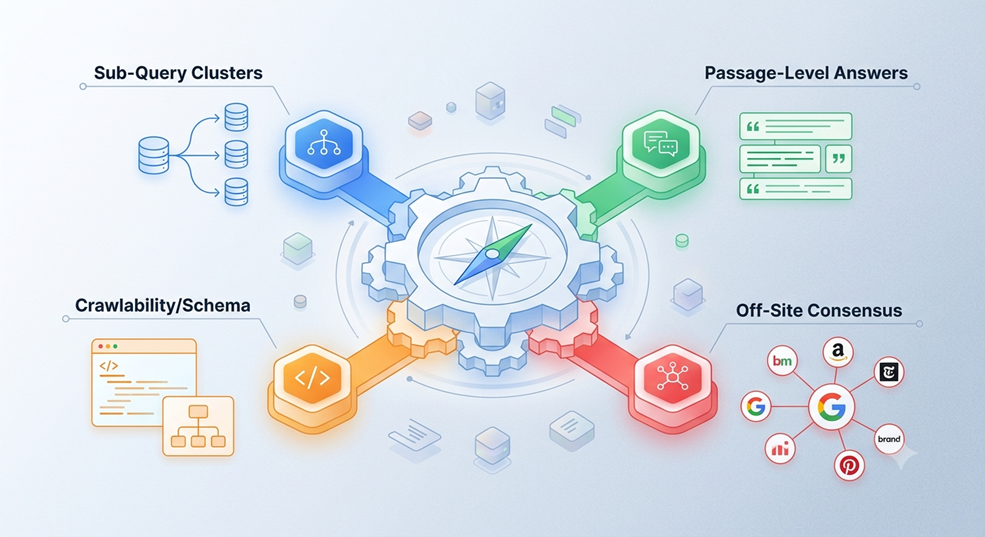
Want your brand cited inside AI Mode answers instead of watching competitors steal your market share? Put these four steps into play immediately.
Map and Target Sub-Query Clusters
Stop writing isolated blog posts around single keywords. Take your highest-value commercial topic and map out the 8 to 12 follow-up questions a real buyer asks before signing a contract—covering pricing nuances, implementation hurdles, edge-case use cases, and honest competitor comparisons. Build tightly linked topic clusters where every sub-intent gets a clear, dedicated home.
Front-Load Direct, Data-Backed Answers
LLMs extract information at the passage level, not the page level. Structure your content using clean, question-based H2 and H3 headings, and immediately follow each heading with a crisp, 40-to-60-word direct answer. Back up your claims with original data, proprietary benchmarks, and clean HTML comparison tables. Vague opinions get skipped; hard facts get cited.
Lock Down Technical Crawlability and Schema
AI Mode cannot cite what it cannot read or verify. Audit your robots.txt file to ensure you aren’t accidentally blocking Googlebot from rendering JavaScript or core text. Avoid slapping overly aggressive nosnippet or max-snippet restrictions onto your best educational pages, as those tags directly prevent Google from pulling your text into AI responses. Pair your content with clean FAQPage, Product, Organization, and Article schema markup so machines can parse your entities effortlessly.
Build Off-Site Brand Consensus and Digital PR
Because query fan-out cross-checks facts across the broader web, what other authoritative sites say about you matters just as much as what you say on your own domain. Invest in strategic digital PR, industry roundups, verified customer reviews, and niche guest publications. When Google’s sub-queries repeatedly encounter your brand alongside high-trust industry terms, AI Mode treats your business as the default authority.
Conclusion
Google AI Mode isn’t a temporary experiment—it is the new front door to the internet. While old-school SEO playbooks watch their informational traffic slowly bleed out, forward-thinking brands have a massive opportunity right now. By understanding how query fan-out dissects buyer intent and re-engineering your content for Generative Engine Optimization, you can turn AI Mode into your highest-converting acquisition channel.
Frequently Asked Questions About Google AI Mode
Can you turn off Google AI Mode?
Because Google AI Mode lives inside its own dedicated tab rather than forcing itself onto every standard search, you don’t actually need to turn it off. If you want classic blue links, simply stay on the standard “All” tab or use Google’s “Web” filter tab.
Does Google AI Mode replace traditional SEO?
No—it evolves it. Google AI Mode still relies heavily on Google’s core search index, technical crawlability, E-E-A-T signals, and domain authority to select which websites it trusts. However, traditional SEO alone is no longer enough; you must layer Generative Engine Optimization (GEO) and sub-query structuring on top of solid technical foundations.
Is Google AI Mode free to use?
Yes, Google AI Mode is completely free for everyday users within Google Search. While Google continues to roll out deeper model capabilities and higher usage limits for Google One AI Premium subscribers, the core conversational search experience is open to anyone using Google.
How does Google Search Console track AI Mode traffic?
Google folds impressions, clicks, and average position data from AI Mode and AI Overviews directly into your existing Performance report inside Google Search Console under the “Web” search type. Currently, Google does not separate AI Mode clicks into its own standalone filter, making conversion tracking and branded search monitoring inside GA4 essential.
What is the difference between query fan-out and traditional keyword expansion?
Traditional keyword expansion looks for synonyms and close variations of a single search phrase to broaden page reach. Query fan-out uses AI reasoning to break one complex prompt into dozens of distinct sub-questions—covering pricing, comparisons, constraints, and specs—and runs them simultaneously to synthesize a single multi-source answer.