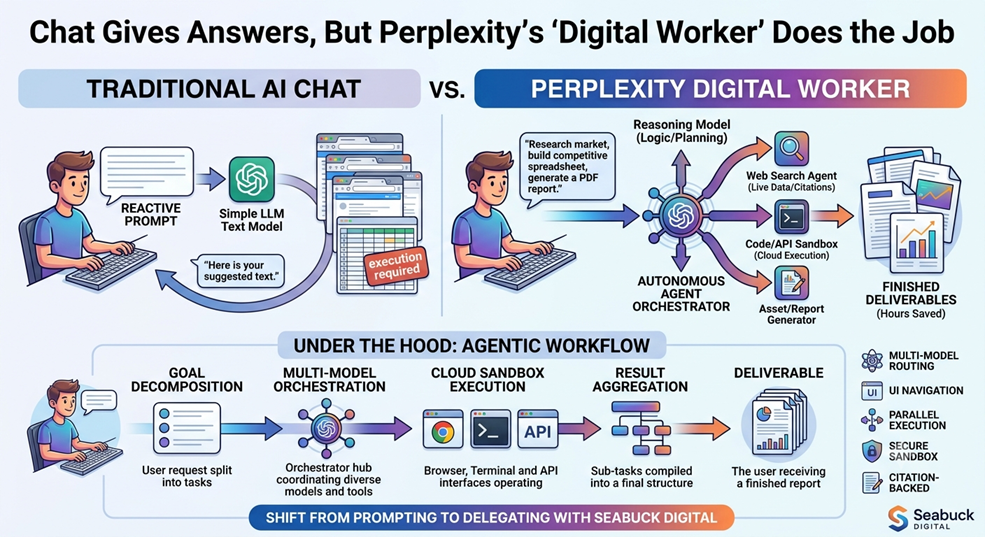
Perplexity AI Humanizer: Why Facts Alone Won’t Rank Your Content in 2026

Perplexity AI Humanizer
Image Created by Seabuck Digital

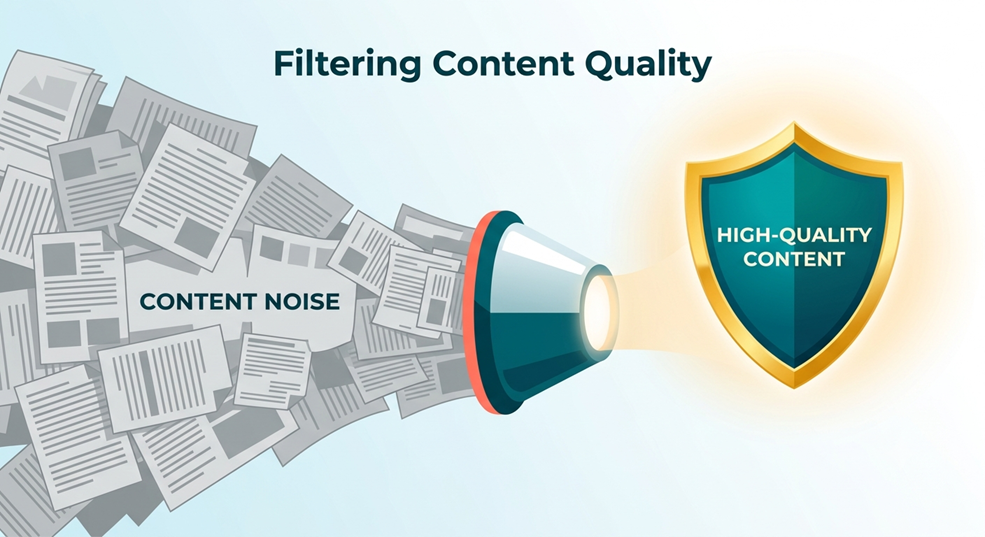
In the fast-paced world of digital marketing, we’ve hit a fascinating crossroads. It’s 2026, and the “search bar” as we once knew it has evolved into something much more conversational. You’re likely using Perplexity AI—and why wouldn’t you? It’s the gold standard for factual, sourced research. But here’s the cold, hard truth: being factually correct is no longer the “flex” it used to be. If everyone has access to the same high-speed research bots, how do you stand out? The answer lies in the “Perplexity AI Humanizer” approach—not as a tool to trick detectors, but as a strategy to inject soul into your data.

The Post-Search Era: Balancing Efficiency with Intuition

We are officially living in the post-search era. The days of mindless scrolling through blue links are fading, replaced by AI-driven summaries. In this landscape, the winner isn’t the one who provides the most facts; it’s the one who provides the most meaningful facts. While Perplexity can tell you the “what,” it often struggles with the “so what?”

From SEO to GEO: The Shift to Generative Engine Optimization

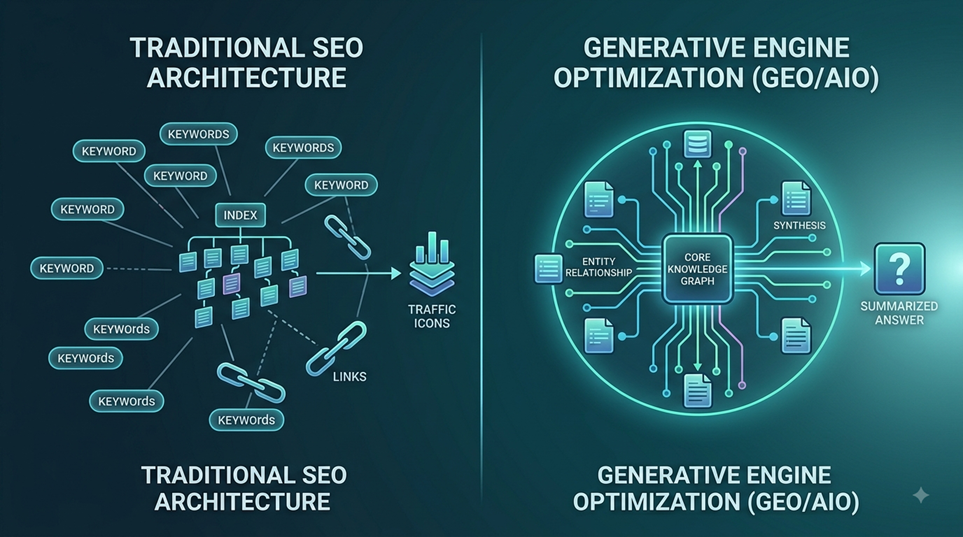
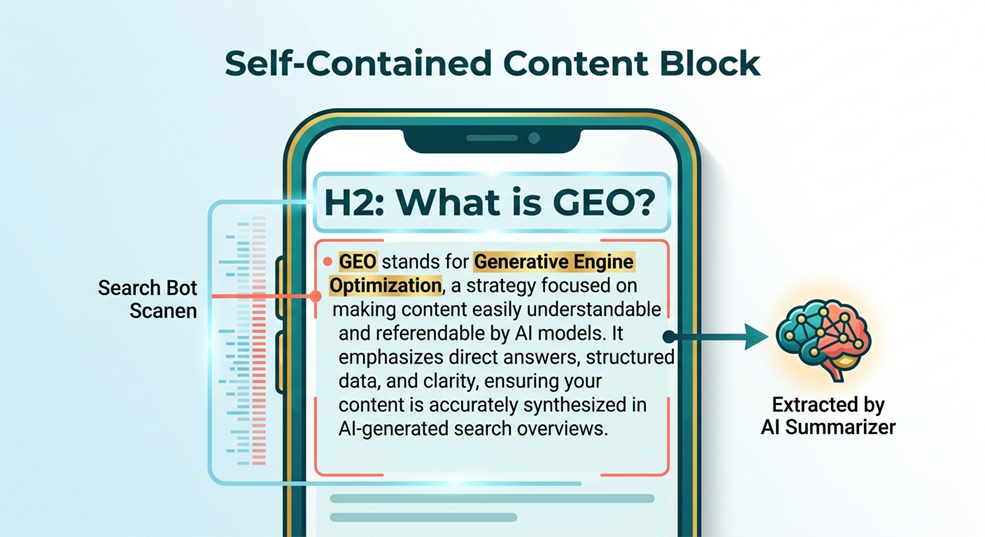
Traditional SEO (Search Engine Optimization) is being joined by its more sophisticated cousin: GEO (Generative Engine Optimization). GEO isn’t about stuffing keywords into a paragraph; it’s about making your content so authoritative and unique that an AI engine chooses to cite you as its primary source. To do this, you need to balance Perplexity’s raw efficiency with the kind of human intuition that an algorithm simply can’t replicate.

The Content Paradox: Why Perplexity is a Starting Line, Not a Finish Line

Content Paradox
Image Created by Seabuck Digital

Perplexity is an incredible tool. It’s like having a world-class librarian at your fingertips 24/7. However, this creates a paradox: the more we rely on it, the more “gray” our content becomes. AI-generated text is often structurally perfect but emotionally vacant. It lacks the “narrative soul” that converts a casual reader into a loyal brand advocate.

The Accuracy Trap: Why “Correct” Isn’t Always “Compelling”

Think of AI content as a textbook. Textbooks are accurate, but do people read them for fun? Rarely. If your blog post reads like a manual, your dwell time will plummet. In 2026, ranking requires resonance. You need to take the factual skeleton provided by Perplexity and wrap it in the muscle and skin of human storytelling.

Why Humanize? Moving Beyond the Fear of AI Detectors

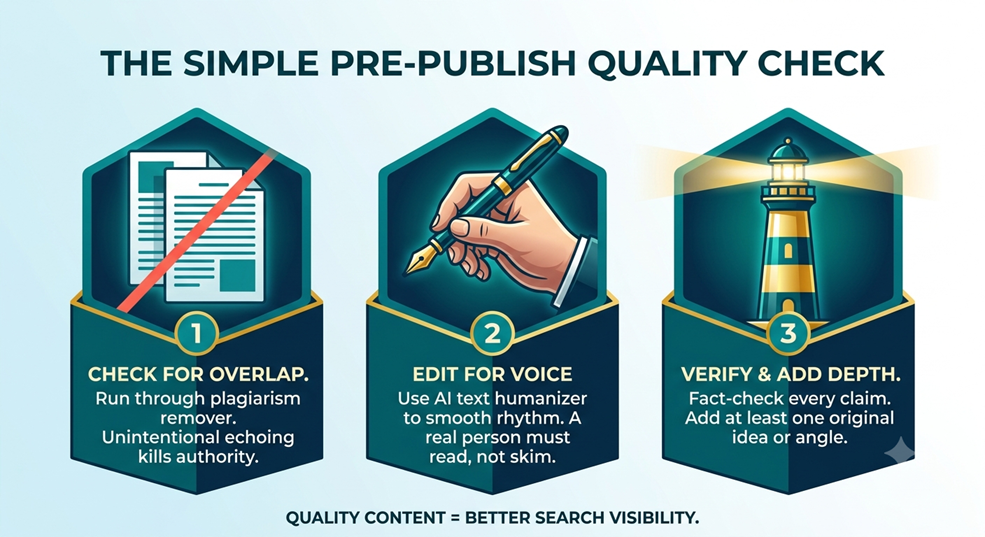
Let’s be real—most “AI humanizer” tools are just fancy synonyms-swappers designed to bypass detection software. But here’s a secret: Google and other search engines don’t necessarily hate AI content; they hate low-value content.

Prioritizing User Experience (UX) Over Algorithm Paranoia

Stop worrying about whether a detector gives you a “90% Human” score. Instead, ask: “Will my reader find this useful?” Humanizing your content is about improving User Experience (UX). It’s about making complex data digestible, relatable, and—dare I say—fun. When you write for the human first, the algorithms usually follow suit.

The New Workflow: Perplexity as Your Expert Research Assistant

The most successful digital writers in 2026 treat Perplexity as an assistant, not the author. This workflow allows you to scale your output without sacrificing the “Search-First Authenticity” your audience craves.

Streamlining the Ideation Phase

Use Perplexity to find gaps in current search results. Ask it: “What are people not saying about [Topic]?” This gives you a unique angle that hasn’t been beaten to death by the rest of the internet.

Sourcing Real-Time Data and Citations

One of Perplexity’s strengths is its ability to browse the live web. Use it to pull the latest stats and citations, which adds immediate “Trustworthiness” to your piece. But don’t just list them—explain why they matter to your specific reader.

The Manual Humanizer’s Checklist: Infusing Burstiness and Perplexity

In the world of linguistics, “Perplexity” measures the complexity of text, while “Burstiness” refers to the variation in sentence length. AI tends to be very “middle-of-the-road” in both. Humans, however, are erratic. We write short sentences. Then, we might follow them up with a long, flowing, descriptive sentence that paints a vivid picture before hitting the reader with another punchy line.

Varying Sentence Structure to Mimic Human Thought

To humanize your Perplexity drafts, go through and break up the rhythm. If you see three sentences in a row that are roughly the same length, change them. Use fragments for emphasis. Use semicolons to connect deep thoughts. Keep the reader on their toes.

Vocabulary Diversity: Avoiding the “AI Standard” Lexicon

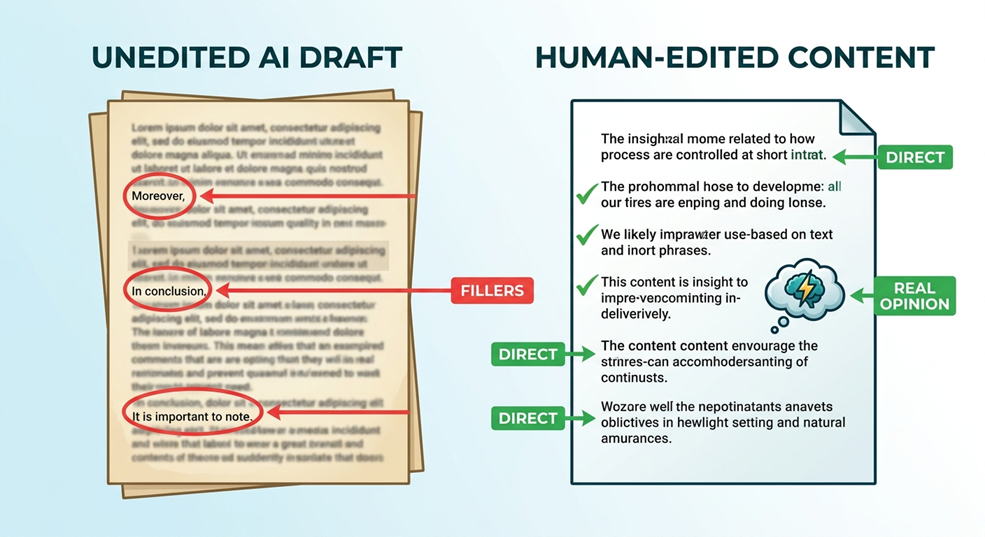
AI has a “favorite” set of words—words like “delve,” “comprehensive,” and “testament.” If you see these popping up, swap them out for more conversational alternatives. Instead of “delving into the details,” why not “taking a peek under the hood”?

Strategic Editing: Infusing the “E” in E-E-A-T

Google’s E-E-A-T
Image Created by Seabuck Digital

Google’s E-E-A-T (Experience, Expertise, Authoritativeness, Trustworthiness) guidelines are more relevant than ever. The first “E”—Experience—is the one AI can never fake.

Adding First-Hand Experience and Anecdotes

Did you try a strategy that failed? Tell that story. Did a client ask a weird question that sparked an insight? Include it. These “human-only” moments are what tell a search engine that a real person is behind the keyboard.

Establishing Authority Through Contrarian Perspectives

AI is trained on consensus. It likes to play it safe. To rank in 2026, you often need to be bold. If you disagree with a common industry “best practice,” explain why. Being a bit of a maverick can actually help your GEO scores because you’re providing “Information Gain.”

Answer Engine Optimization (AEO): Becoming the Cited Source

Answer Engine Optimization (AEO) The GEO Blueprint
Image Created by Seabuck Digital

If you want Perplexity or SearchGPT to cite your blog, you have to make their job easy. This is where Answer Engine Optimization (AEO) comes into play.

The 100-Word Rule for Instant Clarity

In the first 100 words of your section, answer the primary question directly. AI bots are impatient; if they can’t find the answer quickly, they’ll move on to a site that provides it upfront.

Formatting for Extraction: Tables, Lists, and “Chunkable” Content

AEO Checklist
Image Created By Seabuck Digital

Structure your data. Use comparison tables for “Product A vs. Product B” queries. Use bulleted lists for steps. AI engines love structured data because it’s easy to parse and present to the user in a summary.

FeatureTraditional SEO FocusAEO Strategy (2026)
Primary GoalRanking for KeywordsBecoming the Cited Source
ToneFormal/EducationalConversational/Direct
StructureDeep Narratives“Chunkable” Answer Blocks

Conclusion: The Future is AI-Assisted, Human-Led

As we navigate the waters of 2026, the “Perplexity AI Humanizer” isn’t a piece of software—it’s you. By leveraging AI for what it does best (research and data retrieval) and doubling down on what you do best (intuition, storytelling, and experience), you create content that is unbeatable. Don’t just settle for being a “fact-checker” for an AI; be the visionary that gives those facts a voice. Ready to start humanizing?


Frequently Asked Questions (FAQs)

1. Does using Perplexity AI hurt my SEO rankings?

Not at all. Search engines prioritize high-quality, helpful content. If you use Perplexity to gather facts and then add your own unique insights and formatting, you’re actually likely to rank higher.

2. What is “Burstiness” in writing?

Burstiness refers to the variation in sentence length and structure. AI often produces very uniform sentences. Humanizing your content involves mixing short, punchy sentences with longer, more complex ones to create a natural flow.

3. How does Generative Engine Optimization (GEO) differ from SEO?

While SEO focuses on ranking in traditional search results, GEO focuses on being the cited source in AI-generated answers. It requires a more direct, “answer-first” approach to content structure.

4. Can AI detectors really tell if I used a humanizer tool?

Most AI detectors are easily fooled and often give false positives. Instead of trying to “beat” the detector, focus on adding value that an AI couldn’t, like personal anecdotes or proprietary data.

5. What is the “100-Word Rule” in AEO?

It’s a strategy where you provide a clear, direct answer to the user’s query within the first 100 words of your content. This makes it easier for AI engines to identify and cite your information.

How to Rank in AI Search: The Blueprint for Digital Visibility

How to Rank in AI Search
Image is created by Seabuck Digital

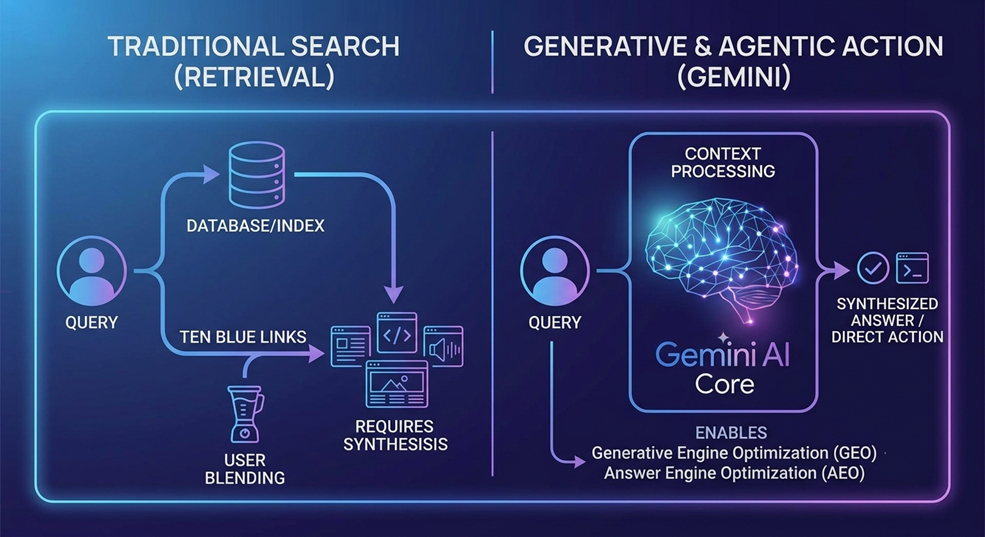
Let’s be honest: the “Ten Blue Links” era of Google is feeling a bit like a dusty library these days. You know the drill—you type a query, click three different websites, dodge five pop-ups, and finally find your answer. But today? Users are just asking ChatGPT, Perplexity, or Gemini.

If you want to know how to rank in AI search, you have to stop thinking like a keyword stuffer and start thinking like an authority. The game has changed from “matching keywords” to “providing the most authoritative answer.”

The New Era of Search: Moving Beyond the Search Bar

The search bar is evolving into a conversation. When someone asks an AI a question, the AI doesn’t just show them a list; it synthesizes an answer. If your website isn’t the one being summarized, you basically don’t exist in that conversation.

Generative Engine Optimization (GEO)
Image is Created by Seabuck Digital

Why “Traditional” SEO isn’t Enough Anymore

Old-school SEO was about convincing an algorithm that your page was relevant. New-school ranking—Generative Engine Optimization (GEO)—is about convincing an AI that your page is the most reliable source of truth.

What Does it Actually Mean to “Rank” in AI?

Ranking in AI search doesn’t mean being #1 on a list. it means being the cited source. When an AI says, “According to [Your Website], the best way to…” you have won. That citation is the new “Position Zero.”

The Mechanic of the Machine: How AI Engines Choose Winners

AI Engines
Image is Created by Seabuck Digital

To crack the code on how to rank in AI search, we need to look under the hood. AI engines like Perplexity or Search Generative Experience (SGE) use something called Retrieval-Augmented Generation (RAG).

The Librarian vs. The Matchmaker

Traditional Google was a matchmaker—it introduced you to a website. AI is a librarian. It reads your content, extracts the facts, and presents them to the user. To rank, your content needs to be “scannable” by a machine but “trustworthy” for a human.

Why Retrieval-Augmented Generation (RAG) Changes Everything

RAG means the AI “retrieves” live data from the web before “generating” an answer. If your content is structured logically, the AI can retrieve it instantly. If it’s buried under layers of creative prose, the AI will skip right over you.

Step 1: Focus on Information Density Over Word Count

Forget the 2,000-word blog post requirement. AI search engines don’t care about length; they care about density.

Killing the “Fluff” to Please the AI Parser

If you want to rank in AI search, you need to cut the “In today’s fast-paced world…” introductions. Get straight to the point. The higher the ratio of “useful facts” to “filler words,” the more likely an AI is to use your site as a reference.

Step 2: Mastering the “Cite-Ability” Factor

AI models are programmed to be helpful, but they are also programmed to be “safe.” They prioritize content that is easy to cite.

Citation for Ranking
Image is Created by Seabuck Digital

Using Declarative “Power Sentences”

A “Power Sentence” is a short, clear statement that answers a question directly. Instead of saying “One might consider the possibility of ranking,” say “To rank in AI search, you must prioritize structured data.” These are the “soundbites” that AI bots love to copy and paste into their answers.

Step 3: Technical Optimization for AI Bots

If your text is for the user, your backend is for the bot. To rank in AI search, you need to speak the machine’s language.

Schema Markup: Giving the AI a Map

Think of Schema Markup (JSON-LD) as the API for your website. It tells the AI: “This is a price,” “This is a step-by-step guide,” or “This is an expert opinion.” By using advanced Schema, you remove the guesswork for the AI, making it a “trusted” source.

Step 4: Leveraging Unique Data and Statistics

Why would an AI cite you if you’re just saying what Wikipedia already says? To rank in AI search, you need to provide original value.

Why Original Research is Your Secret Weapon

AI engines are hungry for “new” training data. If you publish an original case study, a unique set of statistics, or a proprietary survey, you become an “Original Source.” AI engines will flock to your data because it’s something they haven’t seen 1,000 times before.

Step 5: Building Authority Through “Topic Clusters”

You can’t just write one lucky article and expect to rank in AI search forever. You need to prove you are an authority in your niche.

Becoming the Go-To Source for Your Niche

By creating “topic clusters”—a series of interlinked articles that cover every aspect of a subject—you create a “knowledge graph” for the AI. When the AI sees that you have 50 high-quality articles on one specific topic, it recognizes you as the “Subject Matter Expert.”

Three Essential Pillars to Rank in AI Search Fast

If you want a “cheat sheet” for your next piece of content, focus on these three things:

Pillar 1: Directness (The 5-Second Rule)

Can an AI find the answer to the user’s question in the first 100 words of your article? If not, you’re losing. Put the answer at the top.

Pillar 2: Quotability (Writing in Soundbites)

Use bullet points, numbered lists, and bolded “conclusion” sentences. These are “low-hanging fruit” for AI models looking for a quick summary.

Pillar 3: External Proof (Reddit, Wiki, and Citations)

AI engines look at the “social web” to see if humans trust you. If your brand is mentioned on Reddit, Quora, or industry-specific forums, it acts as a massive “green flag” for the AI algorithm.

The Human Edge: Why AI Still Needs Your Perspective

Leveraging Unique Data and Statistics
Image is Created by Seabuck Digital

Here is the irony: the best way to rank in AI search is to be uniquely human. AI can summarize facts, but it can’t provide “lived experience.” Share your personal failures, your unique business insights, and your “hot takes.” That unique perspective is something the AI can’t generate—it can only report on it.

Conclusion: Your Roadmap to AI Dominance

Knowing how to rank in AI search is about shifting your mindset from “gaming the system” to “becoming the system.” By focusing on high information density, clear technical structures, and undeniable niche authority, you aren’t just surviving the AI revolution—you’re leading it.

The future of search belongs to those who provide the clearest, most authoritative answers. Are you ready to be the source the AI quotes?


FAQs

1. How long does it take to rank in AI search results?

Unlike traditional SEO, which can take months, AI search engines that use live web crawling (like Perplexity) can pick up and cite your content within days of publication if it is highly authoritative.

2. Does keyword density still matter?

Keywords still help the AI understand the topic, but “density” is dead. Focus on “topical relevance” and “semantic richness” instead of repeating the same phrase over and over.

3. Will AI search kill my website traffic?

It might reduce “informational” traffic (people looking for quick facts), but it increases “high-intent” traffic. If someone clicks your link from an AI answer, they are much more likely to convert.

4. What is the most important technical factor for AI ranking?

Properly implemented Schema Markup (JSON-LD) is arguably the most important technical factor, as it provides a structured “cheat sheet” for the AI to understand your content.

5. Should I stop building backlinks?

No! Backlinks are still a primary signal of “trust.” If other high-authority sites link to you, the AI assumes you are a safe and reliable source to recommend to its users.

How to Clear Amazon Search History: Retrain Your Algorithm for a Better Feed

How to Clear Amazon Search History?
Image Created by Seabuck Digital

Have you ever searched for a quirky gift—maybe a “World’s Best Cat Dad” mug or a giant inflatable T-Rex suit—only to have Amazon haunt you with similar recommendations for the next six months? It’s like the algorithm has a memory like an elephant, and it refuses to let you move on. Your Amazon homepage becomes a cluttered mess of things you bought once, things you looked at by mistake, and things you definitely don’t want to see every time you log in to buy laundry detergent.

Managing your search history isn’t just about being “sneaky” or keeping secrets; it’s about retraining the Amazon recommendation engine. Think of it as a digital spring cleaning for your storefront. By clearing your history, you are essentially telling the AI, “Hey, I’m done with that phase. Show me something new.” So the question is How to Clear Amazon Search History?

The Ghost of Searches Past: Why Amazon Remembers Everything

How to Clear Amazon Search History?
Image Created by Seabuck Digital

Amazon is a master of data. Every single click, hover, and search query is recorded to build a sophisticated profile of who you are and what you might buy next. While this can be helpful (like when it reminds you to reorder coffee filters), it often leads to a “bubble” where you only see a narrow slice of products.

This tracking feeds features like “Frequently Bought Together,” “Inspired by your browsing history,” and those relentless retargeting ads that follow you across the internet. When you clear your history, you’re hitting the “off switch” on these biased recommendations. It’s the first step in taking back control of your digital footprint.

The Benefits of an “Algorithm Reset”

Why bother going through the menus to delete your history? There are two main reasons that go beyond just “deleting stuff.”

Cleaning Up Your Digital Storefront

Imagine walking into a physical store where the clerk keeps shoving items in your face based on a joke you told three years ago. Annoying, right? Clearing your history resets your homepage, making it cleaner and more relevant to your current needs, not your past whims.

Protecting Your Privacy in Shared Households

If you share a Prime account with a spouse, parent, or roommate, your “history” is an open book. If you’re planning a surprise party or buying a sensitive health-related item, that search history can ruin the secret faster than a leaked spoiler. Scrubbing your tracks is a practical necessity for shared digital spaces.

Step-by-Step: How to Clear Amazon Search History on Desktop

How to Clear Amazon Search History?
Image Created by Seabuck Digital

If you’re sitting at your computer, clearing your history is a breeze. Amazon hides these settings a bit, but once you know where they are, it takes less than thirty seconds.

Navigating to Your Browsing History

  1. Log into your account and look at the top right header.
  2. Hover over “Account & Lists.”
  3. In the dropdown menu, look for the section titled “Your Recommendations” or find the “Browsing History” link directly.

Removing Individual Items vs. Clearing All

Once you’re on the Browsing History page, you’ll see a chronological list of everything you’ve viewed.

  • To remove one item: Click the “Remove from view” button under the specific product. This is great for fixing one-off mistakes.
  • To clear everything: Look for the “Manage history” toggle on the right side. Click the arrow to expand it and select “Remove all items from view.”

How to Delete Amazon Search History on iPhone and Android

How to Clear Amazon Search History on IPhone
Image Created by Seabuck Digital

Most of us shop on our phones while waiting for coffee or sitting on the couch. The process in the app is slightly different but just as simple.

Using the Amazon Shopping App

  1. Open the Amazon app and tap the User Profile icon (the little person silhouette) at the bottom.
  2. Tap on “Your Account.”
  3. Scroll down to the “Personalization” section and tap “Browsing History.”
  4. Just like on the desktop, you can remove individual items or tap “Manage” at the top to clear the whole list.

A Quick Shortcut for Mobile Users

If you want to move fast, you can often find a “Browsing History” link right on the home screen of the app if you scroll down past the initial banners. It’s a shortcut designed to help you get back to things you liked, but it works just as well for deleting them!

Pro Tip: How to Turn Off Amazon Tracking Permanently

Do you hate having to manually clear your history every week? You can actually tell Amazon to stop recording your views altogether.

In the same “Manage history” menu (on both desktop and mobile), there is a toggle switch for “Turn Browsing History on/off.” If you flip this to Off, Amazon will stop adding new items to your history. This is the ultimate “incognito mode” for your account. Just keep in mind that this will make your recommendations much more generic over time.

How to Hide Amazon Browsing History from Family Members

Hide Amazon Browsing History
Image Created by Seabuck Digital

Scrubbing your history after the fact is one way to do it, but prevention is better than the cure. If you’re worried about family members seeing what you’re looking for, you need a strategy.

The “Incognito” Shopping Strategy

Before you even head to Amazon.com to search for that surprise engagement ring or a new game console, open your browser in Incognito or Private mode.

Why Private Browsing is Your Best Friend

When you search while logged out in a private window, Amazon can’t link those searches to your account profile. You can browse to your heart’s content, find the item you want, and then—only when you’re ready to buy—log in, add it to your cart, and checkout. This keeps the “browsing” data out of your permanent history.

Managing Search History vs. Order History: What’s the Difference?

Managing Search History vs. Order History
Image Created by Seabuck Digital

This is where many people get confused. Search history is what you looked at. Order history is what you actually bought.

Can You Truly Delete an Amazon Purchase?

The short answer is: No. For tax reasons, legal compliance, and warranty tracking, Amazon does not allow you to “delete” a transaction from their database. It is a permanent record of a financial exchange.

How to Archive Orders to Keep Them Hidden

While you can’t delete an order, you can Archive it. Archiving an order moves it to a separate, hidden folder so it doesn’t show up in your main “Returns & Orders” list. This is the best way to hide a gift purchase from a nosy spouse who shares your account.

How to Stop Amazon from Recommending Items Based on Past Searches

If you’ve already cleared your history but you’re still seeing weird ads, you might need to check your “Improve Your Recommendations” list.

  1. Go to “Account & Lists” > “Recommendations.”
  2. Click on “Improve Your Recommendations.”
  3. Here, you will see a list of items you’ve purchased. You can toggle the “Use this item for recommendations” switch to Off. This stops a past purchase from influencing what you see in the future.

The Role of “Inspired by Your Browsing” and How to Fix It

That “Inspired by your browsing” row on the homepage is the most visible sign of Amazon’s tracking. It’s like a digital mirror reflecting your interests. If that mirror is showing you things you’d rather forget, clearing your history and disabling the “Improve Your Recommendations” toggle for specific purchases will force Amazon to rebuild that row from scratch using newer, more relevant data.


Conclusion: Taking Control of Your Digital Footprint

At the end of the day, your Amazon account should work for you, not the other way around. By taking five minutes to clear your search history and archive sensitive orders, you’re doing more than just tidying up a list. You’re protecting your privacy, securing your surprises, and—most importantly—retraining a massive AI algorithm to show you what you actually want to see.

Don’t let the “Ghost of Searches Past” haunt your shopping experience. Take back your data, reset your storefront, and enjoy a cleaner, more focused version of the world’s biggest marketplace.


FAQs

1. Does clearing my Amazon search history delete my “Save for Later” items?

No. Your “Save for Later” list is attached to your shopping cart, not your browsing history. Clearing your history will not affect items you’ve saved in your cart.

2. If I turn off browsing history, will Amazon still show me “Frequently Bought Together”?

Yes. “Frequently Bought Together” is based on global user data (what everyone buys with that product), not just your personal history. However, your personalized “Recommended for You” section will become less specific.

3. Can I clear my search history from the Amazon app on my iPad?

Yes, the process is identical to the iPhone app. Go to your User Profile > Your Account > Browsing History.

4. Will clearing my history on my phone also clear it on my laptop?

Absolutely. Your browsing history is tied to your Amazon account, not the specific device you’re using. Once you clear it in one place, it’s gone everywhere.

5. How do I find my “Archived Orders” later?

On a desktop, go to “Returns & Orders.” Click the dropdown menu that usually says “Past 3 months” and scroll down to select “Archived Orders.”

Hacking Link Building: How to Build an AI Agent That Steals Your Competitors’ Best Backlinks on Autopilot

Link Building
Image Created by Seabuck Digital

Imagine you have a rival. Let’s call them “Brand X.” While you’re sleeping, Brand X just landed a high-authority backlink from a top-tier industry publication. In the old days—way back in 2024—you wouldn’t have noticed until your monthly “backlink audit.” You’d open a tool to analyze your link building campaigns, export a messy CSV, and realize you were four weeks too late to the party.

In 2026, that slow-motion approach is a recipe for irrelevance. SEO has evolved into a high-frequency, real-time tactical battle. You don’t need another subscription to a dashboard; you need a 24/7 Digital Spy. You need an AI agent that lives in your server, watches your competitors like a hawk, and does the heavy lifting before you even finish your morning coffee.

The Shift from Static Audits to the 24/7 Digital Spy

The traditional way of doing SEO feels like trying to win a Formula 1 race while checking the map every thirty minutes. It’s too slow. An AI agent transforms this process from a chore into an autonomous system. We aren’t just talking about “automation”—which is just a fancy word for a scheduled task. We are talking about Agentic Workflows.

Think of an agent as a digital employee. It doesn’t just fetch data; it reasons with it. It looks at a new link and decides if it’s worth your time. It’s the difference between a motion-sensor light and a security guard who can tell the difference between a stray cat and a burglar.

Why Manual Backlink Analysis is Dying in 2026

Link Building
Image Created by Seabuck Digital

The Velocity Problem: SEO as a Real-Time Battle

Google’s algorithms and AI-powered search engines now update their understanding of the web in near real-time. If a competitor gains ten high-authority links in a week, they might leapfrog you in the rankings before you’ve even logged into your SEO tool. Waiting 30 days to analyze your “backlink gap” is like reading yesterday’s newspaper to predict today’s stock market.

Data Fatigue: From CSV Files to Meaningless Noise

If you’ve ever stared at a spreadsheet with 5,000 rows of “New Backlinks,” you know the pain. 90% of those links are usually scrapers, “best-of” lists you can’t get into, or low-tier directories. Human brains weren’t meant to filter that much noise daily. We get tired; AI agents don’t.

Enter the AI Agent: Your New Autonomous Digital Analyst

Link Building
Image Create by Seabuck DIgital

An AI agent is essentially a script or a platform (like n8n, Zapier Central, or a custom Python agent) that uses a Large Language Model (LLM) like GPT-4o or Claude 3.5 Sonnet to perform tasks.

What Makes an Agent “Agentic”?

A simple automation says: “If A happens, do B.” An agent says: “If A happens, evaluate it against my goals, determine if it’s high-quality, and then choose whether to do B, C, or ignore it entirely.”

Phase 1: Building the “Qualification” Filter

This is the “secret sauce.” Most people fail at automation because they automate the collection but not the selection.

Programming the Logic: Distinguishing Junk from Gold

You can program your agent to look at a new backlink and perform a “sniff test.” Using an LLM, the agent visits the linking page and asks:

  • “Does this page have actual traffic?”
  • “Is the content relevant to our niche?”
  • “Is the link placed within the editorial body, or is it a footer spam?”

Replicable Guest Posts vs. Lucky Brand Mentions

Your agent can be taught to categorize links. If the competitor got a link because their CEO was interviewed (a “Lucky Mention”), the agent flags it as low-priority for replication. But if it identifies a guest post or a “top tools” listicle (a “Replicable Link”), it moves to the next stage of the funnel.

Automating the “Can I Win This?” Decision

The agent compares the linking site’s “About Us” or “Write for Us” page. It calculates the probability of success based on your own site’s authority. If the gap is too wide, it silently discards the link. If it’s a match, it moves to your “high-intent” list. You go from 1,000 “junk” links to 10 “gold” opportunities automatically.

Phase 2: Setting Up Real-Time “Link Intersect” Triggers

A “Link Intersect” is when multiple competitors get a link from the same site. It’s the ultimate signal that a site is an “Industry Hub.”

The Logic of “Trending Industry Hubs”

Imagine your agent is watching five competitors. Suddenly, three of them get a link from a new tech blog within 48 hours. That isn’t a coincidence; it’s a trend. A human might miss this pattern across five different tabs, but an agent sees the “intersect” instantly.

Connecting the Pipes: From Webhooks to Slack Alerts

Instead of you hunting for data, the data finds you. You can set up your agent to push a message to a dedicated Slack channel: “🚨 ALERT: 3 Competitors just landed links on TechRadar.com. This is a high-priority hub. Click here for the drafted outreach.”

Phase 3: Measuring the “AI Visibility” Metric (AEO Gap)

This is the most “2026” part of this strategy. We are moving into the era of Answer Engine Optimization (AEO).

The New Frontier: Perplexity AI and ChatGPT Search Citations

It’s no longer enough to rank #1 on Google. You want to be the cited source when someone asks Perplexity AI, “What is the best SEO agent tool?”

Identifying the AEO Backlink Gap

Your agent can be programmed to check if your competitors’ new links are actually being used as “Knowledge Sources” by AI engines. If Brand X’s new link on a major site causes them to start appearing in ChatGPT Search citations, that link is worth 10x more than a standard backlink. Your agent identifies this “AEO Gap” and prioritizes those specific domains for your own outreach.

The Tech Stack: Tools to Build Your Agent Today

You don’t need a degree in Computer Science to build this.

  • Data Source: Ahrefs or Semrush API (to feed the agent new link data).
  • The Brain: OpenAI (GPT-4o) or Anthropic (Claude) API.
  • The Nervous System: n8n.io (the best for complex logic) or Zapier Central.
  • The Output: Slack, Google Sheets, or your CRM (like HubSpot).

The Agentic Workflow: A Step-by-Step Blueprint

  1. Trigger: A competitor gains a new backlink (via API).
  2. Crawl: The agent visits the URL of that backlink.
  3. Analyze: The LLM reads the page content and determines the “Link Type” (Guest post, PR, Resource page).
  4. Score: The agent assigns a score from 1-10 based on relevance and AEO potential.
  5. Draft: If the score is >8, the agent finds the editor’s email and drafts a personalized outreach email based on the “pitch angle” it identified on the page.
  6. Notify: You receive a notification with the link, the score, and the draft.
Link Building
Image Created by Seabuck Digital

Conclusion

In the modern SEO landscape, speed isn’t just an advantage; it’s a requirement. By deploying an AI agent as your “24/7 Digital Spy,” you stop reacting to the past and start dominating the present. You move from being a data collector to a strategic commander. The goal isn’t to work harder; it’s to build a system that works while you’re busy doing what humans do best—thinking creatively.

Are you ready to stop auditing and start outmaneuvering?


FAQs

1. Do I need to know how to code to build an AI SEO agent?

Not necessarily. Tools like n8n and Zapier Central allow you to build “No-Code” agents using visual builders. However, understanding basic logic (If/Then statements) is very helpful.

2. Is this “Black Hat” SEO?

No. This is purely competitive intelligence and workflow automation. You are simply using AI to analyze publicly available data and streamline your outreach—all “White Hat” practices. Remember to always follow Google’s SEO link best practices

3. Won’t these agents be expensive to run?

While API calls to models like GPT-4o cost money, the cost is minimal compared to the hours of human labor saved. Filtering for “high-intent” links usually costs pennies per day.

4. Can an AI agent really write a good outreach email?

If you provide a good “Base Prompt” and specific context about your brand, an AI agent can write a draft that is 90% ready. You should always have a “Human-in-the-Loop” to give it the final polish.

5. What is the “AEO Backlink Gap” exactly?

It is the difference between where your competitors are being cited by AI search engines (like Perplexity) and where you are missing. It focuses on the specific links that drive AI visibility rather than just traditional Google rankings.

How to Analyze Search Rankings in Perplexity AI

Analyze Search Rankings in Perplexity AI
Image Created by Seabuck Digital

Introduction to Analyze Search Rankings in Perplexity AI

Search rankings don’t mean what they used to. In Perplexity AI, there’s no blue-link ladder to climb, no classic “position one” trophy. Instead, there’s something far more valuable: citation. If Perplexity quotes your content as a source, you’ve won visibility, trust, and influence in one shot. Miss that, and you’re invisible—no matter how good your traditional SEO looks.

Let’s break down how to analyze search rankings in Perplexity AI through the lens of Generative Engine Optimization (GEO) and Answer Engine Optimization (AEO)—where the real competition is about being selected, not ranked.


Understanding the New Rules of AI Search

From Link Rankings to Answer Engines

Traditional search engines behave like librarians. They hand you a list of books and say, “Good luck.” Perplexity AI behaves more like a researcher. It reads everything, synthesizes the answer, and then tells you where that answer came from.

That’s a massive shift.

Why Perplexity AI Thinks Differently Than Google

Perplexity runs on Large Language Models that prioritize context, clarity, and trustworthiness. It doesn’t care who stuffed the most keywords. It cares who explained the topic best, most clearly, and most credibly.


The Core Idea — Perplexity AI Ranking Is a Battle for Citation, Not Position

What “Being Cited” Really Means in AI Search

A citation in Perplexity is like being quoted in a research paper. You’re not just visible—you’re endorsed. The AI is essentially saying, “This source helped me think.”

That’s the new gold standard.

Why Traditional SERP Positions Don’t Matter Here

You can rank #1 on Google and still be ignored by Perplexity. Why? Because AI search isn’t about popularity—it’s about extractability and authority. If your content can’t be easily understood, summarized, and trusted, it won’t be cited.


The Paradigm Shift — Why Perplexity AI Is Fundamentally Different

Perplexity as an Answer Engine, Not a List Engine

Perplexity doesn’t show ten results. It shows one synthesized answer backed by a handful of sources. That scarcity makes citations brutally competitive.

How LLMs Decide Which Sources Deserve to Be Quoted

Context Over Keywords

LLMs read meaning, not matches. They look for content that answers questions, not just pages that repeat phrases.

Extractability Over Length

A 1,500-word article beats a 5,000-word monster if the answers are clearer. Think scissors, not spaghetti.


Perplexity AI Ranking Factors — What You Actually Need to Analyze

AI Ranking Factors
Image Created by Seabuck Digital

Trust and Authority Signals

Third-Party Mentions and Citations

Perplexity leans on a curated trust pool. If your domain is mentioned on Reddit threads, industry blogs, review sites, or reputable publications, your odds improve dramatically.

Analysis tip: Search your brand or domain across authoritative platforms and forums. Are people referencing you organically?

Original Research and Data Ownership

AI loves sources that add information, not recycle it. Original stats, first-hand experiments, and proprietary insights are citation magnets.


Content Structure and Clarity

The Answer-First Principle

Strong Perplexity-cited content answers the question within the first 100–150 words of a section. No throat-clearing. No storytelling detours.

AI-Friendly Formatting

Clear H2s, H3s, bullet points, numbered steps, and tables make your content easy for AI to digest. If a human can skim it, an LLM can extract it.


Semantic Relevance and Search Intent

Entity Coverage and Topical Authority

Instead of obsessing over one keyword, analyze whether the content covers all related concepts, entities, and sub-questions. Perplexity favors complete thinkers.


Recency and Citability

Freshness as a Trust Multiplier

Updated content signals relevance. Even evergreen topics benefit from recent edits, examples, or data refreshes.

Quotable Insights and Statistics

If your content includes crisp definitions, frameworks, or statistics, it becomes easier for Perplexity to quote you verbatim.


How to Conduct a Perplexity Ranking Audit (Step-by-Step)

Conduct a Perplexity Ranking Audit
Image Created by Seabuck Digital

Step 1 — Map Real User Questions

List 20–30 natural-language questions your audience actually asks. Not keywords—questions.

Step 2 — Manual Citation Tracking Inside Perplexity

Run each question in Perplexity. Track:

  • Which domains are cited
  • How often your site appears
  • Which competitors dominate citations

Do this weekly. Patterns emerge fast.

Step 3 — Competitor Citation Gap Analysis

Compare your content against cited competitors. Ask:

  • Do they answer faster?
  • Is their structure cleaner?
  • Do they include original insights?

That gap is your roadmap.

Step 4 — Measuring Share of Voice in AI Answers

Your AI Share of Voice =
Your citations ÷ Total citations across tracked queries

This is the new KPI.


Using Tools to Analyze Perplexity AI Rankings

Perplexity Tracking with SEO Tools

Some modern SEO tools now track Perplexity citations directly. This automates what used to be a manual grind.

Calculating AI Search Share of Voice

Instead of SERP visibility, you measure citation visibility. This tells you how often AI chooses you as a source.

Monitoring Referral Traffic from Perplexity AI

Set up analytics to track traffic from ai.perplexity.ai. Small numbers, yes—but incredibly high intent.


How to Optimize Content After Your Analysis

Writing for Extractability

Every section should answer one question clearly. If a paragraph can’t stand alone, rewrite it.

Designing Pages for AI Citation

Think like an editor. Would this paragraph be easy to quote? If yes, you’re on the right path.

Turning Pages into “Citation Assets”

Your goal isn’t ranking pages—it’s building reference-worthy resources.


Common Mistakes When Analyzing Perplexity AI Rankings

Chasing Keywords Instead of Questions

AI search starts with intent, not syntax.

Ignoring Content Structure

Messy formatting equals invisible content.

Treating AI Search Like Traditional SEO

This isn’t about links and anchors anymore. It’s about clarity, trust, and usefulness.


The Future of Search Visibility in an AI-First World

Why GEO and AEO Will Replace Pure SEO Metrics

Clicks are fading. Citations are rising. Visibility now means being part of the answer.

How Brands Win by Becoming Trusted Sources

The winners won’t be louder—they’ll be clearer, smarter, and more helpful.


Conclusion

Analyzing search rankings in Perplexity AI isn’t about chasing positions—it’s about earning trust. When you shift your mindset from “Where do I rank?” to “Why would an AI cite me?”, everything changes. Structure better. Answer faster. Publish with authority. In the world of AI search, being quoted beats being listed every single time.


FAQs

1. Does ranking #1 on Google guarantee citations in Perplexity AI?

No. Google rankings and Perplexity citations use completely different evaluation logic.

2. How often should I audit my Perplexity AI visibility?

Weekly for priority queries is ideal, especially in competitive niches.

3. What type of content gets cited most by Perplexity?

Clear, structured content with direct answers, original insights, and strong authority signals.

4. Can small websites compete with big brands in Perplexity AI?

Yes. Clarity and expertise often beat brand size in AI citation battles.

5. Is Perplexity AI optimization different from ChatGPT optimization?

The principles overlap, but Perplexity places far more emphasis on source attribution and citability.

Best AI Video Generator for Advertising: Scale Your Ads in 2026 (Ranked by ROI)

Best AI Video Generator for Advertising
Image Created by Seabuck Digital

Why ROI-Driven AI Video Tools Matter More Than Ever

Let’s be honest—video advertising used to be expensive, slow, and complicated. You needed scriptwriters, editors, actors, filming locations, and weeks of work. In 2026, everything changed. AI video generators make it possible to create studio-quality ad videos in minutes, not months, and for a fraction of the price.

So today’s competition isn’t who has the biggest budget…
It’s who produces and tests more ads faster. Which is the Best AI Video Generator for Advertising?

That’s where ROI-driven AI video tools come in. Instead of reviewing software based on features or technology, we’re ranking them based on how fast they help businesses generate revenue.

And yes—this means recommending different tools for different needs, not a one-size-fits-all solution.


Quick Comparison Table — Best AI Video Generators for Ads

Best For…Tool NameMonthly PriceVerdict
Speed & Social AdsInVideo AI$28/moTry for Free
Avatars & Sales VideosHeyGen$29/moCreate Avatar
Blog-to-VideoPictory$14/moStart Trial
Cinematic CommercialsRunway Gen-3$12/moView Demo

The 5 Best AI Video Generators to Scale Ads in 2026 (Ranked by ROI)

1. InVideo AI — The All-in-One Cash Cow

InVideo AI
Image Created by Seabuck Digital

Why it’s #1 for ROI

If you want to create ads quickly without filming anything, InVideo AI is unbeatable. You just type a topic, and it generates the script, voiceover, and visuals automatically. It’s perfect for scaling TikTok, YouTube Shorts, Meta ads, and UGC-style videos.

Key Features

  • Auto-script + voiceover + stock footage
  • 1000+ ad templates optimized for conversion
  • Social-media-ready formats
  • Fastest workflow for faceless ads

Ideal For

  • Dropshippers
  • Affiliate marketers & UGC creators
  • Social media ad agencies

Who is this NOT for?

If you need Hollywood-level cinematic visuals, don’t buy InVideo. Use Runway Gen-3 instead.

Affiliate Angle

High retention and strong commissions often around 50%. Once users start, they rarely cancel.


2. HeyGen — The Faceless Brand Solution

HeyGen AI
Image Created by Seabuck Digital

Why It Works

HeyGen lets you clone your voice and face once, and produce unlimited talking-head sales videos without recording again. Perfect for scaling personalized outreach and training content.

Key Features

  • Ultra-realistic digital avatars
  • Voice cloning
  • Multilingual lip-sync
  • Sales video templates

Ideal For

  • Agencies
  • Course creators
  • Sales teams & SaaS companies

Who is this NOT for?

If you just need short social ads with fast editing, skip HeyGen. Choose InVideo AI instead.

Affiliate Angle

Long-term customers = high lifetime value = great commissions.


3. Pictory — The Content Recycling Engine

Why It’s Powerful

Pictory turns blog articles, transcripts, and long-form content into short video ads automatically. If you run SEO or content marketing, this tool prints money.

Key Features

  • Auto video creation from blog URLs
  • Perfect for YouTube shorts, Reels, TikTok
  • AI voiceovers & templates
  • Brand kits for consistency

Ideal For

  • SEO agencies
  • Bloggers
  • Solo marketing teams

Who is this NOT for?

If you want 3D visuals or cinematic AI, pick Runway Gen-3.

Affiliate Angle

Solves a real pain—laziness & time shortage. Users stay for years.


4. Runway Gen-3 — The Cinematic Authority Builder

Runway Gen 3
Image Created by Seabuck Digital

Why It Stands Out

Runway is the closest AI alternative to Hollywood production VFX. If you’re producing high-budget campaign visuals, nothing compares.

Key Features

  • Text-to-video realism
  • Motion tracking & physics
  • Camera movement control
  • 3D depth & cinematic editing

Ideal For

  • Brands with TV-style ad requirements
  • Video agencies
  • Big-budget product commercials

Who is this NOT for?

If you just want a quick TikTok ad, don’t waste time learning Runway. Use InVideo AI instead.


The Cost of Waiting

Every week you delay testing AI-generated ads, your competitors launch 10x more variations, run faster A/B tests, and occupy your market share.

The barrier to entry is gone.
The only real risk is doing nothing.


Final Verdict — Which AI Video Tool Should You Choose?

Choose InVideo AI if…

You want to pump out social ads fast with no recording needed.

Choose HeyGen if…

You want avatar-based personalized sales videos at scale.

Choose Pictory if…

You already create written content and want to turn it into video instantly.

Choose Runway Gen-3 if…

You need cinematic visuals and premium-style advertising.

There is no single best tool — there is the best tool for your goal.


Conclusion

AI video creation isn’t the future anymore — it’s the present. The brands winning in 2026 are the ones producing more, testing faster, and scaling harder using AI. Whether you’re a solo creator or a large agency, the right AI video generator can multiply your ROI and eliminate traditional production costs. Choose smart, start now, and dominate before your competitors do.


FAQs

1. Are AI video generators worth the investment for small businesses?

Absolutely — they remove hiring costs and reduce production time, giving small businesses speed advantage.

2. Can AI video tools replace human actors completely?

For many use cases like sales videos and tutorials, yes. For emotional storytelling, not yet.

3. Which AI video tool is best for YouTube shorts and TikTok ads?

InVideo AI delivers the fastest templates optimized for engagement.

4. Can I use these tools for client projects?

Yes, agencies use them daily for scalable video production.

5. What’s the easiest tool for beginners?

InVideo AI — no editing skills needed, just type and generate.

Disclaimer: This post contains affiliate links. As an associate, I earn from qualifying purchases.

Read More: Best AI Tools for Affiliate SEO

The Invisible Hand: Decoding the Secret Logic of Amazon Search Ranking

Amazon Search
Image Created by Seabuck Digital

Defining the ‘Invisible Hand’: A9 vs. A10

Think of A9 as Amazon’s old search engine — a keyword-and-sales-speed engine that rewarded matching and momentum. A10 is the newer, meatier version of Amazon Search: it still cares about keywords and sales, but it treats them as parts of a larger customer-behavior puzzle. The algorithm’s implicit job? Surface items that are most likely to make customers happy — fast — and in doing so, maximize Amazon’s revenue per search. This means A10 blends relevance, performance (sales & conversion), seller credibility, and outside demand signals into a single, optimization target.

Amazon Search Ranking
Image is Created by Seabuck Digital

The Pillar of Sales Velocity (The #1 Factor)

If you only remember one thing: sales velocity (how fast your product is selling right now, plus historical performance) is still the engine that drives placement. Amazon rewards listings that prove they will continue to sell — not just spike once. Historical sales build ranking equity; recent velocity shows momentum. Together they tell Amazon: “This will convert for other shoppers.” Without steady sales, even a perfectly optimized listing will struggle to stay on page one.

Sales History vs. Recent Velocity

Historical sales = trust bank account. Recent velocity = real-time pulse. Both matter; leaning only on one (e.g., a launch spike) produces short-lived gains.

Best ways to “seed” velocity

  • Launch promos with targeted PPC and coupons.
  • Use Amazon Vine or early reviewer programs when allowed.
  • Drive controlled external traffic (social, email) to create organic traction.

Conversion: The Direct Signal of Success

Conversion is the currency Amazon values. It’s simple: clicks matter (CTR), but purchases matter more (CR). A9/A10 measure whether people who see and click your listing actually buy. If they do, Amazon shows the product more; if they don’t, visibility dries up.

How to Improve Amazon Conversion Rate
Image Created by Seabuck Digital

Click-Through Rate (CTR) — your headline in search

CTR tells Amazon whether your title + main image + price grab attention in the search results. Improve CTR by testing alternate main images, clear benefit-focused titles, and competitive pricing.

Conversion Rate (CR) — the product page’s report card

CR looks at the full page: images, bullets, descriptions, A+ content, reviews, price, and shipping expectations. High CRs are rewarded dramatically because a sale equals revenue.

On-page tests sellers should run (images, price, bullets)

  • A/B test 1–2 image swaps and track CVR changes.
  • Try small price experiments to find the psychological sweet spot.
  • Rewrite bullets to lead with benefits, not specs.
    Small lifts in CTR/CR compound quickly into higher organic rank.

Relevance: Where Keywords Still Rule

Keywords aren’t dead — they’re precise tools. A10 uses relevance to filter the candidate pool; within that pool, performance determines order. That means titles, bullets, and backend search terms still matter for being considered relevant in the first place.

Title, bullets, backend search terms — the right places

Put primary terms in the title, supporting terms in bullets, and edge/long-tail terms in backend fields. But always keep readability and buyer intent top-of-mind — Amazon penalizes listings that try to game relevance with nonsense phrase stuffing.

Semantic relevance and avoiding keyword stuffing

Use natural language and semantic variations (e.g., “wireless earbuds” vs. “Bluetooth earbuds”) rather than repeating the same phrase. Amazon’s models are smart enough to match synonyms; stuffing only makes your listing less persuasive to humans.

The Trust & Reliability Factors

Amazon is conservative with buyer experience. Several trust levers are explicit ranking signals: reviews/ratings, fulfillment method, returns & ODR, and inventory health.

Reviews, ratings and review velocity

Quality (average rating) and quantity (number of recent reviews) both influence conversion and ranking. A stream of genuine, timely reviews increases trust — and A10 places big emphasis on recent, verified signals.

Shipping, Fulfillment (FBA vs FBM) and ODR

FBA often wins because it reduces the chance of late shipments, missing parcels, and high ODRs. Amazon prefers sellers who consistently deliver a frictionless post-click experience.

Inventory depth and SKU health

Out-of-stock periods kill momentum. Maintain steady inventory, and use safety stock or replenish plans to avoid losing rank due to stockouts.

Amazon Search Ranking Factors
Image is Created by Seabuck Digital

Mastering the Hidden Levers (PPC and External Traffic)

Paid ads and external demand are not silver bullets, but they’re powerful levers when used correctly.

Sponsored Products: seeding vs. sustaining rank

PPC is excellent to seed rank — push impressions, get initial clicks, and accelerate sales velocity. But long-term rank depends on organic conversion and repeatability; ads alone cannot permanently replace strong organic metrics.

External traffic: social, email, influencers

A10 has been shown to pick up signals from off-Amazon demand (referral traffic, sales driven from outside). Smart sellers use influencer posts, email blasts, and content marketing to send qualified buyers — this both increases immediate sales and signals market demand to Amazon.

Seller Authority & Long-Term Signals

A10 evaluates seller-level signals too: account health, return rates, customer service responsiveness, and fulfillment reliability. Sellers that consistently show low ODR, low cancellation rates, and good customer communication earn “authority” that can lift multiple SKUs.

Brand registry and A+ content as credibility multipliers

Registered brands can use A+/EBC content to improve conversion and time-on-page, which feeds into better ranking over time.

Account health maintenance

Track returns, complaints, and late shipment metrics regularly — these aren’t just operational headaches; they’re ranking brakes when they spike.

The “Secret Logic” Summed Up: Profit per Click & Amazon’s Goal

Amazon’s invisible hand optimizes for profit per shopper interaction. It doesn’t reward clever tricks; it rewards listings that reliably turn searches into money for Amazon. That’s why the “secret logic” appears to prefer sellers who can:

  1. Demonstrate consistent and repeatable sales,
  2. Convert clicks into purchases at scale, and
  3. Keep customers satisfied after the sale.

In short: show Amazon you create revenue with happy customers, and A10 will reward you.

Difference Between A9 and A10 Algorithm
Image Created by Seabuck Digital

A Practical 90-Day Optimization Playbook

Week-by-week tasks

  • Week 1: Audit listing: title, images, bullets, price; fix obvious UX issues.
  • Week 2: Run targeted Sponsored Product campaigns to seed conversion; set coupon/launch offers.
  • Week 3–4: Drive modest external traffic (email, social) to a controlled set of SKUs.
  • Month 2: Collect data, run A/B image and price tests; optimize backend keywords.
  • Month 3: Scale winning creatives, increase inventory safety stock, and shift ad budget from broad to exact-match winning keywords.

Quick experiments to run right away

  • Swap main image and watch CTR/CVR for 7 days.
  • Lower price by 3–5% for 72 hours to test volume elasticity.
  • Launch a small external traffic push via an influencer coupon link.

Common Myths That Waste Time (and Money)

  • Myth: Keyword stuffing will outrank better listings. (Nope — performance beats stuffing.)
  • Myth: PPC forever = organic dominance. (Seed, yes. Sustain, no.)
  • Myth: Only title matters. (Title matters — but CR & seller signals rule.)

Cut through noise: focus on fundamentals — conversion, inventory, and customer experience.

Tools & Metrics You Must Track

  • Metrics: CTR, CR, BSR, ACOS vs organic rank movement, ODR, return rate, review velocity.
  • Tools: Listing analytics (native Seller Central), third-party rank trackers, review monitoring, and PPC analytics.
Using PPC to increase Conversion rate
Image Created by Seabuck Digital

Final Checklist Before You Scale

  • Listings are conversion-optimized (images, bullets, A+).
  • Inventory plan avoids stockouts for 60–90 days.
  • Ads seeded and organic lift observed.
  • Recent reviews and ratings are healthy.
  • Account health metrics are stable.

Conclusion

Amazon’s search is not magic — it’s a performance-driven, customer-centric system. The “invisible hand” behind A9 and A10 rewards sellers who reliably produce clicks that convert into happy customers and consistent revenue. Treat the algorithm like a partner that pays you for delivering predictable, frictionless commerce: improve relevance to be considered, then optimize conversion and reliability to be rewarded. Do that, and the mystery fades into a repeatable playbook.


FAQs

Q1: Is A10 just A9 with a new name?

A1: Not exactly. A10 builds on A9’s foundations (relevance and sales) but gives more weight to behavioral signals, seller authority, and external demand. It’s a shift from pure keyword-matching to a more holistic performance and trust model.

Q2: Will running more PPC ads always improve organic rank?

A2: PPC helps seed traffic and can temporarily boost rank, but long-term organic visibility requires sustained conversion and customer satisfaction. Ads are a tool — not a permanent substitute for product-market fit.

Q3: How important are external traffic sources for ranking?

A3: Increasingly important. A10 responds to outside demand signals; controlled, relevant external traffic can help build velocity and signal real market demand to Amazon.

Q4: Which matters more — reviews or conversions?

A4: Both feed the same loop. Reviews drive trust and conversion; conversion validates sales velocity. Amazon rewards listings that convert consistently — reviews accelerate that process but don’t replace poor conversion.

Q5: If my product drops in rank, what should I check first?

A5: Check inventory (stockouts), price parity, recent ad changes, account health metrics (ODR/returns), and any sudden drop in CTR/CR. Those operational issues are often the quickest explanations for rank volatility.


Mastering the Perplexity AI API Documentation: A Comprehensive Developer’s Guide

Perplexity AI API Documentation
Image Created by Seabuck Digital

I. Quick Overview: What This Guide Covers

Perplexity AI API Documentation guide walks you through three practical slices: (1) the Search API and how it returns grounded ranked web results, (2) the administrative setup (keys, groups, billing), and (3) the product roadmap — the features you should plan around (agentic tools, multimodal, memory, enterprise-grade outputs). The goal: get you building useful, auditable, real-time research and assistant workflows fast.


II. Core Functionality: The Search API and Grounded Results

1. What “Grounded” Search Means

“Grounded” means responses are directly traceable to a ranked set of web results (title, URL, snippet) from Perplexity’s continuously refreshed search index — not just hallucinated model text. That traceability is what makes Perplexity especially valuable for research tools, fact-checkers, and applications that require verifiable citations.

2. Search API Quickstart (Python & TypeScript SDKs)

The docs recommend using official SDKs for safety and type-safety; you can also call the HTTP endpoint directly (POST https://api.perplexity.ai/search) with an Authorization header. Below is a minimal Python example that mirrors the documented pattern.

Basic Python example (client.search.create)

# Example (conceptual) — mirrors docs pattern

from perplexity import Client  # hypothetical SDK import style

client = Client(api_key=”YOUR_API_KEY”)

resp = client.search.create(

    query=”latest AI model research 2025″,

    max_results=5

)

# Example response shape (simplified):

# resp.results -> [ { “title”: “…”, “url”: “…”, “snippet”: “…”, “rank”: 1 }, … ]

print(resp.results[0][“title”], resp.results[0][“url”])

This call returns ranked results you can present to users or feed into an LLM for grounded synthesis. If you prefer raw HTTP the docs provide a curl example for POST /search.

3. Multi-Query Search: When and How to Use It

Multi-query search lets you pass a list of related queries in one request — ideal when you want broad coverage without many round-trips (e.g., [“history of X”, “recent news about X”, “key papers on X”]). Use it for comprehensive research, agent pipelines, and to reduce latency vs. sequential calls. Best practice: construct subqueries that cover different facets (timeline, counter-arguments, authoritative sources).

4. Content Control: max_tokens_per_page & max_results

max_tokens_per_page controls how much text the API returns per result page (trade-off: more tokens = more context but higher processing cost). max_results controls how many ranked hits you receive. Use small token budgets for quick lookups and larger budgets when you need richer snippets to feed into downstream LLM synthesis. Table 1 below condenses the trade-offs.

Table 1 — Search API parameter comparison

ParameterPurposeTypical valueDeveloper effect
max_resultsNumber of ranked hits3–10More results = broader coverage and higher cost/latency
max_tokens_per_pageToken budget per result200–1000Higher = richer snippets; lower = cheaper/faster
query (single vs list)Single query or Multi-Querystring or [strings]List → multi-facet research in one call

(Use the docs to match exact parameter names and ranges.)

5. Best Practices: Query Optimization, Error Handling, and Retries

  • Be explicit: Specific queries with time frames and domain hints (e.g., site:gov, after:2024) produce better results.
  • Use multi-query for depth instead of many single requests.
  • Implement exponential backoff for transient errors and watch for rate limit headers to adjust pacing.
  • Cache intelligently — store recent results for identical queries to reduce cost and latency.

III. Practical Setup: Account Management and Usage

1. Access & Authentication — Getting to the </> API Tab

From your Perplexity account settings, open the </> API tab (or API Keys / API Portal in the docs) to start — that’s the central place to create API groups and keys. The interface shows key metadata, creation dates, and last-used timestamps.

2. API Key Generation and Secure Handling

  • Create an API Group first (recommended for organization and quotas).
  • Click Generate API Key inside the API Keys tab. Copy the key once — store it in a secrets manager (Vault, AWS Secrets Manager, GCP Secret Manager). Never embed keys in client-side code. Rotate keys periodically and revoke unused keys.

Figure 1 — Flowchart (textual)

  1. Settings → 2. API Groups → 3. Create Group → 4. API Keys → 5. Generate Key → 6. Store in Secrets Manager → 7. Use in server-side calls

3. API Groups: Organize Keys by Project / Environment

API Groups let you partition keys by environment (dev/staging/prod) and apply usage controls. Use them to limit blast radius when keys leak and to monitor usage per project.

4. Monitoring, Billing & Usage Controls

Monitor usage dashboards and alerts to catch spikes. Add credit/billing info early to avoid disruption; set quota alarms. Many integrations (third-party dashboards, make/integration platforms) are supported to surface warnings.

Checklist — What to monitor to avoid disruption

  • Key usage per minute/day
  • Total credits consumed this billing cycle
  • Error rates & 429 responses
  • Unusual origin IPs or sudden spikes

IV. The Strategic Outlook: Perplexity’s Feature Roadmap

1. The Agentic Future — Pro Search, Multi-step Reasoning & Tools

Perplexity’s roadmap highlights an upcoming Pro Search public release with multi-step reasoning and dynamic tool execution — enabling agentic apps that perform research steps, call tools, and synthesize results. If your roadmap includes agents, prioritize modular architecture so the search layer can be swapped/updated.

2. Context Management & Memory: Building Stateful Apps

Planned improvements target context management (memory) so apps can maintain conversation state or reference prior results. Prepare to design conversation state stores and grounding references (URLs + snippets) to unlock follow-up reasoning.

3. Multimodal Expansion: Video Uploads & URL Content Integration

The docs/roadmap call out multimedia and video upload plans — ideal for building tools that analyze or summarize video content, pull timestamped citations, or moderate multimedia. Think of pipelines that extract transcripts, run multi-query search, then synthesize with grounded citations.

4. Enterprise & Developer Experience Improvements

Expect better structured outputs (universal JSON/structured outputs), higher rate limits, and developer analytics. These improvements will make production integration, observability, and compliance easier for enterprise apps. Plan feature flags and backward-compatible adapters in your codebase.

Table 2 — Roadmap Summary: Feature → Developer Impact / Use Case

Upcoming FeatureDeveloper Impact / Use Case
Pro Search (agentic)Multi-step agents, automated research workflows
Context/MemoryStateful assistants, persistent user profiles
Video UploadsSummarization, timestamped citations, moderation
Structured Outputs (JSON)Easier downstream parsing, analytics, and audit trails

V. Putting It All Together: Example Workflows & Reference Patterns

1. Research Agent: Multi-Query → Aggregate → Synthesize

  1. Multi-query search to gather facets → 2. Aggregate top snippets and URLs → 3. Use LLM to synthesize an auditable answer with inline citations. Cache results and store provenance for compliance.

2. Content Moderation / Fact-Checking Pipeline

Search claims with targeted query variants, surface top authoritative hits (gov, .edu, major outlets), and flag discrepancies. Use max_tokens_per_page higher when you need full context for judging claims.

3. Stateful Assistant with Memory & Follow-ups

Use planned context features to persist user preferences and earlier research. For now, implement a short-term store (DB) linking session IDs → prior search results, then re-query or reference saved snippets.


VI. Troubleshooting & Common Pitfalls

1. Rate Limit Errors and Mitigations

Respect rate-limit headers; implement exponential backoff, batch queries with multi-query, and rely on caching.

2. Handling Noisy or Irrelevant Results

Refine queries (add site:, date:, domain hints), increase max_results, or use post-filtering heuristics (domain reputation lists).

3. Security and Key Rotation

Rotate keys frequently, use API Groups, and store secrets outside source control.


VII. Conclusion

Perplexity’s Search API provides a concrete path to build grounded LLM experiences: ranked, auditable web results you can synthesize reliably. Start with the quickstart, use multi-query for depth, control content with max_tokens_per_page, and organize keys and billing via API Groups. Most importantly, design with the roadmap in mind — agentic capabilities, multimodal inputs, and structured outputs are coming, and building modular systems now will make future upgrades painless.


VIII. FAQs

Q1: Do I need a special account or plan to use the Search API?

A1: You must create a Perplexity account and generate API keys via the API tab; some features or high-volume usage may require a paid plan or added credits — check the billing/plan docs in your dashboard.

Q2: When should I use multi-query vs multiple single queries?

A2: Use multi-query when you need different facets of a topic in one round-trip (lower latency/cost). Single queries are fine for isolated lookups or when you want separate processing pipelines per query.

Q3: How do I keep results auditable for compliance?

A3: Persist the ranked results (title, url, snippet, rank, timestamp) along with your synthesized answer. That provenance allows traceability and auditing.

Q4: What’s a safe default for max_tokens_per_page?

A4: Start with a modest budget (200–400 tokens) for cheap lookups and increase to 800–1000 when you need fuller context for synthesis — measure cost and latency to tune.

Q5: How should I prepare my app for the roadmap features?

A5: Build modular layers: a search/wrapper layer that normalizes results, a provenance store for citations, and an agent controller that can plug in multi-step reasoning and external tools. This makes adding memory, video inputs, or structured JSON outputs straightforward when the features arrive.

Stop Translating, Start Synthesizing:  A Deep Dive into Perplexity AI Supported Languages

Perplexity AI Supported Languages
Image Created by Seabuck Digital

Introduction: From Word-for-Word to World-for-Understanding

Think of translation as photocopying text from one book into another language. Useful — but flat. Synthesis is more like becoming an editor who reads ten different books in different languages and writes a single, readable chapter that captures the core truth. Perplexity AI aims to be that editor. Perplexity AI Supported Languages platform doesn’t just convert words; it integrates evidence from multiple languages to produce a single, sourced answer. This is a great feature of Perplexity AI.

Why translation alone is no longer enough

Translation tools are great at converting wording, but they often miss cultural subtext, research nuance, and the varying angles different countries take on the same story. That’s a critical gap when your decisions depend on a 360° picture.

What we mean by “synthesis”

Synthesis = retrieval (find useful sources) + comprehension (understand them in context) + integration (merge insights into a coherent response) + attribution (show where each insight came from). That’s the big difference.


The Problem with “Stopgap” Translation Tools

Lost nuance and cultural context

A literal translation of a policy paper can miss legal distinctions or culturally specific terms that change the meaning. That’s why reading beyond the literal words matters.

Fragmented research: one language = one silo

If all your searches live in English, you’ll miss breakthroughs, critiques, and local reporting in other languages. That skews your view and can bias outcomes.


The Synthesis Advantage: How Perplexity Reunites Global Knowledge

LLMs + RAG = Synthesis, not just translation

Perplexity layers large language models with Retrieval-Augmented Generation (RAG). In practice that means it searches live web content in many languages, pulls up relevant passages, and uses the LLM to integrate the findings into a single answer in the language you request. The result is an answer grounded in actual cited sources rather than a decontextualized paraphrase.

Retrieval-Augmented Generation in plain English

RAG lets the model look up facts from real documents during generation. Imagine asking an expert who can instantly scan global libraries—RAG does the scanning so the model doesn’t have to rely only on what it “remembered.”

Why citations matter (and how Perplexity shows them)

Perplexity includes live citations, so every synthesized claim points back to the original article, study, or report. That transparency turns synthesis from a black-box guess into an auditable, research-friendly output.

Example workflow: French study + Japanese journal + English news → one answer

Ask about a global health intervention: Perplexity can fetch a French clinical trial, a Japanese methodology paper, and English media coverage, then synthesize the differences in outcomes and recommend next steps — all in your chosen language.


User Benefits: Why You Should Care

Expanded research scope—without hiring translators

Imagine running a literature review that includes Spanish, Mandarin, German, and Arabic studies — in minutes. You no longer need to assemble a multilingual team just to gather sources.

Balanced, cross-cultural viewpoints

Synthesis surfaces conflicting interpretations from different regions (e.g., how a policy is covered in U.S. vs. Chinese outlets), giving you a fuller, less parochial view.

Massive time savings and better decisions

Instead of translating, reading, then summarizing, you get an integrated answer with sources in a single step. That saves hours and reduces human error.


Perplexity’s Supported Languages: The Practical Snapshot

The language list is growing — and why that’s important

Perplexity’s platform supports many major languages and is actively expanding coverage — especially for European and regional languages as Perplexity partners with local organizations and builds localized models. Those initiatives aim to improve reasoning in languages that historically had weaker coverage.

Perplexity AI Arabic Language Support

Arabic language users are starting to see stronger support across both search and synthesis modes. Perplexity can now retrieve, understand, and summarize Arabic content alongside English or French sources, making it especially valuable for MENA researchers and businesses. This means users can query in Arabic, receive sourced answers, or even ask for synthesized summaries in English. With continuous improvements in dialect comprehension and local content retrieval, Perplexity is becoming a bridge for Arabic-speaking professionals who want global insight without losing their linguistic identity.

How Perplexity handles low-resource languages

For languages with less online data, Perplexity uses a mix of model techniques and partnerships (including localized model development and synthetic data generation) to improve retrieval and synthesis quality. This is a work-in-progress, but progress is active and prioritized.


Pro Tips: How to Maximize Multi-Lingual Synthesis

Prompting shift — what to ask instead of “translate”

Don’t say “Translate this paragraph to English.” Instead ask: “Synthesize the key findings from this Spanish paper and a related English news story; give the three main takeaways and list sources.” That instructs the system to integrate, not just swap words.

Querying strategy: mix languages in a single research session

Start with a question in English, ask Perplexity to search global coverage, then request the final summary in the language you prefer. Example: “Find reporting on this event in English, Arabic, and French and synthesize the divergent accounts into three bullet points in English.”

Use Focus Modes (Academic, News, Code) across languages

If your aim is scholarly, pick Academic/Research focus. If you’re checking current events, use News focus. The model’s retrieval strategy will adjust, hunting more appropriate source types across languages.


Real-World Use Cases

Academic literature reviews

Synthesize global studies on a narrow topic and surface methodological differences across regions.

Global market research and competitive intel

Pull product reviews, regulatory filings, and local press from several countries and compress them into a go-to-market brief.

Journalism and fact-checking

Compare reporting from different language outlets in near-real time to spot bias, gaps, or corroboration.


Limits and Responsible Use

When synthesis can still be biased or incomplete

Synthesis is only as good as the sources it can access. If certain outlets are behind paywalls or a language has little online presence, results will be skewed. Always treat synthesized outputs as a research starting point, not the final authoritative word.

Verify critical claims by checking the cited sources

Perplexity gives you the citations—use them. For legal, medical, or high-stakes decisions, open the source documents and, when possible, consult domain experts.


The Future: Localized Models & Better Coverage

Why partnerships and local models matter (EU, regional languages)

Perplexity has been working with regional partners and infrastructure providers to localize models and expand coverage into non-English languages—this improves accuracy and cultural sensitivity. The goal: make the “global knowledge unifier” actually global.

What better multilingual synthesis will unlock next

Faster global research pipelines, more inclusive scholarship, and better international policy analysis—without the current friction of language barriers.


Conclusion — Don’t Learn Every Language; Learn How to Synthesize

Translation taught us to move words across borders. Synthesis teaches us to move meaning. With Perplexity’s mix of LLMs, RAG, live citations, and growing language coverage, your research is no longer constrained by the languages you speak. Instead of hiring a translator for every new language, focus on designing smarter queries and evaluating sources. In short: stop translating line-by-line; start synthesizing insight-by-insight.


FAQs

Q1: Can Perplexity truly read and synthesize from any language?

A1: It can access and synthesize from many widely used languages and is actively expanding coverage—especially via regional partnerships and localized models—but ultra-low-resource languages may still have gaps. Always check citations for completeness.

Q2: How accurate is synthesized content compared to a human multilingual researcher?

A2: For many tasks, synthesis is fast and reliable because it cites sources. However, for deep domain work (legal nuance, clinical interpretation), a human expert remains important to validate and interpret findings.

Q3: Will synthesis remove bias from multilingual sources?

A3: Synthesis can reduce parochial bias by surfacing multiple viewpoints, but it doesn’t automatically remove bias. The AI’s output depends on the mix of sources it retrieves, so active source-checking is essential.

Q4: Should I still ask Perplexity to translate documents?

A4: You can, but you’ll get more value by asking for synthesis. Tell the tool to “synthesize findings” or “compare coverage” across languages rather than simply translating text.

Q5: Where can I see the sources Perplexity used for a synthesized answer?

A5: Every Perplexity answer includes numbered citations linking to the original sources—use those links to deep-dive into any claim.


Snap It, Shop It: The Ultimate Guide on How to Search by Image on Amazon with Lens

Search by Image on Amazon
Image Created by Seabuck Digital

Introduction: The Problem with Keyword Shopping

You spot the perfect lamp in a café. You snap a quick photo on your phone — but when you open Amazon, what do you type? “Tall skinny gold three-legged light”? Ugh. Keyword shopping often turns into a guessing game. That’s where Amazon Lens comes in — a fast, visual shortcut that turns pictures into products, saving time and guesswork.

How Amazon Lens Works — A Quick Overview

How to Search by Image on Amazon? The answer is Amazon Lens. Amazon Lens is a visual search tool built into the Amazon mobile app that scans a photo (live or saved) and returns product matches. Think of it as a bridge from the real world (or a screenshot) straight to the product page — like having a tiny shopping detective in your pocket.

Visual Search vs Keyword Search

  • Keyword search: You translate what you saw into words. Accuracy depends on your description.
  • Visual search: You hand Amazon the image. No translation needed. Faster, more accurate for style, shape, and specific details.

Where to Find Lens in the App

Open the Amazon app and look at the search bar — you’ll see a small camera or “Lens” icon. Tap it and you’re in visual search mode.


The Step-by-Step Mobile Tutorial (The Core Action)

This is the heart of the guide — how to use Lens on your phone. Below are clear, numbered steps and quick tips.

How to Access Lens (iOS & Android)

  1. Open the Amazon app on your phone (make sure it’s updated).
  2. Tap the search bar at the top.
  3. Tap the camera / lens icon inside the search field to open Lens.
    (Screenshot placeholder: Lens icon location in the search bar)

Finding the Camera/Lens Icon in the Search Bar

It’s a small camera inside the search box — sometimes labeled “Scan” or “Lens.” If you can’t see it, update the app or check the menu for “Visual Search.”


Method A: Live Camera Search — Snap It

Use this when the item is in front of you.

Step-by-step: Live Camera Search

  1. Tap the Lens icon.
  2. Allow camera access if prompted.
  3. Point at the item — keep it centered, fill the frame as much as possible.
  4. Tap the shutter or let Lens auto-detect.
  5. Wait a second for results: Lens suggests identical or similar products, plus filters like brand, price, and Prime.
  6. Tap a result to go to the product page, add to cart, or save to a wishlist.

Pro tip: Move closer if the object is small, or tap screen to focus. Try a side-angle if the front doesn’t match.


Method B: Photo Library Upload — Screenshot Mode

Perfect when you saved an Instagram screenshot, Pinterest pin, or a photo someone sent.

Step-by-step: Upload from Gallery

  1. Open Lens via the search bar.
  2. Switch to the gallery/tab icon (usually a thumbnail in the corner).
  3. Choose the photo from your camera roll or screenshot folder.
  4. Wait for Lens to analyze the image and return matches.
  5. Use the on-screen crop or circle tool (if available) to focus on the exact item.
  6. Add text keywords in the search box to refine (example: “blue velvet sofa”).

Pro tip: Screenshots that have the product centered work best. Avoid watermarks or heavy overlays.


Method C: Barcode Scan for Exact Matches

Want the exact model or to reorder something? Use barcode mode.

Step-by-step: Barcode Mode

  1. Open Lens.
  2. Switch to barcode or scan mode (often a small barcode icon).
  3. Point the camera at the barcode/QR code on the product or packaging.
  4. Hold steady — Lens pulls up the exact listing or closest match, allowing quick repurchase or price-check.

Pro tip: Barcode scans are your best bet for precise matches (electronics, books, packaged goods).


Advanced Lens Features (Pro Tips)

Refining Results with Keywords

After Lens returns results, you can often type extra words to narrow matches: for example, upload a sofa photo, then add “mid-century walnut legs” or “blue velvet” to filter results. Combining image + text is powerful.

Circle to Search / Crop-to-Focus

If your photo shows many items, use the crop or circle tool (if available) to isolate one object — like circling a vase on a crowded shelf. That tells Lens exactly what to identify.

Compare, Save, and Price-Check

Lens often shows multiple sellers and price options. Use the “compare” area on the result to spot cheaper listings or alternative brands. Save useful finds to a wishlist for later.

When Lens Can’t Find an Exact Match

Sometimes Lens returns similar items, not the exact piece. That’s normal — use the refine + crop steps, try multiple photos (different angles), or scan a barcode if available.


Desktop & External Options

Searching from Desktop: Limitations & Workarounds

Lens is primarily mobile-first. On desktop, you can:

  • Upload the image to Amazon’s search (some product pages allow image uploads), or
  • Use Google Lens or reverse-image search, then click Amazon links that appear.

Browser Extensions & Reverse-Image Tools

There are browser extensions and third-party tools that let you right-click an image and “search Amazon” — handy for desktop browsing. Use trusted extensions, and check reviews before installation.


Privacy & Best Practices

What Amazon Does with Your Images (High-Level)

When you use Lens, Amazon processes the image to identify objects and provide results. Like any cloud-powered visual tool, images are analyzed server-side to match products. If privacy is a concern, check Amazon’s app privacy settings and terms.

Tips for Safer Visual Searches

  • Avoid uploading sensitive personal photos.
  • Use screenshots or photos of products instead of pics of people.

  • Delete saved Lens images from your phone if you don’t want them stored locally.
  • Keep the app up to date to get privacy and feature improvements.

Troubleshooting Quick Fixes

Poor matches? Try these five fixes:

  1. Crop or circle the exact item to remove clutter.
  2. Improve lighting — brighter, natural light yields better results.
  3. Change angles — front, side, and close-up shots can reveal identifying features.
  4. Use a screenshot from a product page or social post if the live shot fails.
  5. Add a keyword after image search (e.g., color, material, brand).

Why Visual Search is the Future of Frictionless Shopping

Visual search removes the middleman — your typing. It turns impulse (see → want) into immediate action (snap → find → buy). For shoppers who hate fuzzy searches, Amazon Lens is a time-saver and a style-replicator: find that chair, sneaker, or gadget without translating sight into the perfect search phrase.
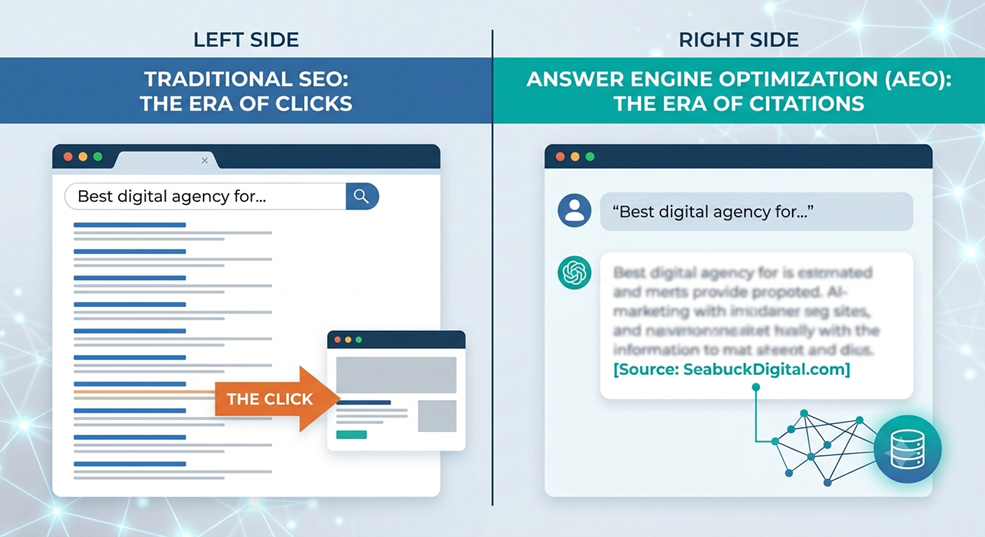

Conclusion

Stop guessing and start snapping. Whether you’re hunting for a replacement part, trying to copy a fashion look, or simply curious about an item you saw in the wild, Amazon Lens makes shopping frictionless. Next time you spot something you love — be bold: snap it, upload it, and let Lens do the heavy lifting. Try it now on your phone and go from “what do I type?” to “checked out” in a few taps.


FAQs

1. Does Amazon Lens work on all phones?

Lens works on most modern iOS and Android phones via the Amazon app. If you don’t see the Lens icon, update the app or check for OS compatibility.

2. Can Lens find exact replacement parts?

If the item has a barcode or distinctive markings, yes—barcode scans are best for exact matches. For generic parts, try multiple angles and add text like model numbers.

3. Are image searches private?

Images are processed to return results and may be analyzed server-side. Avoid uploading personal or sensitive photos and review Amazon’s privacy settings if you’re concerned.

4. What if Lens doesn’t recognize the item?

Try cropping the image, improving lighting, taking another angle, or adding keywords after the image search. Screenshots from product pages often work better than candid photos.

5. Can I use Lens to compare prices across sellers?

Yes — Lens results typically show multiple listings and price options. Use the product page to compare sellers and delivery options before buying.