
The Best AI-Powered Analytics Platforms for Every Team Type

Best AI-Powered Analytics Platforms
Best AI-Powered Analytics Platforms (Image Created by Seabuck Digital)

Introduction

Remember when building a simple monthly sales dashboard meant writing 200 lines of SQL, exporting a CSV, and wrestling with Excel pivot tables for three hours? Or worse, pinging your data team and waiting four days for a single chart?

Those days are officially over.

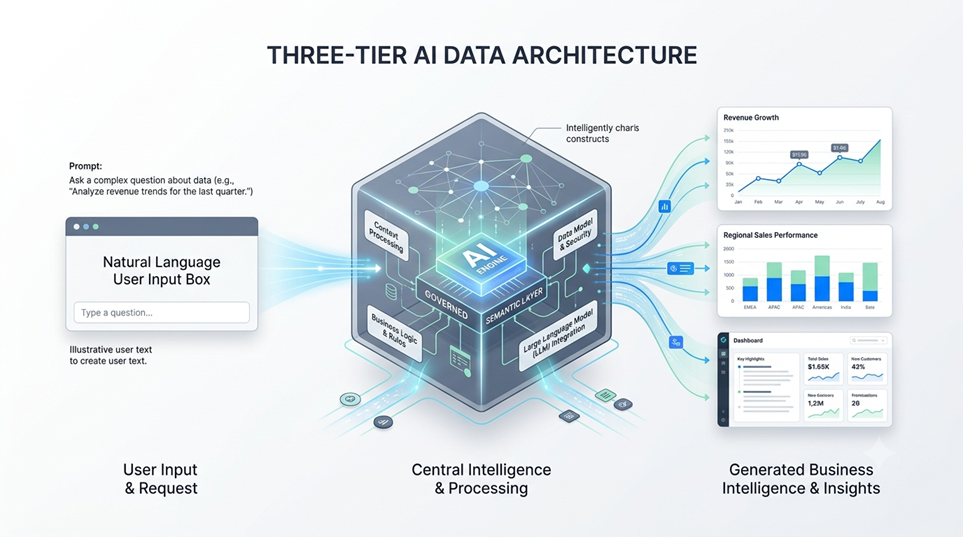
We’ve crossed a massive threshold in modern business intelligence. We’ve moved far past “AI as an assistant”—where a chatbot simply formats your formulas—to AI as an autonomous agent. The best AI-powered analytics platforms don’t just throw static graphs onto a screen anymore. They proactively investigate metric anomalies, answer complex natural-language follow-ups, read warehouse schema logs, and pull verified business insights directly inside Slack or Teams.

Because every organization has different technical capabilities, a single list won’t fit everyone. A non-technical marketing lead needs something vastly different than a Senior Data Engineer at an enterprise firm. Let’s explore the best AI-powered analytics platforms broken down by team persona, technical requirements, and core architectural needs.
The 2026 Paradigm Shift: From Passive Dashboards to Autonomous AI Data Agents

What Makes a Data Tool Truly “AI-Powered” Today?

A few years ago, placing an “AI” tag on a software product meant it had basic linear regression forecasting or basic chart templates. Today, true AI analytics platforms utilize Large Language Models (LLMs) combined with structured semantic layers. They map plain-English questions directly into verified database queries, execute those queries safely against live warehouses, and present human-readable stories alongside visualizations.

The Death of the Ad-Hoc SQL Request

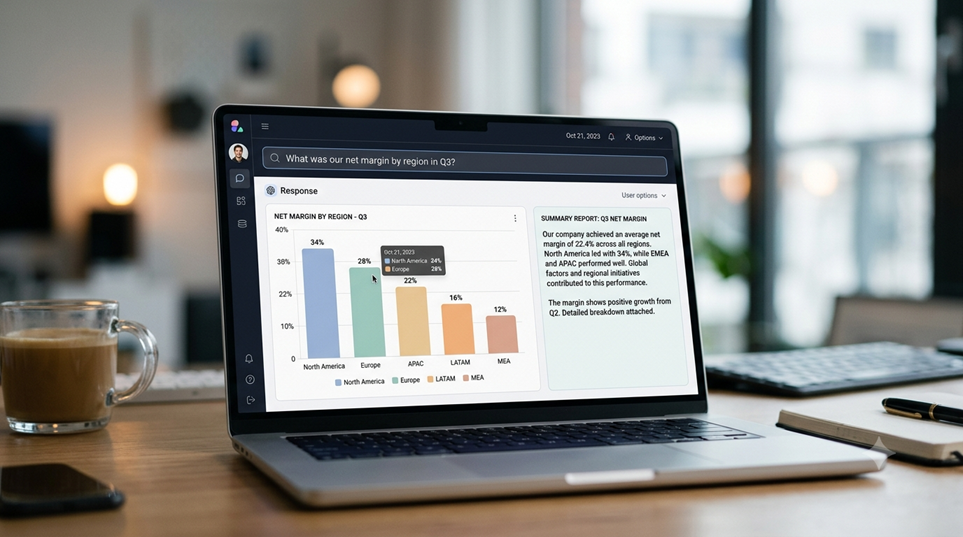
The biggest win of this transformation is the end of the dreaded data backlog. Data teams used to spend up to 80% of their working hours answering repetitive questions like “What was our conversion rate in Q3 by region?” Modern AI analytics agents handle these micro-queries automatically. This frees engineers to build robust pipelines while empowering business users to explore metrics independently without breaking underlying data.

Top AI Analytics Platforms for Business Users & Non-Technical Teams

Conversational AI Analytics (Business Users)
Conversational AI Analytics (Business Users) [Image Created by Seabuck Digital]

If your primary goal is self-service analytics—letting executives, product leads, and marketers ask questions in plain English—these tools deliver the fastest time-to-value.

  Business User Query

          │

          ▼

┌─────────────────────────┐

│ Conversational Engine   │ (ThoughtSpot / Julius / Zenlytic)

└──────────┬──────────────┘

           │ (Natural Language Translation)

           ▼

┌─────────────────────────┐

│ Governed Semantic Model │

└──────────┬──────────────┘

           │ (SQL Generation)

           ▼

┌─────────────────────────┐

│ Data Warehouse / Files  │

└─────────────────────────┘

1. ThoughtSpot: Search-Driven Analytics for Fast Answers

ThoughtSpot built its reputation on search-driven BI, making it an easy transition into the generative AI era. Its Spotter AI agent allows users to type queries into a Google-like search bar and instantly receive interactive charts, natural-language narrative summaries, and live data dashboards.

Standout Features & Ideal Users

  • Best For: Mid-market to enterprise business teams who want fast ad-hoc search without writing SQL.
  • Key Strengths: Live connections to major cloud data warehouses (Snowflake, BigQuery, Databricks), instant anomaly detection, and natural language query translation.
  • The Catch: Premium enterprise pricing that scales on usage, requiring structured data modeling to ensure clean answers.

2. Julius AI: The Conversational Analyst for Files and Databases

Julius AI functions as a personal, on-demand data scientist. You can upload raw CSVs, complex Excel sheets, or PDFs, or connect directly to live Postgres and Snowflake warehouses. Through a chat interface, Julius writes Python/SQL under the hood, generates clean charts, runs statistical modeling, and provides automated notebooks for recurring reports.

Standout Features & Ideal Users

  • Best For: Operational teams, startup founders, and researchers who work heavily with spread-sheets, documents, and light warehouse connections.
  • Key Strengths: Learns database structures over time with a sub-agent layer, generates customizable visualizations, and supports reusable analysis templates.
  • The Catch: Less suited for complex, multi-department enterprise BI modeling compared to legacy platforms.

3. Zenlytic: The AI Agent (Zoë) with a Git-Governed Semantic Layer

Zenlytic takes aim directly at dashboard fatigue. Powered by its native AI agent, Zoë, Zenlytic allows teams to interact with their metrics natively inside Slack or Microsoft Teams. Zoë reads your warehouse schema and query history to build a semantic map of your business metrics automatically.

Standout Features & Ideal Users

  • Best For: Tech-forward companies, SaaS brands, and e-commerce setups that want accurate conversational data right inside their team chat apps.
  • Key Strengths: Stores metric definitions in version-controlled Git repos, creates verifiable Excel/PowerPoint exports, and provides transparent query hover-states for full data lineage.
  • The Catch: Requires initial setup time to map complex or messy database schemas properly.

Top AI Analytics Platforms for Enterprise Ecosystems

For large companies with legacy database architectures, strict governance needs, and thousands of end-users, these platforms integrate deep AI functionality directly into established BI platforms.

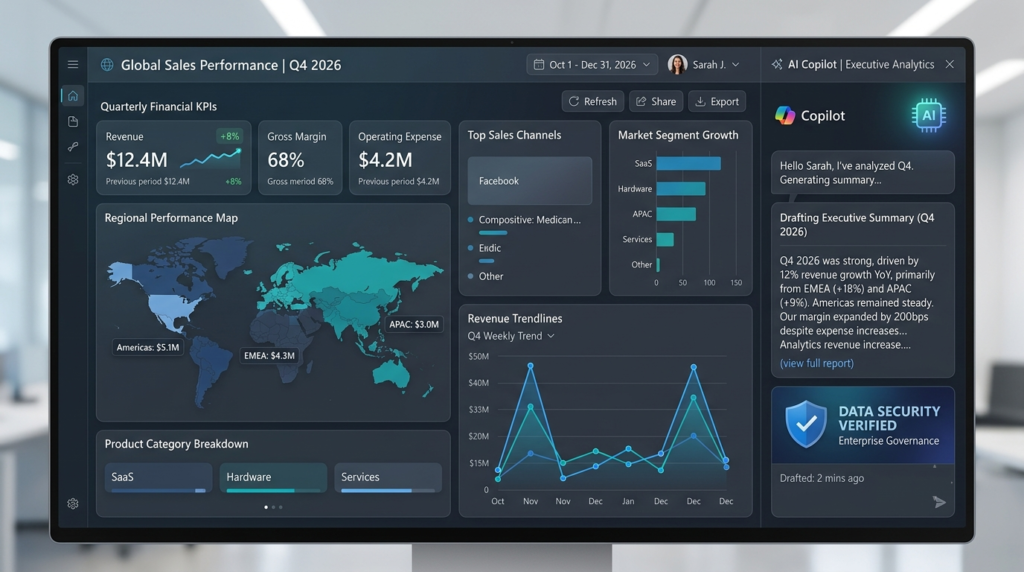
Governed Semantic Layer & BI Copilot (Enterprise)
Governed Semantic Layer & BI Copilot (Enterprise) [Image Created by Seabuck Digital]

4. Microsoft Power BI (with Copilot): Enterprise Intelligence at Scale

Microsoft has embedded Copilot directly across the Fabric and Power BI stacks. Users can simply describe the report they want, and Power BI Copilot automatically generates page layouts, drafts DAX calculations, and synthesizes executive narrative summaries.

Standout Features & Ideal Users

  • Best For: Companies heavily invested in the Microsoft 365, Azure, and Fabric software environments.
  • Key Strengths: Seamless integrations with Teams and Office, powerful governance controls, conditional formatting automation, and massive global community support.
  • The Catch: Licensing costs scale quickly with Fabric capacity requirements, and DAX modeling still demands technical expertise for setup.

5. Tableau AI (Salesforce Einstein): Predictive Insights Meets Deep Visualization

Tableau AI merges traditional data visualization with Salesforce’s Einstein engine. Instead of forcing users to manually slice and dice dashboards, Tableau AI automatically surfaces why a metric moved, highlights contextual outliers, and suggests logical next steps for sales and marketing ops teams.
Standout Features & Ideal Users

  • Best For: Enterprise organizations running Salesforce CRM that require high-level, publication-grade data visualizations.
  • Key Strengths: Deep CRM metric integration, automated natural-language insight summaries, and robust enterprise data security.
  • The Catch: Higher learning curve for administrative setup and premium per-user licensing fees.

6. Looker (Google Cloud): Semantic Security Meets Conversational BI

Google’s Looker stands out primarily due to LookML—its centralized semantic modeling layer. By pairing LookML with Google Cloud’s conversational AI, Looker ensures that when a user asks an AI agent for “churn rate,” the AI uses the company’s precise, governed definition every single time.
Standout Features & Ideal Users

  • Best For: Organizations running on Google Cloud Platform (GCP) and BigQuery that prioritize 100% metric consistency across departments.
  • Key Strengths: Robust semantic layer that eliminates AI hallucination, seamless integration with Gemini models, and strong cloud-native scaling.
  • The Catch: LookML development requires specialized technical skills before business users can fully leverage the conversational search.

Top AI Analytics Platforms for Data Engineers and Data Scientists

When the goal isn’t just generating charts, but running complex machine learning workflows, unstructured data analysis, and lakehouse-scale querying, these platforms lead the charge.

Data Lakehouse & SQL AI Engineering (Data Teams)
Data Lakehouse & SQL AI Engineering (Data Teams) [Image Created by Seabuck Digital]

7. Databricks AI Intelligence Platform: Native LLMs on the Data Lakehouse

Databricks uses its proprietary Unity Catalog and engine innovations to power an AI-native data lakehouse experience. It enables data teams to build, fine-tune, and deploy custom LLMs directly over proprietary enterprise data while giving engineers natural-language code assistants to build complex data pipelines.

Standout Features & Ideal Users

  • Best For: Data engineering teams, ML engineers, and enterprise data science departments handling unstructured data at scale.
  • Key Strengths: Unified governance across structured and unstructured data, native support for open-source AI models, and deep Python/PySpark optimization.
  • The Catch: Requires advanced technical skills; not designed as a drag-and-drop tool for non-technical business users.

8. Snowflake Cortex AI: Serverless Machine Learning and SQL Chat

Snowflake Cortex AI brings fully managed serverless AI capabilities straight into the Snowflake cloud data platform. Engineers can run state-of-the-art LLMs, perform vector searches, and run sentiment analysis directly inside standard SQL queries without managing external infrastructure.

Standout Features & Ideal Users

  • Best For: Database administrators and data engineers looking to run low-latency AI workflows directly inside their cloud warehouse.
  • Key Strengths: Serverless execution with zero infrastructure management, enterprise-grade RBAC security, and native SQL integration for fast ML deployment.
  • The Catch: Compute costs can escalate rapidly if queries are poorly optimized or run over massive datasets.

At-a-Glance Feature Comparison Matrix

PlatformPrimary Target AudienceCore AI SuperpowerData Connection TypeSetup Effort
ThoughtSpotBusiness Leads & AnalystsSearch-driven natural-language queryingLive Warehouse SyncMedium
Julius AIOperational Teams & AnalystsFile analysis & automated Python executionCSV/Excel/PDF & Live DBsVery Low
ZenlyticCross-Functional TeamsChat-native agent (Zoë) inside Slack/TeamsLive Warehouse + Git SemanticLow to Medium
Power BI (Copilot)Enterprise OrganizationsFabric ecosystem integration & auto-reportsFull Hybrid Enterprise ConnectionsHigh
Tableau AISalesforce & CRM TeamsPredictive analytics & context summariesSalesforce / Enterprise WarehousesHigh
Databricks AIData Engineers & ML LeadsNative Lakehouse LLMs & data engineeringOpen Lakehouse ArchitectureVery High
Snowflake CortexData Engineers & DBAsIn-warehouse serverless SQL LLM executionSnowflake Cloud WarehouseMedium to High
At-a-Glance Feature Comparison Matrix

Critical Evaluation Factors: How to Choose the Right AI Analytics Stack

Selecting an AI analytics platform isn’t like buying regular productivity software. If an AI writing assistant makes a minor typo, it’s easy to edit. But if an AI data agent miscalculates your Q4 gross margins, it can derail strategic executive decisions.

Here are the three critical factors you must test before signing a contract:

1. Hallucination Prevention & Semantic Layer Integrity

An LLM on its own is terrible at pure arithmetic. To deliver accurate answers, an AI analytics tool must sit on top of a governed semantic layer. This layer acts as a dictionary that explicitly tells the AI: “Net Revenue = Gross Revenue minus Returns and Discounts.” Always test a vendor by asking complex, ambiguous business questions to see if the AI asks for clarification or simply guesses.

2. Role-Based Access Control (RBAC) & Data Privacy

Connecting an AI agent to your data warehouse creates potential security risks if not managed properly. Ensure the platform honors existing database permissions. A sales manager in EMEA should never receive aggregated executive payroll insights, even if they ask the AI agent directly in plain English. Verify that the vendor does not use your proprietary data to train public LLMs.

3. Total Cost of Ownership (TCO): Consumption vs. Per-Seat Pricing

Pay close attention to pricing models:

  • Per-Seat Licensing: Best for predicting costs across large business teams.
  • Consumption-Based Pricing: Scales based on query compute or LLM token usage. While cheaper initially for small teams, usage spikes can result in unexpected monthly invoices if ad-hoc queries run rampant.

Conclusion: Matching Your Technical Maturity to the Right Platform

There is no single “best” AI-powered analytics platform for every company—only the platform that matches your team’s specific technical maturity and primary workflows:

  1. If you want immediate plain-English answers without engineering help: Start with Julius AI for file work or ThoughtSpot for live search.
  2. If your team lives inside Slack or Teams and wants a chat-native data analyst: Deploy Zenlytic.
  3. If you need enterprise-grade security and already use major clouds: Leverage Microsoft Power BI Copilot, Tableau AI, or Looker.
  4. If you are building custom AI applications on massive data lakes: Go directly to Databricks AI or Snowflake Cortex AI.

The future of business analytics belongs to teams that spend less time wrangling data and more time acting on insights. Pick the right platform for your setup, set up proper semantic guardrails, and let AI handle the heavy lifting.

Frequently Asked Questions (FAQs)

What is the main difference between a traditional BI tool and an AI-powered analytics platform?

Traditional BI tools require human engineers to build static, pre-aggregated dashboards that users must click through manually. AI-powered analytics platforms allow users to query data dynamically using natural language. They automatically investigate root causes, summarize key takeaways, and surface hidden anomalies without requiring manual SQL coding.

How do AI analytics platforms prevent hallucinations and false numbers?

Top-tier platforms avoid hallucinations by using LLMs strictly as translation engines rather than calculation engines. The AI translates your plain-English question into structured code (SQL or Python), which is then run against a governed semantic layer. The database handles the math, ensuring 100% mathematical precision while the AI simply explains the output.

Can small business teams without data engineers use AI analytics platforms?

Yes! Tools like Julius AI and ThoughtSpot are designed specifically for non-technical users. You can upload standard Excel sheets, CSVs, or Google Sheets and instantly start asking questions, building visualizations, and generating downloadable reports within minutes.

Is it safe to connect sensitive company databases to LLM-driven analytics tools?

It is safe if you choose platforms that adhere to enterprise security standards (SOC2 Type II, HIPAA, GDPR compliance). Enterprise tools utilize private LLM endpoints that guarantee your proprietary company data is never retained, shared, or used to train public foundation models.

Which platform is best if my company already relies heavily on Microsoft products?

If your company heavily utilizes Microsoft 365, Azure, and Teams, Microsoft Power BI with Copilot inside Microsoft Fabric is the most natural fit. It offers native security alignment, single sign-on (SSO), and seamless data sharing across your existing Office suite.

Why Organic Search Visibility Starts with Better Content Quality Control

Organic Search Visibility
Organic Search Visibility (Image Created by Seabuck Digital)

Introduction

Here’s something most site owners don’t want to hear: the traffic problem you’re trying to fix with more content is usually a quality problem wearing a traffic costume.

You publish three times a week. You hit the keywords your research turned up. Rankings still stall, and somehow a competitor putting out half as much content is pulling ahead. It’s not that they found some secret keyword you missed. It’s that their pages hold up when something a search engine, or increasingly an AI system summarizing search results actually looks closely at them.

That distinction is much more important than it was a couple of years ago. Google used to be the only game in town when it came to the top ten blue links. There’s a second, softer game taking place, too: whether your page is sufficiently valuable and authoritative to cite in an AI-generated overview by Google, ChatGPT, or Perplexity. Both games are played the same way and have content that can stand up to scrutiny.

Understanding Organic Search Visibility

Quality Content = Better Organic Search Visibility
Quality Content = Better Organic Search Visibility (Image Created by Seabuck Digital)

Organic search visibility is the metric that represents the overall share of voice your website owns in non-paid search engine results. Unlike a single keyword ranking (e.g., being #1 for “best running shoes”), visibility calculates your footprint across your entire keyword universe. It takes into account your rankings for thousands of related search queries, factoring in the search volume of those terms and the estimated click-through rate (CTR) of your positions.

In short, if your organic search visibility is high, your brand appears consistently wherever your target audience looks, building immediate trust before a user even clicks.

The Mechanics: How Quality Control Dictates Visibility

When a site shifts from mass-producing low-quality pages to enforcing strict quality checks, its organic search visibility changes in three distinct ways:

  • Keyword Footprint Expansion: High-quality, deep content naturally answers secondary and long-tail questions (highly specific search queries). Instead of ranking for just one target keyword, a single authoritative page might visible for hundreds of related terms.
  • Algorithmic Trust & “Halo Effect”: Search engines like Google evaluate websites sitewide. When your quality control eliminates flat, duplicate, or unhelpful content, the overall domain authority rises. This “halo effect” makes it easier for new content to achieve high visibility right out of the gate.
  • Protection Against Core Algorithm Updates: Algorithm updates are designed to filter out the “content flood” mentioned in the article. Sites with high visibility built on shallow, unedited AI content often experience sudden, catastrophic visibility drops. Conversely, sites with strict content guardrails see their visibility remain steady or climb during updates.

Key Metrics to Track Visibility

To know if your quality control strategy is actually moving the needle, you should monitor these three metrics rather than just looking at raw traffic:

MetricWhat It MeasuresWhy It Matters for Quality
Share of Voice (SoV)Your percentage of clicks for a specific cluster of industry keywords compared to competitors.Shows if your depth is stealing market share from competitors who publish twice as often.
Average Position TrendsThe macro-movement of all your indexed keywords over time.If your average position improves while your total published pages stay flat, your quality control is working.
AI Citation Share (GEO)How often your brand is named or linked in AI Overviews, Perplexity, or ChatGPT.The ultimate test of modern visibility—proving your content is structured and clear enough to be synthesized.

The Content Flood Problem

The Content Flood Problem
The Content Flood Problem (Image created by Seabuck Digital)

There’s just more content out there than there used to be, full stop. AI writing tools made publishing cheap, so instead of competing against a few dozen similar articles, a new page is often competing against thousands of near-identical ones. Google has leaned into this in its own guidance on people-first content, pushing harder toward rewarding originality and depth while quietly demoting anything that reads like a reshuffled version of what’s already ranking.

What tends to break through isn’t the longest post or the one stuffed with the most keywords. It’s the one that sounds like a person who actually understands the subject sat down and wrote it  specific, structured, and without a lot of throat-clearing before it gets to the point.

Quality Control Isn’t a Final Step Anymore

For a long time, “quality control” meant a spellcheck pass right before hitting publish. That’s not where the bar sits now. A more honest quality check asks three things before anything goes live:

  • Does this say something original, or does it just rearrange the top five search results?
  • Would every claim in here survive someone fact-checking it?
  • Is there anything a reader couldn’t already get from skimming the first page of results?

If a piece fails any of those, no amount of technical SEO polish saves it for long.

Originality, Accuracy, and Depth Are What Get Trusted

Search algorithms and language models are both, in their own ways, looking for signs that content can be trusted. Consistent accuracy, real originality, and actual depth are what separate a page worth citing from one worth skipping past. This isn’t abstract; it shows up in rankings that hold steady versus ones that spike and fade within a month.

Duplicate Content Is Quieter Than People Think

The thing that surprises people is that many under-performing pieces of content are not poorly written. It is as unoriginal as the writer never realized. If it seems like plagiarism if you skim it, it is, and if it seems like the same group of sentences is repeated over five pages of the same site, well, that’s some plagiarism, too.

That’s usually the missing step, not a lack of effort. Most writers aren’t trying to copy anyone. They just don’t realize how close a paraphrase can drift to its source until they actually put the two side by side. Running a draft through an online plagiarism remover before it goes live is a quick way to catch that it takes a couple of minutes, points out the lines that are echoing another source too closely, and gives you a chance to reword them while it’s still easy. Moz has a solid breakdown of how duplicate content dilutes authority, even when none of it was copied on purpose worth a read if this feels like a new concept.

Where AI-Assisted Drafting Actually Goes Wrong

Using AI to help draft something isn’t the issue. Publishing that draft without touching it is.

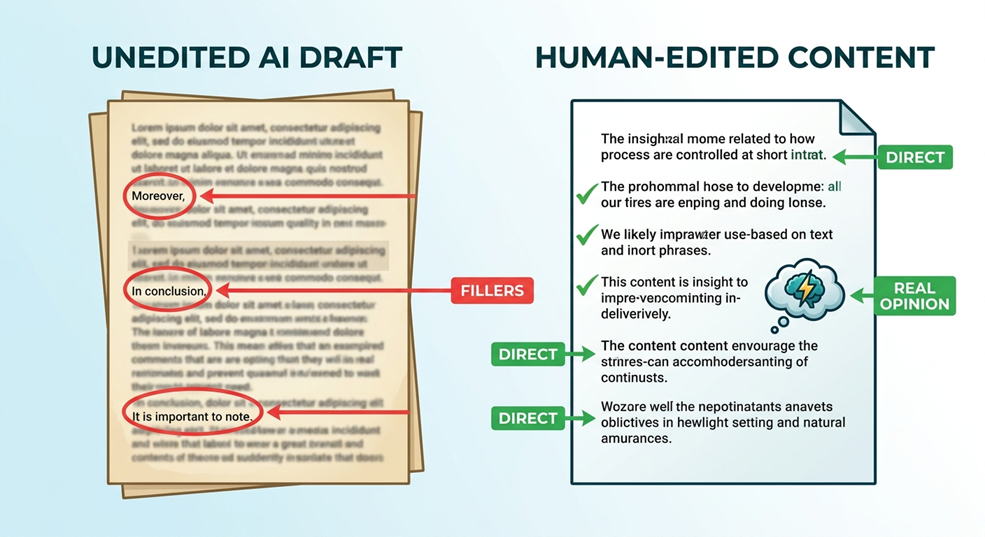
A first draft written with AI assistance often has a certain rhythm to its sentences that are all roughly the same length, transitions that repeat (“Moreover,” “In conclusion,” “It’s important to note”), and a flatness where a real opinion should be. None of that is fatal on its own, but stacked together it reads as generic, and generic doesn’t get cited or shared.

Fixing this is mostly an editing problem, not a tooling problem. Reworking sentence rhythm, cutting the filler transitions, and putting an actual point of view back into the writing turns a passable draft into something worth reading. It’s the same fix whether the flat, repetitive tone came from an AI tool or just a rushed first draft either way, someone has to go back through and make it sound like a person again. Some writers use an AI text humanizer at this stage to smooth that tone out before a human editor takes the final pass, which cuts down on how much rewriting is left by the time someone actually sits down with the piece. Skip that step entirely, though, and ship the raw draft as-is, and it shows not in any one obvious way, but in a flatness, readers pick up on even if they can’t quite say why.

A Simple Pre-Publish Check Worth Doing Every Time

Three things, done in order, catch most of what quietly caps a page’s performance:

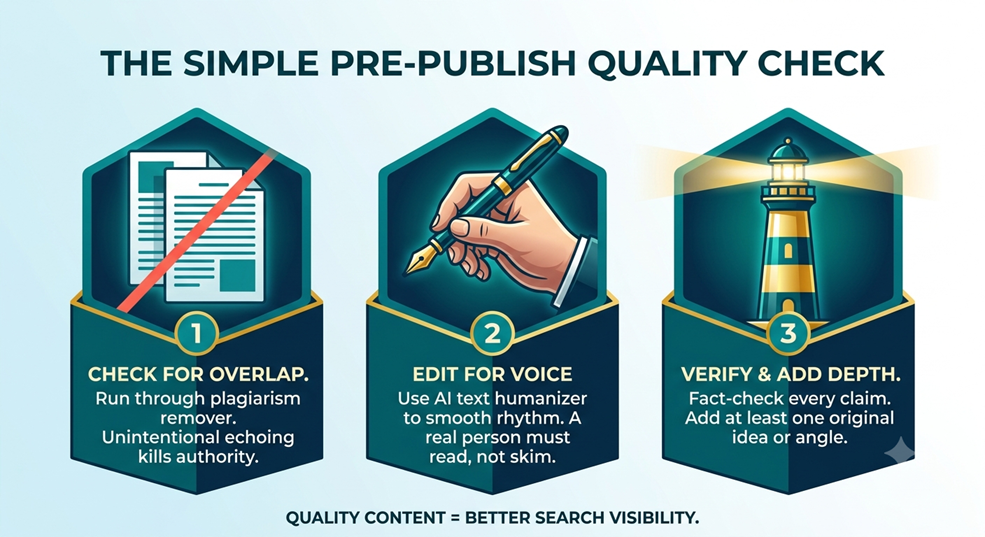
  • Check for overlap. Run the draft through a plagiarism remover to confirm it isn’t unintentionally echoing what’s already out there.
  • Edit for voice. Use an AI text humanizer to smooth out the rhythm and phrasing issues that make AI-assisted drafts sound alike, then have a person read it start to finish rather than skim it.
  • Verify and add something. Fact-check every claim, and make sure the piece includes at least one idea or angle the top-ranking pages don’t already cover.

None of this takes long. It just has to actually happen, every time, instead of being the step that gets skipped when a deadline is close.

Writing for AI Search, Not Just Search Engines

Writing for AI Search
Writing for AI Search (Image Created by Seabuck Digital)

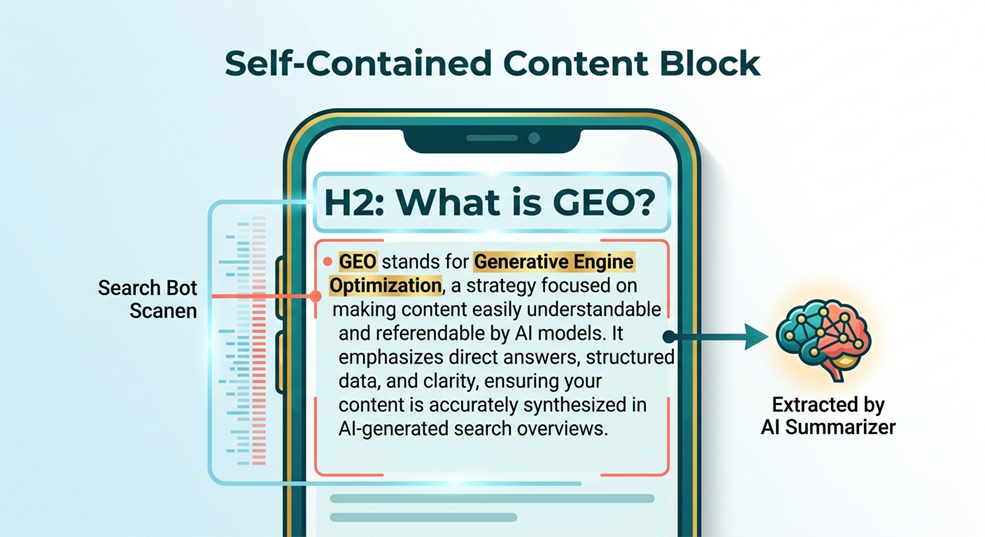
Generative Engine Optimization adds something traditional SEO never had to think about: getting pulled into an AI-generated answer, not just ranked on a results page. That tends to favor sections that can stand alone with a heading that implies a clear question, followed by a direct answer, rather than a section that meanders for three paragraphs before saying anything. Vague or padded sections rarely make it into an AI Overview or a chatbot’s summary, no matter how well the page ranks otherwise. Search Engine Journal’s ongoing coverage of how AI Overviews pull and cite sources is worth a look if you want to see this pattern play out in real examples rather than theory.

Quality Control Is the Strategy

Publishing more isn’t what wins search visibility anymore. Publishing content that holds up to a curious reader, to a search algorithm, and to whatever AI system is deciding what’s worth referencing is what wins it. Checking drafts for unintentional overlap, editing AI-assisted writing until it actually sounds like someone wrote it, and holding every piece to a real bar before it ships isn’t extra work tacked onto content production. At this point, it’s just what content production means.

FAQs

Does writing with AI assistance hurt SEO?

Not by itself. Google has said repeatedly that it rewards helpful content regardless of how it was produced. The risk isn’t AI involvement; it’s shipping unedited AI output without anyone actually reading it first.

How often should content be checked for duplication before publishing?

Every time, not occasionally. It takes a few minutes and catches problems that are much harder to undo once a page has been indexed and already lost ranking.

Can a single low-quality section damage the visibility of an entire website?

Yes. Google evaluates websites using both page-level and site-wide quality signals. If a substantial portion of your site consists of unoriginal, duplicate, or heavily automated content without human oversight, it creates a “sitewide drag.” This lowers the algorithmic trust of your entire domain, making it much harder for even your highest-quality pieces to achieve top organic visibility.

How does content formatting affect both SEO and AI search visibility (GEO)?

Traditional SEO requires clear formatting (like H2 and H3 tags) to help search crawlers understand the page hierarchy. Generative Engine Optimization (GEO) takes this a step further: AI summarizers look for highly concise, self-contained blocks of information. If your section starts with a clear question-based heading and immediately follows it with a direct, data-backed answer, an AI system can easily extract and cite that block. If the answer is buried deep within paragraphs of filler text, the AI will skip it entirely.

What’s the real difference between SEO and GEO?

SEO is about ranking on a results page. GEO is about being pulled into an AI-generated answer or summary, which tends to reward writing that’s clear and self-contained enough to be quoted on its own, section by section.

How to Optimize Content for ChatGPT: The Seabuck Digital Guide to AEO and GEO

How to Optimize Content for ChatGPT
How to Optimize Content for ChatGPT (Image Created by Seabuck Digital)

The Great Search Shift: Why Traditional Clicks Are Dying

The Death of the 10 Blue Links

Remember the golden era of SEO? You’d identify a high-volume keyword, write an 800-word blog post stuffed with synonyms, rank on page one, and watch the traffic roll in. Those days are rapidly evaporating. We are witnessing a monumental migration away from traditional Search Engine Optimization toward Answer Engine Optimization (AEO) and Generative Engine Optimization (GEO). Users don’t want a scavenger hunt across ten different websites just to find a single answer. They want the answer served to them on a silver platter, summarized, synthesized, and perfectly tailored to their exact query.

Would ChatGPT Recommend You Right Now? How to Optimize Content for ChatGPT

Let’s look at this through a terrifyingly simple lens. If a high-value potential client types your exact service into ChatGPT right now—say, “Who is the best digital marketing agency for enterprise scale in our region?”—will the AI pull your name out of its vast neural net, or will it confidently hand that client over to your competitor? Stop optimizing for clicks; start optimizing for citations. The battleground has shifted from winning a clickable link to becoming the trusted source that the large language model (LLM) cites.

AEO vs SEO
SEO Vs AEO (Image created by Seabuck Digital)

Section 1: Decoding the Mind of the Machine: How ChatGPT “Thinks”

Static Brains vs. Live Eyes: The Data Sourcing Engine

To outsmart the algorithm, you have to understand exactly how it gathers information. ChatGPT isn’t just an advanced Google scraper. It operates using a hybrid system that blends historical memory with real-time observation.

The Foundation: Training Data and Corporate Partnerships

At its core, ChatGPT relies on an astronomical base of static training data—think archives like Common Crawl, digital libraries, and massive web scrapes. But here is the secret sauce: OpenAI actively signs licensing agreements with massive data goldmines. Deals with Reddit, Dotdash Meredith, and major media conglomerates mean that ChatGPT heavily favors these platforms. If your brand doesn’t have a footprint inside these trusted hubs, you are effectively invisible to the baseline model.

The Lens: Real-Time Web Integration via Bing

When users ask for breaking news or fresh data, ChatGPT activates its live eyes. Using integrations like Bing Web Search, it dynamically crawls the web to synthesize current answers. It functions like a hyper-fast research assistant that reads the top articles in milliseconds and drafts a summary. If your technical SEO makes it hard for a standard bot to parse your text quickly, ChatGPT will simply skip your site for an easier read.

The Currency of AI Search: Information Gain over Copycat Content

Here is a hard truth most agencies won’t tell you: the internet is drowning in generic, AI-generated fluff. When a search engine reads ten articles that say the exact same thing, why should it care about yours? ChatGPT prioritizes Information Gain. This is an algorithmic score that measures how much new, unique value your content provides compared to what the model already knows. If your content lacks fresh insights, proprietary data, or unique case studies, its information gain score drops to zero, and it gets filtered out of the final AI summary.

Section 2: The Tactical AEO Playbook: Engineering Content for LLMs

Schema and LLM Extraction
Schema and LLM Extraction (Image Created by Seabuck Digital)

Step 1: Speak the Robot’s Language with Conversational Formatting

LLMs crave absolute clarity. They don’t have time to wade through romantic, flowery introductions. To optimize for conversational search, structure your content using the Inverted Pyramid model. Lead with the most crucial information immediately.

Adopt an explicit Q&A structure in your HTML. Use your H2 or H3 tags to phrase questions exactly how a human would ask them verbally or in a chat prompt. Right below that heading, make the very first sentence a direct, unambiguous answer. Think of it as feeding the model an easily digestible snippet it can copy-paste directly into its chat box. Save the background context and deep analysis for the paragraphs below.

Step 2: Injecting Data Gold—Proprietary Stats and Deep Case Studies

How do you guarantee a high information gain score? You publish things that cannot be replicated. Stop quoting public statistics that everyone else pulled from HubSpot five years ago. Instead, mine your own company data.

Publish your internal agency experiments, list your exact conversion metrics, and tell raw, unedited stories through comprehensive case studies. When you write, “In our Q1 experiment across 40 accounts, we found that AEO increased conversion efficiency by 34%,” you are creating an entirely new data point. ChatGPT loves hard numbers and expert quotes because they break the consensus and provide concrete evidence for its answers.

Step 3: Fixing Your Invisible Layer—Flawless Technical Schema

If your visual layout is for humans, your schema markup is the API for the machine. Do not force an LLM to guess what your page is about. Use flawless, explicit schema properties to define exactly who you are and what you offer.

Deploy advanced Organization, Product, and FAQ schema across your domain. If you publish a guide, wrap it in TechArticle schema. By structuring your metadata clearly, you are drawing a literal roadmap for the AI’s web-scraping bots, allowing them to map your entity, your relationships, and your expertise without wasting computational power.

Step 4: Off-Page Citations—Getting Talked About in the Right Ecosystems

Traditional SEO relies heavily on backlink authority. AEO relies on brand mentions and consensus. ChatGPT uses a variety of third-party platforms to validate its assertions.

If a user asks for software recommendations, ChatGPT will look at what real people are saying on G2, Capterra, and Reddit. If you want to optimize for ChatGPT, you need a robust digital PR strategy that targets these community hubs. Actively build your presence on Quora, ensure your Wikipedia data is highly accurate, and foster genuine conversations around your brand across digital forums. When the AI sees your brand consistently associated with a specific topic across multiple platforms, it registers your entity as a trusted industry leader.

Section 3: Flying Without a Dashboard: Measuring AI Search Success

The Mirage of Keyword Rankings

If you are still sending your clients monthly PDFs showing that they rank #3 for a generic keyword, you are tracking a ghost. In a world where search results are dynamically generated and personalized on the fly by an AI, static rank tracking is becoming obsolete. There is no permanent “spot” to track when the interface adapts to every user’s unique prompting behavior.

The Real-World Metrics: Brand Queries and Referral Traffic

So, how do we track success at Seabuck Digital? Look for the breadcrumbs left behind in your analytics.

  • Direct Brand Queries: An increase in organic search volume for your specific brand name indicates that users saw your name inside an AI interface and went to Google to find your actual site.
  • AI Referral Traffic: Keep a hawk-like eye on your referral traffic sources in Google Analytics. Look specifically for clicks landing from domains like chatgpt (dot) com, ai (dot) com, or perplexity (dot) ai.
  • Manual Prompt Auditing: Build a spreadsheet of core industry queries and run regular manual prompt tests across different LLMs. Track whether your brand is mentioned, how confidently the AI recommends you, and whether it links back to your verified site.

Conclusion: Winning the Answer Engine Era

Optimizing for ChatGPT isn’t a temporary growth hack; it is the baseline requirement for digital survival. By shifting your perspective from chasing superficial clicks to building authoritative citations, you ensure that your business remains deeply embedded in the digital architecture of tomorrow. Structure your data clearly, produce undeniable, proprietary value, and build an untarnished off-page reputation. When you make it incredibly easy for the machine to trust your brand, it will reward you by making you the ultimate answer.

FAQs

Q1: Will optimizing my content for ChatGPT hurt my traditional Google SEO traffic?

Not at all. In fact, it will likely improve it. Google’s algorithms have heavily evolved into generative models themselves (such as Search Generative Experience). The exact same principles that make your content attractive to ChatGPT—such as direct answers, structured schema, and high information gain—are precisely what Google looks for to fuel its own AI summaries.

Q2: How often does ChatGPT update its knowledge base to find my new content?

It happens in two ways. For static training data, updates happen in large, infrequent batch cycles. However, for live queries, ChatGPT utilizes real-time search engines like Bing. If your new content is properly indexed by major search engines and cleanly formatted, it can be discovered and cited by ChatGPT within minutes of publication.

Q3: Can I block ChatGPT from scraping my site while still optimizing for it?

No. If you block OpenAI’s user-agents (like GPTBot) using your robots.txt file, the model will not be able to crawl your site for real-time answers. If you want to be cited as a source in live chat conversations, you must leave your doors open for their crawlers to read your pages.

Q4: Does text length matter when trying to get cited by an AI engine?

Context matters far more than arbitrary word counts. ChatGPT values density and efficiency. A crisp, 400-word article packed with original statistics and a direct, structured answer has a significantly higher chance of being synthesized by an LLM than a repetitive, 3,000-word essay filled with fluff.

Q5: What is the single biggest mistake brands make with GEO?

Regurgitating the consensus. If your content writer simply reads the top three results on Google and summarizes them, your content offers zero unique utility. If the AI can already find that exact information everywhere else, it has absolutely no incentive to pick your specific URL as its primary citation.

Perplexity Student Guide: Transforming Raw Data into Straight A’s (Without the AI Hallucinations)

Perplexity Student Guide
Perplexity Student Guide (Image Created by Seabuck Digital)

1. Introduction: The Academic Trust Crisis in the AI Era

Let’s be completely honest for a moment. We have all been there. It’s 2:00 AM, the cursor is blinking relentlessly on a blank Google Doc, and you have a massive research paper due in exactly six hours. In a moment of desperation, you turn to a traditional AI chatbot. You type in a complex prompt, and within seconds, it spits out beautiful, authoritative paragraphs complete with perfect academic citations. You breathe a sigh of relief, copy-paste the text, and hit submit.

Then comes grading day, and your professor calls you into their office. Those flawless sources? They don’t exist. The AI completely hallucinated them.

1.1. The Fatal Flaw of Traditional LLMs

Traditional Large Language Models (LLMs) are essentially super-powered autocomplete systems. They are trained to predict the next logical word in a sentence, not to verify historical truth. When you ask them for academic sources, they often generate realistic-sounding titles, fake journal volumes, and non-existent URLs. They prioritize looking right over being right.

1.2. The Nightly Nightmare: Ghost Citations and Failed Papers

Using these “ghost citations” isn’t just risky; it’s a fast track to failing a class or triggering an academic integrity review. Professors are hyper-aware of AI-generated fluff. When a tool invents a study that was never published, your credibility vanishes instantly. You don’t need a creative storyteller when your academic career is on the line; you need a relentless fact-checker.

1.3. Enter Perplexity Student: Your Hallucination-Free Study Partner

This is exactly where the Perplexity Student ecosystem changes the game. Perplexity isn’t a shortcut to bypass thinking; it’s an elite, citation-backed research assistant. Instead of pulling answers out of a black box of static training data, it cross-references the live web, checks peer-reviewed repositories, and leaves a transparent, clickable paper trail for every single sentence it generates. It bridges the gap between AI speed and academic rigor.

2. Demystifying Perplexity AI: The Search Engine with a Brain

Think of Perplexity as a hybrid creature: half cutting-edge search engine, half elite research analyst. It doesn’t replace your search bar; it revolutionizes what happens after you click enter.

2.1. Why It’s Different from ChatGPT and Gemini

While standard bots converse based on what they remember from their past training, Perplexity treats every query like a fresh investigation. It instantly scours the internet, analyzes dozens of top-tier sources, synthesizes the information into a cohesive answer, and anchors every single claim to a specific, numbered footnote. If you see a claim, you can click the number and view the exact primary source material.

2.2. The Power of Live Web Indexing and Real-Time Tracking

Academics move fast, and world events move faster. Because Perplexity utilizes live web indexing, it can reference studies published five minutes ago, tracking developing news, scientific breakthroughs, or economic shifts in real time. It converts messy, sprawling search results into structured, reliable intelligence.

3. Pillar 1: Accessibility, Pricing, and the Frictionless Setup

Getting access to top-tier AI tools shouldn’t require trading off your textbook budget. Perplexity has built a dedicated pipeline specifically designed to put industrial-grade research tools into student hands without the financial strain.

3.1. What Exactly is Perplexity Education Pro?

Perplexity Education Pro is a specialized subscription tier tailored for academic institutions. It unlocks advanced AI models (like Claude 3.5 Sonnet and GPT-4o), allows unlimited file uploads (perfect for reading 50-page PDFs), grants access to deep research modes, and offers advanced visualization tools. It takes the standard Perplexity experience and supercharges it for heavy academic lifting.

3.2. Step-by-Step Guide: How to Verify Your Student Status

Perplexity Education Pro
The Verification Workflow (The Image is created by Seabuck Digital)

Unlocking this setup is straightforward, but you need to follow the official verification process carefully to claim your academic benefits.

3.2.1. The .Edu Fast Track

The quickest way to get started is by visiting the official student portal or help center. If your school uses a standard .edu or institution-verified email address, the process is virtually instant:

  1. Go to the Perplexity Student verification page.
  2. Sign up or log in using your official school email credentials.
  3. The system will automatically recognize the academic domain and update your account status.

3.2.2. Manual Verification and Alternative Proofs

What if your school doesn’t offer a .edu email string, or you are studying internationally? Don’t worry. You can submit manual documentation to the Perplexity help center. Uploading a clear photo of your current student ID card, a recent tuition receipt, or an official enrollment letter from your registrar will allow their support team to manually provision your academic status.

3.3. Scoring the Ultimate Perplexity Student Discount

Once verified, you unlock massive savings. Perplexity frequently runs campus-wide cohorts and direct student discount programs that slash the price of Pro features significantly—sometimes even offering months of premium access completely free if enough students from your specific university sign up. It turns a premium tech luxury into an accessible everyday study utility.

4. The Comet Browser Integration: Supercharging On-the-Go Research

Research doesn’t just happen inside a single tab. You are constantly bouncing between JSTOR articles, news publications, and university databases. That is where the Comet integration comes into play.

4.1. What is Comet and How Does It Serve Students?

Perplexity Comet Browser Extension
Perplexity Comet Browser Extension (Image is created by Seabuck Digital)

Comet is Perplexity’s dedicated browser layer built to live right alongside your daily browsing flow. Instead of constantly copying text, switching tabs, opening an AI window, and pasting it back in, Comet brings the analytical power of Perplexity directly onto the webpage you are currently reading.

4.2. Effortless Sourcing: Turning Casual Browsing Into Citable Evidence

Imagine reading a dense, confusing economics article. With Comet activated, you can highlight a complex paragraph and ask Perplexity to explain the concept, find contradicting viewpoints, or extract the primary data points instantly. It allows you to build an active, rolling bibliography while you read, turning passive web browsing into an organized research collection.

5. Pillar 2: Mastering Perplexity Spaces for Organization and Deep Work

If you use AI as a simple one-off chat box, you are missing out on its greatest superpower. True academic mastery requires structure, and that is exactly what Perplexity Spaces provides.

5.1. Building Permanent, Structured Digital Libraries

Think of a Perplexity Space as a dedicated, private research room for a specific class. You can create a Space titled “History 301: The Cold War” or “Bio 110: Genetics.” Inside that specific Space, you can upload your syllabus, relevant lecture slides, and key PDF research papers.

[Your Perplexity Space]

   ├── Uploaded Files (Syllabus, PDFs, Lecture Slides)

   ├── Set System Instructions (e.g., “Use MLA format, prioritize peer-reviewed data”)

   └── Memory Layer (Remembers previous queries and context across all chats)

Every single prompt you run inside that Space will only draw from and contextualize against those specific materials. It creates a localized, intelligent brain that understands the exact context of your course.

5.2. Moving Beyond the Single-Prompt Loop

Mastering Perplexity Spaces for Organization and Deep Work
Mastering Perplexity Spaces for Organization and Deep Work (Image Created by Seabuck Digital)

In a standard chat, the AI forgets everything once you close the tab. Within a Space, the context remains persistent. You can ask a question on Monday, come back on Friday, and reference the previous answer flawlessly. You no longer have to waste time re-uploading documents or pasting the same background context over and over again.

5.3. Collaborating on Group Projects Without the Chaos

Group projects are historically a logistical nightmare. One person does all the work, someone else loses the shared doc, and the final paper reads like it was written by five different alien species. Spaces allows you to invite your classmates into a unified, collaborative research environment. Your entire team can query the same pool of uploaded documents, share found insights, and assemble a cohesive, citation-backed outline together in real time.

6. Pillar 3: The Advanced Academic Workflow Masterclass

Let’s look at how to practically apply this system to your weekly academic routine to maximize your output while saving hundreds of hours of manual labor.

6.1. Deconstructing Complex Syllabi and Dense Research Papers

At the beginning of the semester, upload your entire course syllabus into a dedicated Space. You can ask Perplexity: “Look at my upcoming deadlines for the next 12 weeks. Break this down into a weekly reading schedule and highlight which weeks will have the heaviest workload based on assignment point values.”

When faced with a daunting, 60-page academic paper filled with dense, impenetrable academic jargon, drop the PDF into your Space and use this specific prompt workflow:

“Summarize the primary methodology of this paper, isolate the core dataset used, list any limitations identified by the authors, and present the final conclusion in three simple bullet points.”

Within thirty seconds, you have a clear, conceptual map of the paper before you even read the first sentence.

6.2. Generating Tailored Study Guides and Interactive Flashcards

Do you have a brutal midterm coming up? Don’t just stare at your highlighted textbook pages hoping for passive absorption. Active recall is the gold standard of learning.

Ask Perplexity to analyze your uploaded lecture notes and generate a customized study guide. You can prompt it to create interactive, text-based flashcards: “Give me 15 challenging conceptual questions based strictly on Chapter 4 of my notes. Provide the questions first, wait for my response, and then score my answers while correcting any misunderstandings using the primary source text.” You have transformed an AI search engine into an active, adaptive, personal tutor.

7. Conclusion: Upgrading to an Elite Academic Collaborator

The traditional approach to using AI in academics is completely broken. Treating AI as a sneaky way to generate unverified blocks of text is a high-stakes gamble that inevitably ends in hallucinations, factual errors, and compromised academic integrity.

By upgrading to the Perplexity Student framework, you are shifting from a risky shortcut to a precise, citation-backed workflow. You leverage the platform’s real-time web indexing, the frictionless capture capabilities of the Comet integration, and the structural organization of permanent Spaces to build a bulletproof research system. You aren’t cutting corners; you are simply building a faster, smarter, and infinitely more reliable bridge from raw data to academic excellence. Protect your integrity, supercharge your research, and let the hallucinations become a thing of the past.

8. Frequently Asked Questions (FAQs)

Q1: Can professors detect if I use Perplexity Student for my research papers?

Perplexity generates factual text and provides the exact real-world citations to back it up. If you use it to find sources, read those sources, and write your paper using your own voice, you are engaging in clean, legitimate academic research. However, if you copy and paste synthesized text blocks verbatim, standard AI writing detectors may flag the phrasing structures. Use Perplexity to find, analyze, and map out your information—but always write the final words yourself.

Q2: What happens if Perplexity provides a citation that looks broken or incorrect?

While Perplexity is explicitly engineered to minimize errors by using live search queries, no software system is flawless. The beauty of Perplexity is that every single citation is a clickable link. Always click through to the primary source to quickly verify that the text accurately supports the specific claim before hardcoding it into your final draft.

Q3: Is the Perplexity Education Pro discount open to high school students?

Yes. As long as you possess a valid school-issued email address or can provide official, verifiable documentation showing active enrollment in an accredited educational program (such as a current student identity card), you can apply for the verification process through the official Perplexity help center.

Q4: How many files can I upload to a single Perplexity Space?

The specific file upload limits vary depending on whether you are using the free tier or the premium Education Pro account. Upgrading to the Education Pro tier unlocks significantly larger, high-volume file caps, allowing you to upload multiple heavy textbooks, datasets, and dense PDF compilations into a single workspace without hitches.

Q5: Can I export my search threads and research from Spaces directly into citation managers like Zotero or Mendeley?

While you cannot directly sync accounts with a single click yet, Perplexity makes exporting data incredibly simple. Every thread and synthesis inside a Space includes a clean, shareable link and a markdown text format. You can copy the generated citation lists or use the Comet browser extension to capture the source URLs directly into your preferred bibliography manager within seconds.

Best Answer Engine Optimization Platforms 2026: Moving from Pure Analytics to True Actionability

Best Answer Engine Optimization
AEO (Image Created by Seabuck Digital)

What are the best AEO platforms in 2026?

The best Answer Engine Optimization tools include Listable Labs for all-in-one practitioner workflows, Profound for enterprise analytics, and Writesonic for direct, real-time content optimization.

The Death of the Rank Tracker: Why the Traditional SEO Dashboard is Broken

Shift from Clicks to Citations - The Death of the Rank Tracker
Shift from Clicks to Citations (Image Created by Seabuck Digital)

Remember when tracking SEO success meant opening up a dashboard and cheering because your core keyword hit position #3 on Google? Those days feel like ancient history. In 2026, the traditional SEO dashboard isn’t just outdated—it is functionally blind.

The Massive Shift from Clicks to Citations

When users search today, they aren’t scanning a list of ten blue links. They are reading a fluid, customized paragraph generated by an AI assistant. If your brand isn’t woven into that response as an active, clickable citation, you don’t exist to that user. Clicks are plummeting because search engines are solving problems natively on the page. The currency of modern web visibility has fundamentally evolved from raw organic impressions to high-value engine citations.

Understanding Share of Voice (SoV) vs. Geometric Rankings

Traditional tracking software tells you where a URL ranks in a static index. But large language models (LLMs) don’t have a static index. They synthesize real-time data dynamically. Because of this, marketing teams have switched their main KPI to Share of Voice (SoV) and Citation Share. If ChatGPT generates ten different product recommendations across ten variations of a prompt, how many of those summaries prominently feature your brand? That is the macro-metric that matters now.

The Core Conflict: Observability vs. Actionability in 2026

As the software market races to serve modern search teams, a massive divide has formed. It’s the battle between Observability and Actionability.

Most baseline listicles scrape generic software landing pages, telling you that a platform “tracks brand mentions across LLMs.” Let’s be completely honest: simply knowing that your brand visibility dropped 12% inside Perplexity this week is utterly useless if the software leaves you staring at a blank screen wondering why.

True optimization requires more than just tracking lines on a graph. The best tools in 2026 don’t just observe the disaster—they give you the exact diagnostic steps to fix your content gaps so you can win back your visibility.

The Best Answer Engine Optimization Platforms of 2026

Software UI Mockup or Categorization Map
Software UI Mockup or Categorization Map (Image Created by Seabcuk Digital)

To help you cut through the marketing noise, we’ve broken down the leading tools by user profile, specialized functionality, and practical use cases.

The Enterprise Heavyweights: Deep Analytics & ROI Attribution

These systems are custom-built for large corporations, data-heavy teams, and CMOs who need to prove the exact monetary value of their optimization spend to board members.

Profound: Tying AI Citations to Revenue

Profound has cemented its spot at the top of the enterprise market for one critical reason: it solves the attribution problem. It doesn’t just show you that your enterprise B2B software was cited inside ChatGPT Search; it bridges the data gap to tie that specific citation directly to your Google Analytics conversions and pipeline metrics. If you need to know exactly how much revenue an absolute increase in Perplexity footprint generates, Profound is the gold standard.

Goodie / AthenaHQ: Autonomous Narrative Tracking

Goodie (frequently operating alongside the AthenaHQ engine) approaches optimization from a corporate reputation angle. It continuously tracks brand sentiment and narrative trajectories across complex corporate entities. If a major model begins hallucinating or shifting its tone from positive to neutral when describing your security compliance protocols, AthenaHQ flags the anomaly instantly and isolates the source material causing the drift.

The Optimization & Content Execution Leaders

If you are a practitioner who needs to write, update, and deploy pages immediately based on shifting engine data, these platforms are designed for your day-to-day workflow.

Writesonic (GEO Platform): In-App Content Healing

Writesonic has successfully shifted from a standard AI writing assistant into a powerhouse Generative Engine Optimization (GEO) platform. It doesn’t just show you where your competitors are stealing your citation real estate—it features a built-in content healing workspace. It flags the missing context on your page and generates the precise structural paragraphs, tables, or data markers needed to capture the citation, allowing you to deploy updates directly to your CMS.

AirOps & Quattr: Programmatic Workflows at Scale

AirOps and Quattr are built for massive sites and e-commerce platforms with thousands of landing pages. These platforms use programmatic workflows to dynamically analyze content gaps across entire product catalogs. If a specific category of your online store loses visibility inside Google’s AI Overviews, these tools programmatically adjust structural content layers and schema configurations to align with the model’s new extraction parameters.

The Best All-Rounders & Mid-Market Trackers

These platforms offer the perfect balance of deep tracking capabilities, highly actionable insight interfaces, and flexible pricing structures for agencies and growing brands.

Listable Labs: The Unified Practitioner Workspace

Listable Labs is arguably the premier workspace for agile digital agencies and modern marketing teams. It unifies competitive benchmarking, multi-LLM tracking, and concrete action plans into a single clean UI. Instead of overwhelming you with raw engineering telemetry, it translates complex vector-distance shifts into a straightforward task list: “Add a comparison table to this URL to regain your Perplexity citation.”

Semrush AI Optimization Toolkit: The Familiar Add-on Play

For teams already deeply embedded within the traditional Semrush ecosystem, their specialized AI Optimization Toolkit (now fully integrated into Semrush One) offers a low-friction entry point. It blends your existing keyword research data with incoming AI Overview share metrics, making it incredibly easy to track how your standard organic positioning relates to your generative visibility.

AIClicks & Otterly AI: Fast, Budget-Friendly Prompt Monitoring

If you run an early-stage startup, a boutique local brand, or a lean marketing team, enterprise price tags are out of the question. Tools like AIClicks and Otterly AI offer hyper-accessible prompt monitoring setups starting between $29 and $39 a month. They allow you to lock in a specific core set of high-value buyer prompts and receive clean alerts the second your brand drops out of the top recommendation answers.

2026 AEO Platform Comparison Matrix

Platform NameBest Fit ForCore LLMs CoveredStarting Price
ProfoundEnterprise CMOs & Data Analytics TeamsChatGPT, Perplexity, Gemini, ClaudeCustom Enterprise
Writesonic (GEO)Content Teams & SEO AgencysChatGPT, Perplexity, Google AIO$99 / month
Listable LabsMid-Market Brands & In-house TeamsChatGPT, Perplexity, Gemini$149 / month
Semrush AI ToolkitExisting Semrush UsersGoogle AI Overviews, ChatGPTAdd-on Suite
AIClicks / OtterlyStartups & Boutique AgenciesChatGPT, Perplexity$29 / month

The “Information Gain” Framework: How to Evaluate Your Core Tech Stack

Choosing your software suite shouldn’t be based on shiny user interfaces. You need to look under the hood to ensure the tool actually collects accurate data.

UI-Level Scraping vs. Flat API Data Tracking

Technical "UI Scraping vs. API" Diagram
Technical “UI Scraping vs. API” Diagram (Image Created By Seabuck Digital)

This is the hidden flaw most software sales reps won’t tell you about. Many cheap tracking tools pull data exclusively through flat API calls. However, API results completely strip out the real-world formatting—such as markdown tables, custom bullet cards, maps, or interactive buttons—that a human user actually sees on screen. Ensure your chosen tool utilizes advanced UI-level rendering so you see exactly what your customers see.

Model Drifts and the Need for Real-Time Data Refresh Rates

Traditional search indices update predictably. AI models, on the other hand, change completely whenever a new weights patch or fine-tuning layer is deployed. A keyword tracking report that updates once every two weeks is fundamentally useless. Your platform must offer high-frequency tracking loops that catch sudden system updates before they skew your monthly lead flow.

Brand Safety: Tracking Hallucinations and Misinformation

What happens when an LLM recommends your software product but falsely claims you don’t support a feature that you actually excel at? Or worse, what if it lists an incorrect support phone number? Your platform must feature real-time misinformation alerts that actively flag inaccurate claims being programmatically served to potential buyers.

Traditional SEO Is Blind
(Misses Conversational Blending)
Pure Observability
• Alerts you to drops
• Monitors raw citations
• Flat data lines
Active Actionability
• Diagnoses content gaps
• Generates data
• Direct CMS execution tables

Turning Software Metrics into Actual Organic Growth

Website Audit Process
The Seabuck Digital Audit Process (Image Created by Seabuck Digital)

At the end of the day, software is only as good as the overarching digital strategy driving it. You can purchase the most expensive enterprise dashboard on the market, but if your content lacks true Information Gain—unique statistics, proprietary industry data, or lived case studies—no tool will save your visibility. Real optimization requires manual expertise, cultural context, and an understanding of how semantic search systems operate.

If you want to stop guessing and uncover exactly how the world’s leading AI engines see your business right now, let our team run a specialized, manual analysis for you. Reach out to get a custom, comprehensive AI Search Visibility Audit handled entirely by our expert strategy team at Seabuck Digital.

Frequently Asked Questions (FAQs)

Q1: What is the main difference between traditional SEO software and an AEO platform?

Traditional SEO software measures your URL’s physical position in static search results. An AEO platform tracks your brand’s Share of Voice, conversational citation frequency, and narrative presence within AI synthesizers like ChatGPT, Perplexity, and Gemini.

Q2: Why are some tools reporting “zero volume” for keywords that drive actual AI traffic?

Traditional keyword research tools rely on historic Google autocompletes and click streams. Conversational AI queries are much longer, highly unique, and intent-driven, which causes standard database estimators to heavily underreport their true traffic potential.

Q3: Can an AEO platform automatically fix my website content?

Certain advanced optimization platforms like Writesonic (GEO) or programmatic suites like AirOps provide inline content suggestions and generation panels, allowing you to quickly patch context gaps and push updates straight to your live site via CMS integrations.

Q4: Is UI-level scraping better than tracking via developer APIs?

Yes. Developer APIs often return raw, unformatted text strings. UI-level scraping captures the actual visual response layout, ensuring you see exactly how your brand citations, tables, or product cards are presented to everyday users.

Q5: How often do AI search engine rankings shift compared to regular Google search?

AI search engines fluctuate far more dynamically. Because they synthesize content based on real-time data retrievals, user prompt context, and frequent model updates, your citation footprints can shift daily rather than weekly.

How is Perplexity Different Than Google? The Shift from Searching to Knowing

How is Perplexity Different Than Google?

Introduction

For decades, we’ve been conditioned to “Google it.” It’s a verb, a habit, and for many, the front door to the internet. But if you’ve spent any time online lately, you’ve likely noticed a change. The “front door” is getting cluttered with sponsored posts, SEO-optimized fluff, and a dozen tabs you never actually wanted to open. Enter Perplexity.

Is Perplexity just a “Google killer”? Not exactly. The real story is more nuanced. We are witnessing a fundamental shift in how humans consume information. The difference between Perplexity and Google isn’t just about features; it’s about the gap between taking an action and seeking understanding.

The Context Gap: Why One Size No Longer Fits All

Imagine you’re planning a trip. If you need to book a hotel in Tokyo, you go to Google. If you want to understand the historical significance of the Meiji Restoration and how it shaped modern Japanese urban planning, you go to Perplexity. This is the “Context Gap.”

Google: The Giant of Action and Intent

Google is built for utility. It excels when you have a specific destination in mind. Whether you’re looking for a local plumber, checking a live cricket score, or trying to buy a new pair of running shoes, Google is the world’s most efficient switchboard. It connects you to a destination. Its primary goal is to help you do something.

Perplexity: The Architect of Understanding

Perplexity, on the other hand, is built for the “why” and the “how.” It doesn’t want to send you away to another website; it wants to bring the knowledge to you. It acts as an Answer Engine, synthesizing vast amounts of data into a single, cohesive narrative. It’s for those moments when you don’t want a list of links—you want a briefing.

Search Engine vs. Answer Engine: A Fundamental Identity Crisis

To understand why they feel so different, we have to look at their DNA. Google is a Search Engine; Perplexity is an Answer Engine. It sounds like semantics, but the user experience is worlds apart.

Search Engine vs. Answer Engine
Search Engine vs. Answer Engine (Image Created by Seabuck Digital)

The Library vs. The Librarian Analogy

Think of Google as the world’s largest, most organized library. When you walk in and ask for information on “renewable energy,” Google hands you a stack of twenty books and says, “The answers are in here somewhere. Happy reading!” You still have to do the manual labor of scanning the chapters and connecting the dots.

Perplexity is the expert librarian who has already read those twenty books. When you ask the same question, the librarian looks at you and says, “Based on current research, renewable energy is pivoting toward green hydrogen and solid-state batteries because of X, Y, and Z.” It saves you the “manual labor” of clicking, scrolling, and filtering out the junk.

How Information Flow Has Changed in 2026

In 2026, we are dealing with a level of information fatigue that didn’t exist ten years ago. The way we interact with data has evolved from “discovery” to “curation.”

The Friction of the “Blue Link” Legacy

Google’s classic “Ten Blue Links” model creates friction. Every time you click a link, wait for a page to load, dodge a cookie consent banner, and scroll past an ad, you lose momentum. This is “Search Labor.” As AI matures, users are becoming less tolerant of this friction.

The Rise of Generative Synthesis

Perplexity uses Generative Engine Optimization (GEO) principles to provide a “Generative Synthesis.” Instead of making you browse, it uses LLMs to browse for you. It looks at the top results in real-time, extracts the relevant facts, and writes a response. You get the “what” without the “where.”

Deep Dive: When to Use Google (The Master of Utility)

Despite the hype around AI, Google isn’t going anywhere. Why? Because some things don’t need a conversational summary.

Deep Dive : When to Use Google
Deep Dive : When to use Google? (Image created by Seabuck Digital)

Local Discovery and Real-Time Navigation

Try asking an AI for “tacos near me” versus using Google Maps. Google’s integration with local business data, reviews, and real-time traffic is a moat that Perplexity can’t easily cross. When the intent is local or navigational, Google remains the undisputed king.

Transactional Intent: Why Google Still Owns Shopping

If you want to compare the prices of a specific Sony camera across five different retailers, Google Shopping is built for that. Perplexity can summarize reviews of the camera, but it isn’t a marketplace. Google is the king of the “Buy” button.

Deep Dive: When to Use Perplexity (The Master of Research)

Perplexity shines when the topic is complex, multi-layered, or academic. It’s the tool for the curious.

Deep Dive: When to Use Perplexity
Deep Dive: When to Use Perplexity (Image created by Seabuck Digital)

Threaded Conversations and Contextual Memory

One of the most frustrating things about traditional search is starting over. If you search for “best soil for tomatoes” on Google, and then want to know “when to plant them,” you have to start a new search. On Perplexity, you just ask, “And when should I plant them?” It remembers the context. It’s a dialogue, not a series of isolated queries.

Verified Citations: Fighting the Hallucination Problem

The biggest fear with AI is “hallucinations”—AI making things up. Perplexity tackles this by making citations the star of the show. Every sentence is usually followed by a small, clickable number. If you doubt a claim, you can see exactly which website it came from. It offers a level of transparency that standard chatbots often lack.

The Revenue Wall: Why Google Can’t Always Be Perplexity

You might wonder, “Why doesn’t Google just become Perplexity?” The answer lies in the $200 billion advertising machine.

Google’s business model relies on you clicking links. If Google perfectly answers every question on the search results page, you never click an ad, and Google doesn’t get paid. This is the “Innovator’s Dilemma.” Perplexity, being primarily subscription-based (Pro tier) or focused on direct utility, doesn’t have the same pressure to keep you clicking on sponsored “blue links.”

GEO vs. SEO: The Future of Digital Visibility

For creators and marketers, this shift is massive. We are moving from Search Engine Optimization (SEO) to Generative Engine Optimization (GEO).

On Google, you want to rank #1 to get the click. On Perplexity, you want your content to be the source that the AI uses to build its answer. The focus is shifting from “how do I get a visitor?” to “how do I become the authoritative source for the AI’s synthesis?”

Conclusion: Becoming a Search Power User

So, how is Perplexity different than Google? It’s the difference between a Map and a Mentor.

Google is your map. Use it when you need to find a location, buy a product, or navigate to a specific site. It is the infrastructure of the internet.

Perplexity is your mentor. Use it when you need to learn, summarize, or understand. It is the intelligence layer on top of that infrastructure.

The future isn’t about choosing one over the other; it’s about knowing which tool to pull out of your belt. If you want to do, Google it. If you want to know, Perplexity it. In the age of AI, the smartest person in the room isn’t the one with all the answers—it’s the one who knows how to ask the right tool the right question.


Frequently Asked Questions (FAQs)

1. Is Perplexity more accurate than Google?

Perplexity is excellent for synthesizing facts, but it can occasionally misinterpret complex data. Google shows you the raw source, which can be more reliable if you know how to vet websites yourself. Perplexity’s citations help mitigate this risk.

2. Does Perplexity have a free version?

Yes, Perplexity offers a robust free version. The “Pro” version allows for more advanced models (like GPT-4o or Claude 3.5) and deeper “Pro” file uploads and research capabilities.

3. Will Perplexity replace Google for everyday use?

For “informational” searches (research, learning, explaining), many users are already switching. However, for “navigational” and “transactional” searches (Maps, Shopping, local services), Google remains the superior tool.

4. Can Perplexity search the live web?

Yes! Unlike standard ChatGPT, which has a knowledge cutoff, Perplexity’s core function is to browse the live internet in real-time to provide up-to-date answers.

5. How does Perplexity handle citations differently?

While Google gives you a list of links to choose from, Perplexity writes the answer first and integrates citations as footnotes. This allows you to verify individual claims without leaving the conversation.

Perplexity AI Extension for Chrome: Turn Your Browser into a Research Engine

Perplexity AI Extension for Chrome
Perplexity AI Extension for Chrome [ Image Created by Seabuck Digital ]

We’ve all been there. You start with one innocent search query, and an hour later, your Chrome browser looks like a crowded graveyard of microscopic favicons. You have 47 tabs open, your laptop fan sounds like a jet engine taking off, and you still haven’t found that one specific data point you need. This is “Tab Fatigue,” and it’s the silent killer of productivity for digital marketers and researchers alike.

But what if your browser didn’t just display pages, but actually understood them? Enter the Perplexity AI Extension for Chrome. It’s not just a utility; it’s a workflow disruptor that turns your browser from a simple window into a high-octane research engine.

The Death of the Infinite Tab: Why Your Browsing Workflow is Broken

The "Tab Fatigue" vs. "Zero-Tab"
The “Tab Fatigue” vs. “Zero-Tab” [ Image Created by Seabuck Digital ]

Traditional search engines have conditioned us to hunt and gather. We type a query, open five different links, scan through fluff-filled intros, and hope to find a nugget of truth. It’s a fragmented, exhausting process. For professionals in the SEO and digital marketing space, time isn’t just money—it’s the ability to scale.

The Perplexity extension flips the script. Instead of forcing you to hunt for information across the web, it brings the answers directly to the page you’re already on. It’s like having a brilliant research assistant sitting on your shoulder, ready to whisper the exact answer you need without you ever having to look away from your work.

What is the Perplexity AI Extension for Chrome ?

At its core, the Perplexity Chrome extension is a bridge between the vast, chaotic web and the precise power of Large Language Models (LLMs). While most people use the Perplexity website as a “Google Killer,” the extension integrates that power into your daily navigation.

More Than Just a Search Bar

Don’t mistake this for a simple search shortcut. It’s an interactive layer that sits on top of your browser. It leverages real-time web indexing—meaning it knows what happened five minutes ago, not just five months ago—and combines it with an interface designed for speed.

The “Zero-Tab” Productivity Workflow: A Professional’s Secret Weapon

Imagine a world where you never have to open a new tab to verify a fact or summarize a long-form guide. That is the “Zero-Tab” reality. For anyone managing high-volume digital projects, this is a game-changer.

Instant Summarization: Reading 3,000 Words in 30 Seconds

We’ve all landed on those massive 3,000-word industry “mega-guides” that are 80% fluff and 20% value. Instead of scrolling through the “What is SEO?” section for the thousandth time, you can hit the Perplexity extension and ask for a summary. Within seconds, you get a bulleted list of the core arguments, data points, and conclusions. You’ve just reclaimed twenty minutes of your life.

Contextual Queries: Interrogating Your Current Tab

The "Contextual Toggle"
The “Contextual Toggle” [ Image Created by Seabuck Digital ]

This is where the magic happens. The extension isn’t just searching the web; it’s “reading” your active tab. You can ask questions specific to the content on your screen.

“This Page” vs. “Entire Internet” Toggle

The extension features a simple but powerful toggle. Want to know what the entire internet says about a topic? Set it to “All.” Want to know exactly what this specific whitepaper says about conversion rates? Set it to “This Page.” It allows you to interrogate a document like a lawyer cross-examining a witness.

Breaking the “Cmd+T” Habit: The Toolbar Shortcut

For most of us, “Cmd+T” (or Ctrl+T) is a muscle memory reflex. We open a new tab for every tiny curiosity. The Perplexity extension breaks this cycle. By pinning the extension to your toolbar, you create a central hub for all inquiries. It keeps your workspace clean and your focus sharp. Think of it as a cognitive decluttering tool.

The Meta Perspective: Shifting from SEO to GEO (Generative Engine Optimization)

The GEO/AEO Strategy Diagram
The GEO/AEO Strategy Diagram [ Image Created by Seabuck Digial ]

As digital marketers, we have to look under the hood. The rise of this extension isn’t just a win for productivity; it’s a signal of a massive shift in the search landscape. We are moving from Search Engine Optimization to Generative Engine Optimization (GEO) and Answer Engine Optimization (AEO).

How Generative Engines are Redefining User Intent

Users are increasingly consuming “summarized” content. They aren’t always clicking through to your site; they are getting the answer from the Perplexity popup. This might sound scary for traffic, but it’s an evolution. User intent is shifting from “show me a list of sites” to “give me the answer now.”

The Strategy Insight: Are You “Crawlable” for AI?

If Perplexity can’t summarize your article or cite your data in its extension popup, you are effectively invisible to a growing segment of power users. Your content needs to be structured, authoritative, and clear enough for an AI to parse and present. Being cited in that little extension window is the new “Position Zero.”

Extension vs. Browser vs. Traditional Search: Why the Plugin Wins

You might ask, “Why not just keep a ChatGPT tab open?” or “Why not use the Perplexity web app?” The answer lies in the friction.

The “Comet” Factor: Speed and Precision

Perplexity uses “Comet,” their specialized browsing technology, which is optimized for speed and accuracy within the Chromium environment. It’s faster than jumping between tabs and more context-aware than a standalone chatbot.

Inline Citations: Fact-Checking at Flash Speed

Unlike some AI tools that “hallucinate” facts with total confidence, Perplexity provides inline citations. In the extension window, you’ll see small numbers next to claims. Hover over them, and you see the source. This allows for instant verification—essential for anyone writing high-stakes content.

Practical Use Cases for Digital Marketers and SEO Strategists

Let’s get tactical. How do you actually use this thing to beat your competition?

Stealthy Competitor Analysis

Land on a competitor’s new service page. Use the extension to ask: “What are the primary pain points this page addresses, and what is their unique selling proposition?” In seconds, you have a distilled competitive brief without manually taking notes.

Rapid-Fire Content Ideation

Reading a great article on a niche topic? Ask the extension: “Based on this page, what are five related questions people are asking on Reddit or Quora?” Boom—you have your next five blog post ideas.

Technical SEO “Gut Checks”

Need to know if a page is properly optimized? Ask: “What are the primary H1 and H2 tags on this page, and do they mention [Keyword]?” It’s a quick way to audit a page without digging into the “View Source” code.

Why Being “Cited” is the New Ranking #1

In the age of AI, the click-through rate (CTR) is changing. If the Perplexity extension pulls your site as a source, you gain massive brand authority. Users see your URL as the “verified source” for the AI’s answer. This builds a level of trust that a standard blue link simply can’t match.

The "Professional Edge" Comparison Table
The “Professional Edge” Comparison Table [ Image Created by Seabuck Digital ]

Conclusion: Embracing the AI-Native Browsing Era

The Perplexity AI extension is more than a convenience; it’s a glimpse into the future of the internet. It transforms the browser from a passive viewer into an active participant in your research. For the team at Seabuck Digital and our peers in the industry, staying ahead means adopting these tools early.

Don’t just browse the web—command it. Turn your browser into a research engine today and stop drowning in tabs.

Has AI changed your browsing habits yet? Are you finding yourself clicking fewer links but getting better answers? Let’s talk about it in the comments below!


FAQs

1. Is the Perplexity Chrome Extension free to use?

Yes, the basic version of the extension is free. It provides powerful summarization and search features without requiring a paid subscription, though a Pro account offers more advanced model options.

2. Does it work on PDFs opened in Chrome?

Absolutely. If you open a PDF in your Chrome browser, you can use the “This Page” toggle to summarize the document or ask specific questions about the data within the PDF.

3. Is it better than the ChatGPT Chrome extension?

While both are great, Perplexity is specifically built for search and citations. If you need real-time facts and verified sources, Perplexity usually has the edge over ChatGPT’s general knowledge base.

4. Will using this extension hurt my site’s SEO?

It doesn’t hurt your SEO, but it changes how you should think about content. You want your content to be “AI-friendly” so that these extensions cite you as the primary source for their answers.

5. Can I use it on browsers other than Chrome?

While designed for Chrome, it works on most Chromium-based browsers, including Microsoft Edge and Brave. Just head to the Chrome Web Store to install it.

Perplexity AI Humanizer: Why Facts Alone Won’t Rank Your Content in 2026

Perplexity AI Humanizer
Image Created by Seabuck Digital

In the fast-paced world of digital marketing, we’ve hit a fascinating crossroads. It’s 2026, and the “search bar” as we once knew it has evolved into something much more conversational. You’re likely using Perplexity AI—and why wouldn’t you? It’s the gold standard for factual, sourced research. But here’s the cold, hard truth: being factually correct is no longer the “flex” it used to be. If everyone has access to the same high-speed research bots, how do you stand out? The answer lies in the “Perplexity AI Humanizer” approach—not as a tool to trick detectors, but as a strategy to inject soul into your data.

The Post-Search Era: Balancing Efficiency with Intuition

We are officially living in the post-search era. The days of mindless scrolling through blue links are fading, replaced by AI-driven summaries. In this landscape, the winner isn’t the one who provides the most facts; it’s the one who provides the most meaningful facts. While Perplexity can tell you the “what,” it often struggles with the “so what?”

From SEO to GEO: The Shift to Generative Engine Optimization

Traditional SEO (Search Engine Optimization) is being joined by its more sophisticated cousin: GEO (Generative Engine Optimization). GEO isn’t about stuffing keywords into a paragraph; it’s about making your content so authoritative and unique that an AI engine chooses to cite you as its primary source. To do this, you need to balance Perplexity’s raw efficiency with the kind of human intuition that an algorithm simply can’t replicate.

The Content Paradox: Why Perplexity is a Starting Line, Not a Finish Line

Content Paradox
Image Created by Seabuck Digital

Perplexity is an incredible tool. It’s like having a world-class librarian at your fingertips 24/7. However, this creates a paradox: the more we rely on it, the more “gray” our content becomes. AI-generated text is often structurally perfect but emotionally vacant. It lacks the “narrative soul” that converts a casual reader into a loyal brand advocate.

The Accuracy Trap: Why “Correct” Isn’t Always “Compelling”

Think of AI content as a textbook. Textbooks are accurate, but do people read them for fun? Rarely. If your blog post reads like a manual, your dwell time will plummet. In 2026, ranking requires resonance. You need to take the factual skeleton provided by Perplexity and wrap it in the muscle and skin of human storytelling.

Why Humanize? Moving Beyond the Fear of AI Detectors

Let’s be real—most “AI humanizer” tools are just fancy synonyms-swappers designed to bypass detection software. But here’s a secret: Google and other search engines don’t necessarily hate AI content; they hate low-value content.

Prioritizing User Experience (UX) Over Algorithm Paranoia

Stop worrying about whether a detector gives you a “90% Human” score. Instead, ask: “Will my reader find this useful?” Humanizing your content is about improving User Experience (UX). It’s about making complex data digestible, relatable, and—dare I say—fun. When you write for the human first, the algorithms usually follow suit.

The New Workflow: Perplexity as Your Expert Research Assistant

The most successful digital writers in 2026 treat Perplexity as an assistant, not the author. This workflow allows you to scale your output without sacrificing the “Search-First Authenticity” your audience craves.

Streamlining the Ideation Phase

Use Perplexity to find gaps in current search results. Ask it: “What are people not saying about [Topic]?” This gives you a unique angle that hasn’t been beaten to death by the rest of the internet.

Sourcing Real-Time Data and Citations

One of Perplexity’s strengths is its ability to browse the live web. Use it to pull the latest stats and citations, which adds immediate “Trustworthiness” to your piece. But don’t just list them—explain why they matter to your specific reader.

The Manual Humanizer’s Checklist: Infusing Burstiness and Perplexity

In the world of linguistics, “Perplexity” measures the complexity of text, while “Burstiness” refers to the variation in sentence length. AI tends to be very “middle-of-the-road” in both. Humans, however, are erratic. We write short sentences. Then, we might follow them up with a long, flowing, descriptive sentence that paints a vivid picture before hitting the reader with another punchy line.

Varying Sentence Structure to Mimic Human Thought

To humanize your Perplexity drafts, go through and break up the rhythm. If you see three sentences in a row that are roughly the same length, change them. Use fragments for emphasis. Use semicolons to connect deep thoughts. Keep the reader on their toes.

Vocabulary Diversity: Avoiding the “AI Standard” Lexicon

AI has a “favorite” set of words—words like “delve,” “comprehensive,” and “testament.” If you see these popping up, swap them out for more conversational alternatives. Instead of “delving into the details,” why not “taking a peek under the hood”?

Strategic Editing: Infusing the “E” in E-E-A-T

Google’s E-E-A-T
Image Created by Seabuck Digital

Google’s E-E-A-T (Experience, Expertise, Authoritativeness, Trustworthiness) guidelines are more relevant than ever. The first “E”—Experience—is the one AI can never fake.

Adding First-Hand Experience and Anecdotes

Did you try a strategy that failed? Tell that story. Did a client ask a weird question that sparked an insight? Include it. These “human-only” moments are what tell a search engine that a real person is behind the keyboard.

Establishing Authority Through Contrarian Perspectives

AI is trained on consensus. It likes to play it safe. To rank in 2026, you often need to be bold. If you disagree with a common industry “best practice,” explain why. Being a bit of a maverick can actually help your GEO scores because you’re providing “Information Gain.”

Answer Engine Optimization (AEO): Becoming the Cited Source

Answer Engine Optimization (AEO) The GEO Blueprint
Image Created by Seabuck Digital

If you want Perplexity or SearchGPT to cite your blog, you have to make their job easy. This is where Answer Engine Optimization (AEO) comes into play.

The 100-Word Rule for Instant Clarity

In the first 100 words of your section, answer the primary question directly. AI bots are impatient; if they can’t find the answer quickly, they’ll move on to a site that provides it upfront.

Formatting for Extraction: Tables, Lists, and “Chunkable” Content

AEO Checklist
Image Created By Seabuck Digital

Structure your data. Use comparison tables for “Product A vs. Product B” queries. Use bulleted lists for steps. AI engines love structured data because it’s easy to parse and present to the user in a summary.

FeatureTraditional SEO FocusAEO Strategy (2026)
Primary GoalRanking for KeywordsBecoming the Cited Source
ToneFormal/EducationalConversational/Direct
StructureDeep Narratives“Chunkable” Answer Blocks

Conclusion: The Future is AI-Assisted, Human-Led

As we navigate the waters of 2026, the “Perplexity AI Humanizer” isn’t a piece of software—it’s you. By leveraging AI for what it does best (research and data retrieval) and doubling down on what you do best (intuition, storytelling, and experience), you create content that is unbeatable. Don’t just settle for being a “fact-checker” for an AI; be the visionary that gives those facts a voice. Ready to start humanizing?


Frequently Asked Questions (FAQs)

1. Does using Perplexity AI hurt my SEO rankings?

Not at all. Search engines prioritize high-quality, helpful content. If you use Perplexity to gather facts and then add your own unique insights and formatting, you’re actually likely to rank higher.

2. What is “Burstiness” in writing?

Burstiness refers to the variation in sentence length and structure. AI often produces very uniform sentences. Humanizing your content involves mixing short, punchy sentences with longer, more complex ones to create a natural flow.

3. How does Generative Engine Optimization (GEO) differ from SEO?

While SEO focuses on ranking in traditional search results, GEO focuses on being the cited source in AI-generated answers. It requires a more direct, “answer-first” approach to content structure.

4. Can AI detectors really tell if I used a humanizer tool?

Most AI detectors are easily fooled and often give false positives. Instead of trying to “beat” the detector, focus on adding value that an AI couldn’t, like personal anecdotes or proprietary data.

5. What is the “100-Word Rule” in AEO?

It’s a strategy where you provide a clear, direct answer to the user’s query within the first 100 words of your content. This makes it easier for AI engines to identify and cite your information.

How to Rank in AI Search: The Blueprint for Digital Visibility

How to Rank in AI Search
Image is created by Seabuck Digital

Let’s be honest: the “Ten Blue Links” era of Google is feeling a bit like a dusty library these days. You know the drill—you type a query, click three different websites, dodge five pop-ups, and finally find your answer. But today? Users are just asking ChatGPT, Perplexity, or Gemini.

If you want to know how to rank in AI search, you have to stop thinking like a keyword stuffer and start thinking like an authority. The game has changed from “matching keywords” to “providing the most authoritative answer.”

The New Era of Search: Moving Beyond the Search Bar

The search bar is evolving into a conversation. When someone asks an AI a question, the AI doesn’t just show them a list; it synthesizes an answer. If your website isn’t the one being summarized, you basically don’t exist in that conversation.

Generative Engine Optimization (GEO)
Image is Created by Seabuck Digital

Why “Traditional” SEO isn’t Enough Anymore

Old-school SEO was about convincing an algorithm that your page was relevant. New-school ranking—Generative Engine Optimization (GEO)—is about convincing an AI that your page is the most reliable source of truth.

What Does it Actually Mean to “Rank” in AI?

Ranking in AI search doesn’t mean being #1 on a list. it means being the cited source. When an AI says, “According to [Your Website], the best way to…” you have won. That citation is the new “Position Zero.”

The Mechanic of the Machine: How AI Engines Choose Winners

AI Engines
Image is Created by Seabuck Digital

To crack the code on how to rank in AI search, we need to look under the hood. AI engines like Perplexity or Search Generative Experience (SGE) use something called Retrieval-Augmented Generation (RAG).

The Librarian vs. The Matchmaker

Traditional Google was a matchmaker—it introduced you to a website. AI is a librarian. It reads your content, extracts the facts, and presents them to the user. To rank, your content needs to be “scannable” by a machine but “trustworthy” for a human.

Why Retrieval-Augmented Generation (RAG) Changes Everything

RAG means the AI “retrieves” live data from the web before “generating” an answer. If your content is structured logically, the AI can retrieve it instantly. If it’s buried under layers of creative prose, the AI will skip right over you.

Step 1: Focus on Information Density Over Word Count

Forget the 2,000-word blog post requirement. AI search engines don’t care about length; they care about density.

Killing the “Fluff” to Please the AI Parser

If you want to rank in AI search, you need to cut the “In today’s fast-paced world…” introductions. Get straight to the point. The higher the ratio of “useful facts” to “filler words,” the more likely an AI is to use your site as a reference.

Step 2: Mastering the “Cite-Ability” Factor

AI models are programmed to be helpful, but they are also programmed to be “safe.” They prioritize content that is easy to cite.

Citation for Ranking
Image is Created by Seabuck Digital

Using Declarative “Power Sentences”

A “Power Sentence” is a short, clear statement that answers a question directly. Instead of saying “One might consider the possibility of ranking,” say “To rank in AI search, you must prioritize structured data.” These are the “soundbites” that AI bots love to copy and paste into their answers.

Step 3: Technical Optimization for AI Bots

If your text is for the user, your backend is for the bot. To rank in AI search, you need to speak the machine’s language.

Schema Markup: Giving the AI a Map

Think of Schema Markup (JSON-LD) as the API for your website. It tells the AI: “This is a price,” “This is a step-by-step guide,” or “This is an expert opinion.” By using advanced Schema, you remove the guesswork for the AI, making it a “trusted” source.

Step 4: Leveraging Unique Data and Statistics

Why would an AI cite you if you’re just saying what Wikipedia already says? To rank in AI search, you need to provide original value.

Why Original Research is Your Secret Weapon

AI engines are hungry for “new” training data. If you publish an original case study, a unique set of statistics, or a proprietary survey, you become an “Original Source.” AI engines will flock to your data because it’s something they haven’t seen 1,000 times before.

Step 5: Building Authority Through “Topic Clusters”

You can’t just write one lucky article and expect to rank in AI search forever. You need to prove you are an authority in your niche.

Becoming the Go-To Source for Your Niche

By creating “topic clusters”—a series of interlinked articles that cover every aspect of a subject—you create a “knowledge graph” for the AI. When the AI sees that you have 50 high-quality articles on one specific topic, it recognizes you as the “Subject Matter Expert.”

Three Essential Pillars to Rank in AI Search Fast

If you want a “cheat sheet” for your next piece of content, focus on these three things:

Pillar 1: Directness (The 5-Second Rule)

Can an AI find the answer to the user’s question in the first 100 words of your article? If not, you’re losing. Put the answer at the top.

Pillar 2: Quotability (Writing in Soundbites)

Use bullet points, numbered lists, and bolded “conclusion” sentences. These are “low-hanging fruit” for AI models looking for a quick summary.

Pillar 3: External Proof (Reddit, Wiki, and Citations)

AI engines look at the “social web” to see if humans trust you. If your brand is mentioned on Reddit, Quora, or industry-specific forums, it acts as a massive “green flag” for the AI algorithm.

The Human Edge: Why AI Still Needs Your Perspective

Leveraging Unique Data and Statistics
Image is Created by Seabuck Digital

Here is the irony: the best way to rank in AI search is to be uniquely human. AI can summarize facts, but it can’t provide “lived experience.” Share your personal failures, your unique business insights, and your “hot takes.” That unique perspective is something the AI can’t generate—it can only report on it.

Conclusion: Your Roadmap to AI Dominance

Knowing how to rank in AI search is about shifting your mindset from “gaming the system” to “becoming the system.” By focusing on high information density, clear technical structures, and undeniable niche authority, you aren’t just surviving the AI revolution—you’re leading it.

The future of search belongs to those who provide the clearest, most authoritative answers. Are you ready to be the source the AI quotes?


FAQs

1. How long does it take to rank in AI search results?

Unlike traditional SEO, which can take months, AI search engines that use live web crawling (like Perplexity) can pick up and cite your content within days of publication if it is highly authoritative.

2. Does keyword density still matter?

Keywords still help the AI understand the topic, but “density” is dead. Focus on “topical relevance” and “semantic richness” instead of repeating the same phrase over and over.

3. Will AI search kill my website traffic?

It might reduce “informational” traffic (people looking for quick facts), but it increases “high-intent” traffic. If someone clicks your link from an AI answer, they are much more likely to convert.

4. What is the most important technical factor for AI ranking?

Properly implemented Schema Markup (JSON-LD) is arguably the most important technical factor, as it provides a structured “cheat sheet” for the AI to understand your content.

5. Should I stop building backlinks?

No! Backlinks are still a primary signal of “trust.” If other high-authority sites link to you, the AI assumes you are a safe and reliable source to recommend to its users.

How to Clear Amazon Search History: Retrain Your Algorithm for a Better Feed

How to Clear Amazon Search History?
Image Created by Seabuck Digital

Have you ever searched for a quirky gift—maybe a “World’s Best Cat Dad” mug or a giant inflatable T-Rex suit—only to have Amazon haunt you with similar recommendations for the next six months? It’s like the algorithm has a memory like an elephant, and it refuses to let you move on. Your Amazon homepage becomes a cluttered mess of things you bought once, things you looked at by mistake, and things you definitely don’t want to see every time you log in to buy laundry detergent.

Managing your search history isn’t just about being “sneaky” or keeping secrets; it’s about retraining the Amazon recommendation engine. Think of it as a digital spring cleaning for your storefront. By clearing your history, you are essentially telling the AI, “Hey, I’m done with that phase. Show me something new.” So the question is How to Clear Amazon Search History?

The Ghost of Searches Past: Why Amazon Remembers Everything

How to Clear Amazon Search History?
Image Created by Seabuck Digital

Amazon is a master of data. Every single click, hover, and search query is recorded to build a sophisticated profile of who you are and what you might buy next. While this can be helpful (like when it reminds you to reorder coffee filters), it often leads to a “bubble” where you only see a narrow slice of products.

This tracking feeds features like “Frequently Bought Together,” “Inspired by your browsing history,” and those relentless retargeting ads that follow you across the internet. When you clear your history, you’re hitting the “off switch” on these biased recommendations. It’s the first step in taking back control of your digital footprint.

The Benefits of an “Algorithm Reset”

Why bother going through the menus to delete your history? There are two main reasons that go beyond just “deleting stuff.”

Cleaning Up Your Digital Storefront

Imagine walking into a physical store where the clerk keeps shoving items in your face based on a joke you told three years ago. Annoying, right? Clearing your history resets your homepage, making it cleaner and more relevant to your current needs, not your past whims.

Protecting Your Privacy in Shared Households

If you share a Prime account with a spouse, parent, or roommate, your “history” is an open book. If you’re planning a surprise party or buying a sensitive health-related item, that search history can ruin the secret faster than a leaked spoiler. Scrubbing your tracks is a practical necessity for shared digital spaces.

Step-by-Step: How to Clear Amazon Search History on Desktop

How to Clear Amazon Search History?
Image Created by Seabuck Digital

If you’re sitting at your computer, clearing your history is a breeze. Amazon hides these settings a bit, but once you know where they are, it takes less than thirty seconds.

Navigating to Your Browsing History

  1. Log into your account and look at the top right header.
  2. Hover over “Account & Lists.”
  3. In the dropdown menu, look for the section titled “Your Recommendations” or find the “Browsing History” link directly.

Removing Individual Items vs. Clearing All

Once you’re on the Browsing History page, you’ll see a chronological list of everything you’ve viewed.

  • To remove one item: Click the “Remove from view” button under the specific product. This is great for fixing one-off mistakes.
  • To clear everything: Look for the “Manage history” toggle on the right side. Click the arrow to expand it and select “Remove all items from view.”

How to Delete Amazon Search History on iPhone and Android

How to Clear Amazon Search History on IPhone
Image Created by Seabuck Digital

Most of us shop on our phones while waiting for coffee or sitting on the couch. The process in the app is slightly different but just as simple.

Using the Amazon Shopping App

  1. Open the Amazon app and tap the User Profile icon (the little person silhouette) at the bottom.
  2. Tap on “Your Account.”
  3. Scroll down to the “Personalization” section and tap “Browsing History.”
  4. Just like on the desktop, you can remove individual items or tap “Manage” at the top to clear the whole list.

A Quick Shortcut for Mobile Users

If you want to move fast, you can often find a “Browsing History” link right on the home screen of the app if you scroll down past the initial banners. It’s a shortcut designed to help you get back to things you liked, but it works just as well for deleting them!

Pro Tip: How to Turn Off Amazon Tracking Permanently

Do you hate having to manually clear your history every week? You can actually tell Amazon to stop recording your views altogether.

In the same “Manage history” menu (on both desktop and mobile), there is a toggle switch for “Turn Browsing History on/off.” If you flip this to Off, Amazon will stop adding new items to your history. This is the ultimate “incognito mode” for your account. Just keep in mind that this will make your recommendations much more generic over time.

How to Hide Amazon Browsing History from Family Members

Hide Amazon Browsing History
Image Created by Seabuck Digital

Scrubbing your history after the fact is one way to do it, but prevention is better than the cure. If you’re worried about family members seeing what you’re looking for, you need a strategy.

The “Incognito” Shopping Strategy

Before you even head to Amazon.com to search for that surprise engagement ring or a new game console, open your browser in Incognito or Private mode.

Why Private Browsing is Your Best Friend

When you search while logged out in a private window, Amazon can’t link those searches to your account profile. You can browse to your heart’s content, find the item you want, and then—only when you’re ready to buy—log in, add it to your cart, and checkout. This keeps the “browsing” data out of your permanent history.

Managing Search History vs. Order History: What’s the Difference?

Managing Search History vs. Order History
Image Created by Seabuck Digital

This is where many people get confused. Search history is what you looked at. Order history is what you actually bought.

Can You Truly Delete an Amazon Purchase?

The short answer is: No. For tax reasons, legal compliance, and warranty tracking, Amazon does not allow you to “delete” a transaction from their database. It is a permanent record of a financial exchange.

How to Archive Orders to Keep Them Hidden

While you can’t delete an order, you can Archive it. Archiving an order moves it to a separate, hidden folder so it doesn’t show up in your main “Returns & Orders” list. This is the best way to hide a gift purchase from a nosy spouse who shares your account.

How to Stop Amazon from Recommending Items Based on Past Searches

If you’ve already cleared your history but you’re still seeing weird ads, you might need to check your “Improve Your Recommendations” list.

  1. Go to “Account & Lists” > “Recommendations.”
  2. Click on “Improve Your Recommendations.”
  3. Here, you will see a list of items you’ve purchased. You can toggle the “Use this item for recommendations” switch to Off. This stops a past purchase from influencing what you see in the future.

The Role of “Inspired by Your Browsing” and How to Fix It

That “Inspired by your browsing” row on the homepage is the most visible sign of Amazon’s tracking. It’s like a digital mirror reflecting your interests. If that mirror is showing you things you’d rather forget, clearing your history and disabling the “Improve Your Recommendations” toggle for specific purchases will force Amazon to rebuild that row from scratch using newer, more relevant data.


Conclusion: Taking Control of Your Digital Footprint

At the end of the day, your Amazon account should work for you, not the other way around. By taking five minutes to clear your search history and archive sensitive orders, you’re doing more than just tidying up a list. You’re protecting your privacy, securing your surprises, and—most importantly—retraining a massive AI algorithm to show you what you actually want to see.

Don’t let the “Ghost of Searches Past” haunt your shopping experience. Take back your data, reset your storefront, and enjoy a cleaner, more focused version of the world’s biggest marketplace.


FAQs

1. Does clearing my Amazon search history delete my “Save for Later” items?

No. Your “Save for Later” list is attached to your shopping cart, not your browsing history. Clearing your history will not affect items you’ve saved in your cart.

2. If I turn off browsing history, will Amazon still show me “Frequently Bought Together”?

Yes. “Frequently Bought Together” is based on global user data (what everyone buys with that product), not just your personal history. However, your personalized “Recommended for You” section will become less specific.

3. Can I clear my search history from the Amazon app on my iPad?

Yes, the process is identical to the iPhone app. Go to your User Profile > Your Account > Browsing History.

4. Will clearing my history on my phone also clear it on my laptop?

Absolutely. Your browsing history is tied to your Amazon account, not the specific device you’re using. Once you clear it in one place, it’s gone everywhere.

5. How do I find my “Archived Orders” later?

On a desktop, go to “Returns & Orders.” Click the dropdown menu that usually says “Past 3 months” and scroll down to select “Archived Orders.”