
Introduction
Remember when building a simple monthly sales dashboard meant writing 200 lines of SQL, exporting a CSV, and wrestling with Excel pivot tables for three hours? Or worse, pinging your data team and waiting four days for a single chart?
Those days are officially over.
We’ve crossed a massive threshold in modern business intelligence. We’ve moved far past “AI as an assistant”—where a chatbot simply formats your formulas—to AI as an autonomous agent. The best AI-powered analytics platforms don’t just throw static graphs onto a screen anymore. They proactively investigate metric anomalies, answer complex natural-language follow-ups, read warehouse schema logs, and pull verified business insights directly inside Slack or Teams.
Because every organization has different technical capabilities, a single list won’t fit everyone. A non-technical marketing lead needs something vastly different than a Senior Data Engineer at an enterprise firm. Let’s explore the best AI-powered analytics platforms broken down by team persona, technical requirements, and core architectural needs.
The 2026 Paradigm Shift: From Passive Dashboards to Autonomous AI Data Agents
What Makes a Data Tool Truly “AI-Powered” Today?
A few years ago, placing an “AI” tag on a software product meant it had basic linear regression forecasting or basic chart templates. Today, true AI analytics platforms utilize Large Language Models (LLMs) combined with structured semantic layers. They map plain-English questions directly into verified database queries, execute those queries safely against live warehouses, and present human-readable stories alongside visualizations.
The Death of the Ad-Hoc SQL Request
The biggest win of this transformation is the end of the dreaded data backlog. Data teams used to spend up to 80% of their working hours answering repetitive questions like “What was our conversion rate in Q3 by region?” Modern AI analytics agents handle these micro-queries automatically. This frees engineers to build robust pipelines while empowering business users to explore metrics independently without breaking underlying data.
Top AI Analytics Platforms for Business Users & Non-Technical Teams
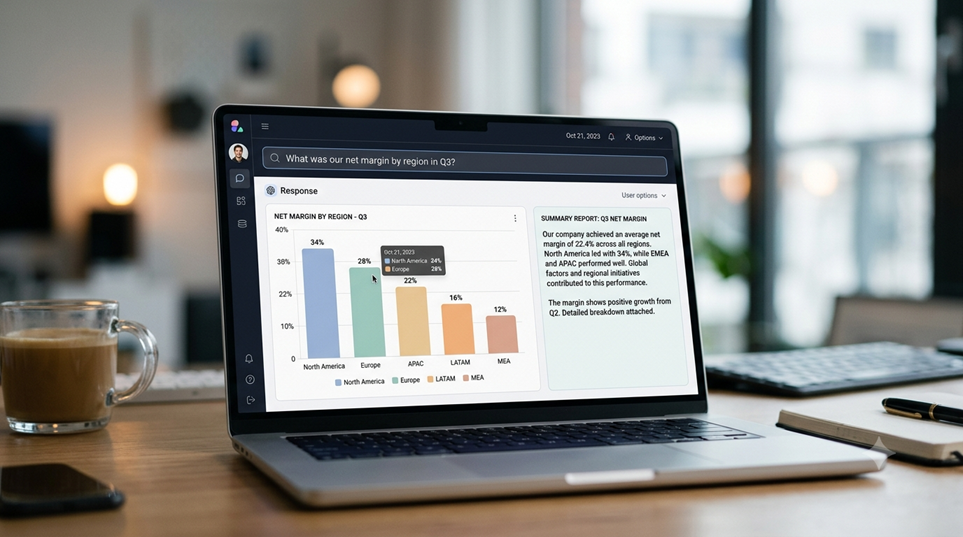
If your primary goal is self-service analytics—letting executives, product leads, and marketers ask questions in plain English—these tools deliver the fastest time-to-value.
Business User Query
│
▼
┌─────────────────────────┐
│ Conversational Engine │ (ThoughtSpot / Julius / Zenlytic)
└──────────┬──────────────┘
│ (Natural Language Translation)
▼
┌─────────────────────────┐
│ Governed Semantic Model │
└──────────┬──────────────┘
│ (SQL Generation)
▼
┌─────────────────────────┐
│ Data Warehouse / Files │
└─────────────────────────┘
1. ThoughtSpot: Search-Driven Analytics for Fast Answers
ThoughtSpot built its reputation on search-driven BI, making it an easy transition into the generative AI era. Its Spotter AI agent allows users to type queries into a Google-like search bar and instantly receive interactive charts, natural-language narrative summaries, and live data dashboards.
Standout Features & Ideal Users
- Best For: Mid-market to enterprise business teams who want fast ad-hoc search without writing SQL.
- Key Strengths: Live connections to major cloud data warehouses (Snowflake, BigQuery, Databricks), instant anomaly detection, and natural language query translation.
- The Catch: Premium enterprise pricing that scales on usage, requiring structured data modeling to ensure clean answers.
2. Julius AI: The Conversational Analyst for Files and Databases
Julius AI functions as a personal, on-demand data scientist. You can upload raw CSVs, complex Excel sheets, or PDFs, or connect directly to live Postgres and Snowflake warehouses. Through a chat interface, Julius writes Python/SQL under the hood, generates clean charts, runs statistical modeling, and provides automated notebooks for recurring reports.
Standout Features & Ideal Users
- Best For: Operational teams, startup founders, and researchers who work heavily with spread-sheets, documents, and light warehouse connections.
- Key Strengths: Learns database structures over time with a sub-agent layer, generates customizable visualizations, and supports reusable analysis templates.
- The Catch: Less suited for complex, multi-department enterprise BI modeling compared to legacy platforms.
3. Zenlytic: The AI Agent (Zoë) with a Git-Governed Semantic Layer
Zenlytic takes aim directly at dashboard fatigue. Powered by its native AI agent, Zoë, Zenlytic allows teams to interact with their metrics natively inside Slack or Microsoft Teams. Zoë reads your warehouse schema and query history to build a semantic map of your business metrics automatically.
Standout Features & Ideal Users
- Best For: Tech-forward companies, SaaS brands, and e-commerce setups that want accurate conversational data right inside their team chat apps.
- Key Strengths: Stores metric definitions in version-controlled Git repos, creates verifiable Excel/PowerPoint exports, and provides transparent query hover-states for full data lineage.
- The Catch: Requires initial setup time to map complex or messy database schemas properly.
Top AI Analytics Platforms for Enterprise Ecosystems
For large companies with legacy database architectures, strict governance needs, and thousands of end-users, these platforms integrate deep AI functionality directly into established BI platforms.
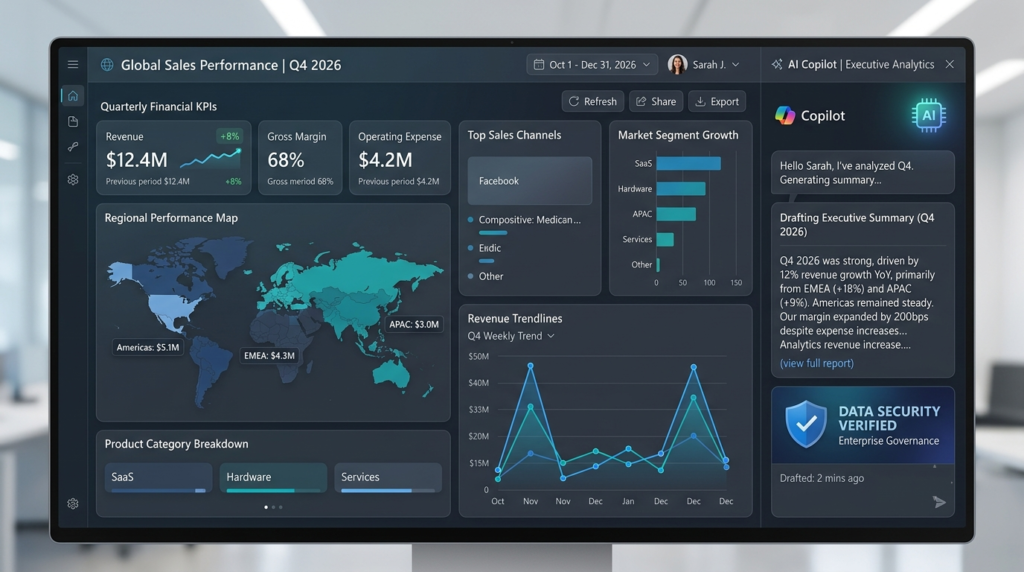
4. Microsoft Power BI (with Copilot): Enterprise Intelligence at Scale
Microsoft has embedded Copilot directly across the Fabric and Power BI stacks. Users can simply describe the report they want, and Power BI Copilot automatically generates page layouts, drafts DAX calculations, and synthesizes executive narrative summaries.
Standout Features & Ideal Users
- Best For: Companies heavily invested in the Microsoft 365, Azure, and Fabric software environments.
- Key Strengths: Seamless integrations with Teams and Office, powerful governance controls, conditional formatting automation, and massive global community support.
- The Catch: Licensing costs scale quickly with Fabric capacity requirements, and DAX modeling still demands technical expertise for setup.
5. Tableau AI (Salesforce Einstein): Predictive Insights Meets Deep Visualization
Tableau AI merges traditional data visualization with Salesforce’s Einstein engine. Instead of forcing users to manually slice and dice dashboards, Tableau AI automatically surfaces why a metric moved, highlights contextual outliers, and suggests logical next steps for sales and marketing ops teams.
Standout Features & Ideal Users
- Best For: Enterprise organizations running Salesforce CRM that require high-level, publication-grade data visualizations.
- Key Strengths: Deep CRM metric integration, automated natural-language insight summaries, and robust enterprise data security.
- The Catch: Higher learning curve for administrative setup and premium per-user licensing fees.
6. Looker (Google Cloud): Semantic Security Meets Conversational BI
Google’s Looker stands out primarily due to LookML—its centralized semantic modeling layer. By pairing LookML with Google Cloud’s conversational AI, Looker ensures that when a user asks an AI agent for “churn rate,” the AI uses the company’s precise, governed definition every single time.
Standout Features & Ideal Users
- Best For: Organizations running on Google Cloud Platform (GCP) and BigQuery that prioritize 100% metric consistency across departments.
- Key Strengths: Robust semantic layer that eliminates AI hallucination, seamless integration with Gemini models, and strong cloud-native scaling.
- The Catch: LookML development requires specialized technical skills before business users can fully leverage the conversational search.
Top AI Analytics Platforms for Data Engineers and Data Scientists
When the goal isn’t just generating charts, but running complex machine learning workflows, unstructured data analysis, and lakehouse-scale querying, these platforms lead the charge.

7. Databricks AI Intelligence Platform: Native LLMs on the Data Lakehouse
Databricks uses its proprietary Unity Catalog and engine innovations to power an AI-native data lakehouse experience. It enables data teams to build, fine-tune, and deploy custom LLMs directly over proprietary enterprise data while giving engineers natural-language code assistants to build complex data pipelines.
Standout Features & Ideal Users
- Best For: Data engineering teams, ML engineers, and enterprise data science departments handling unstructured data at scale.
- Key Strengths: Unified governance across structured and unstructured data, native support for open-source AI models, and deep Python/PySpark optimization.
- The Catch: Requires advanced technical skills; not designed as a drag-and-drop tool for non-technical business users.
8. Snowflake Cortex AI: Serverless Machine Learning and SQL Chat
Snowflake Cortex AI brings fully managed serverless AI capabilities straight into the Snowflake cloud data platform. Engineers can run state-of-the-art LLMs, perform vector searches, and run sentiment analysis directly inside standard SQL queries without managing external infrastructure.
Standout Features & Ideal Users
- Best For: Database administrators and data engineers looking to run low-latency AI workflows directly inside their cloud warehouse.
- Key Strengths: Serverless execution with zero infrastructure management, enterprise-grade RBAC security, and native SQL integration for fast ML deployment.
- The Catch: Compute costs can escalate rapidly if queries are poorly optimized or run over massive datasets.
At-a-Glance Feature Comparison Matrix
| Platform | Primary Target Audience | Core AI Superpower | Data Connection Type | Setup Effort |
| ThoughtSpot | Business Leads & Analysts | Search-driven natural-language querying | Live Warehouse Sync | Medium |
| Julius AI | Operational Teams & Analysts | File analysis & automated Python execution | CSV/Excel/PDF & Live DBs | Very Low |
| Zenlytic | Cross-Functional Teams | Chat-native agent (Zoë) inside Slack/Teams | Live Warehouse + Git Semantic | Low to Medium |
| Power BI (Copilot) | Enterprise Organizations | Fabric ecosystem integration & auto-reports | Full Hybrid Enterprise Connections | High |
| Tableau AI | Salesforce & CRM Teams | Predictive analytics & context summaries | Salesforce / Enterprise Warehouses | High |
| Databricks AI | Data Engineers & ML Leads | Native Lakehouse LLMs & data engineering | Open Lakehouse Architecture | Very High |
| Snowflake Cortex | Data Engineers & DBAs | In-warehouse serverless SQL LLM execution | Snowflake Cloud Warehouse | Medium to High |
Critical Evaluation Factors: How to Choose the Right AI Analytics Stack
Selecting an AI analytics platform isn’t like buying regular productivity software. If an AI writing assistant makes a minor typo, it’s easy to edit. But if an AI data agent miscalculates your Q4 gross margins, it can derail strategic executive decisions.
Here are the three critical factors you must test before signing a contract:
1. Hallucination Prevention & Semantic Layer Integrity
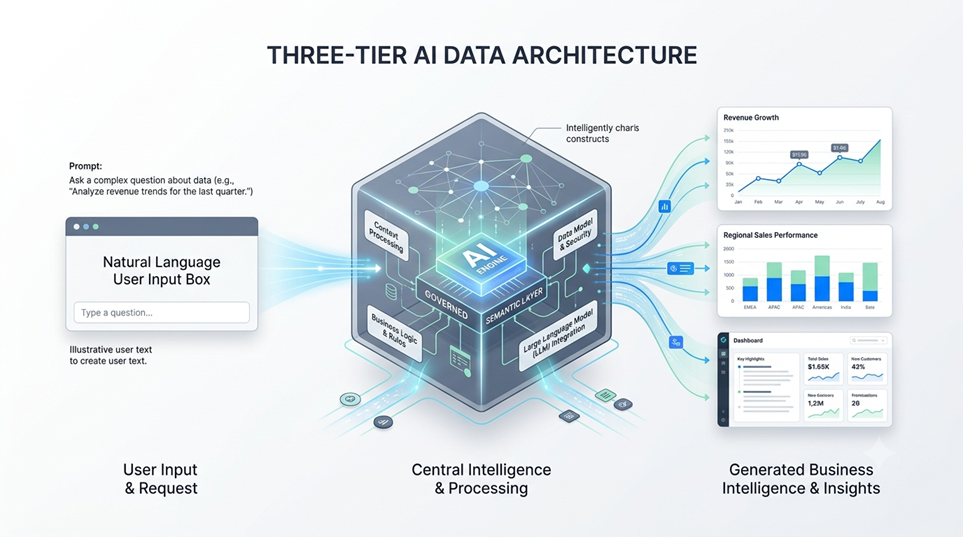
An LLM on its own is terrible at pure arithmetic. To deliver accurate answers, an AI analytics tool must sit on top of a governed semantic layer. This layer acts as a dictionary that explicitly tells the AI: “Net Revenue = Gross Revenue minus Returns and Discounts.” Always test a vendor by asking complex, ambiguous business questions to see if the AI asks for clarification or simply guesses.
2. Role-Based Access Control (RBAC) & Data Privacy
Connecting an AI agent to your data warehouse creates potential security risks if not managed properly. Ensure the platform honors existing database permissions. A sales manager in EMEA should never receive aggregated executive payroll insights, even if they ask the AI agent directly in plain English. Verify that the vendor does not use your proprietary data to train public LLMs.
3. Total Cost of Ownership (TCO): Consumption vs. Per-Seat Pricing
Pay close attention to pricing models:
- Per-Seat Licensing: Best for predicting costs across large business teams.
- Consumption-Based Pricing: Scales based on query compute or LLM token usage. While cheaper initially for small teams, usage spikes can result in unexpected monthly invoices if ad-hoc queries run rampant.
Conclusion: Matching Your Technical Maturity to the Right Platform
There is no single “best” AI-powered analytics platform for every company—only the platform that matches your team’s specific technical maturity and primary workflows:
- If you want immediate plain-English answers without engineering help: Start with Julius AI for file work or ThoughtSpot for live search.
- If your team lives inside Slack or Teams and wants a chat-native data analyst: Deploy Zenlytic.
- If you need enterprise-grade security and already use major clouds: Leverage Microsoft Power BI Copilot, Tableau AI, or Looker.
- If you are building custom AI applications on massive data lakes: Go directly to Databricks AI or Snowflake Cortex AI.
The future of business analytics belongs to teams that spend less time wrangling data and more time acting on insights. Pick the right platform for your setup, set up proper semantic guardrails, and let AI handle the heavy lifting.
Frequently Asked Questions (FAQs)
What is the main difference between a traditional BI tool and an AI-powered analytics platform?
Traditional BI tools require human engineers to build static, pre-aggregated dashboards that users must click through manually. AI-powered analytics platforms allow users to query data dynamically using natural language. They automatically investigate root causes, summarize key takeaways, and surface hidden anomalies without requiring manual SQL coding.
How do AI analytics platforms prevent hallucinations and false numbers?
Top-tier platforms avoid hallucinations by using LLMs strictly as translation engines rather than calculation engines. The AI translates your plain-English question into structured code (SQL or Python), which is then run against a governed semantic layer. The database handles the math, ensuring 100% mathematical precision while the AI simply explains the output.
Can small business teams without data engineers use AI analytics platforms?
Yes! Tools like Julius AI and ThoughtSpot are designed specifically for non-technical users. You can upload standard Excel sheets, CSVs, or Google Sheets and instantly start asking questions, building visualizations, and generating downloadable reports within minutes.
Is it safe to connect sensitive company databases to LLM-driven analytics tools?
It is safe if you choose platforms that adhere to enterprise security standards (SOC2 Type II, HIPAA, GDPR compliance). Enterprise tools utilize private LLM endpoints that guarantee your proprietary company data is never retained, shared, or used to train public foundation models.
Which platform is best if my company already relies heavily on Microsoft products?
If your company heavily utilizes Microsoft 365, Azure, and Teams, Microsoft Power BI with Copilot inside Microsoft Fabric is the most natural fit. It offers native security alignment, single sign-on (SSO), and seamless data sharing across your existing Office suite.